Expanded. Spotify Playlist Notes launched August 17, growing the User Notes feature Spotify introduced last month beyond songs to cover podcast episodes and audiobooks. Notes attach directly to any item inside a playlist you own or collaborate on - up to 240 characters, visible to anyone who can view the playlist. Spotify's editorial team gets the same tool, plus a new Editor Profile page showing the people behind its biggest playlists.
Takeaways
- Spotify Playlist Notes launch August 17 - attach notes to songs, podcast episodes, and audiobooks in any playlist you own or collaborate on
- Grows from User Notes (July 2026), which covered songs only
- Editor Notes and Editor Profiles rolling out to users 16+ in US, Canada, UK, Ireland, Australia, and New Zealand
- User notes rolling out globally on iOS and Android across 100+ markets
- Notes surface in Now Playing even when listening outside the playlist where the note was added
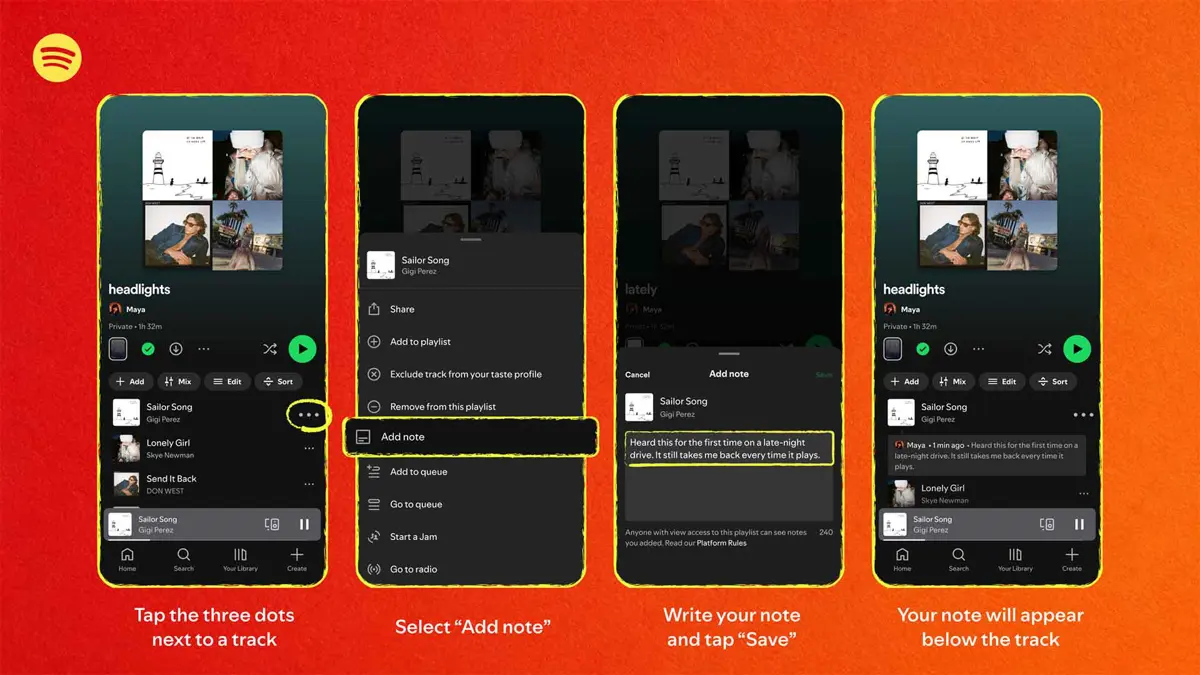
Adding a note takes three taps. Open a playlist you own or collaborate on, tap the three dots next to any track, episode, or audiobook, select "Add note," write up to 240 characters, then save. Notes appear below the item with your name linking to your profile. Spotify's User Notes feature launched last month covered tracks only - Playlist Notes extends the same mechanic to every content type Spotify now carries, from podcasts to audiobooks to music.
Spotify's own editors get a parallel version with more reach. Editor Notes attach to tracks on flagship playlists and explain why a song made the cut, what makes it culturally relevant, or how it fits the broader mood of the playlist. Editor Profiles give each curator their own page - top tracks, top albums, and every playlist they contribute to. Starting playlists for Editor Notes include Today's Top Hits, RapCaviar, Hot Country, All New Pop, mint, and Fresh Finds Hip-Hop. To read a note, tap "Notes" at the top of any participating playlist.
Editor Notes and Profiles roll out now to Free and Premium users 16 and older in the US, Canada, the UK, Ireland, Australia, and New Zealand. User notes hit iOS and Android across 100+ markets on the same timeline. Spotify has been adding curatorial layers for months - from custom cover art and transition tools to editor-led videos on New Music Friday. Notes fit that pattern, though whether editorial transparency keeps users engaged longer than algorithmic recommendations do is the question Spotify never quite answers publicly.