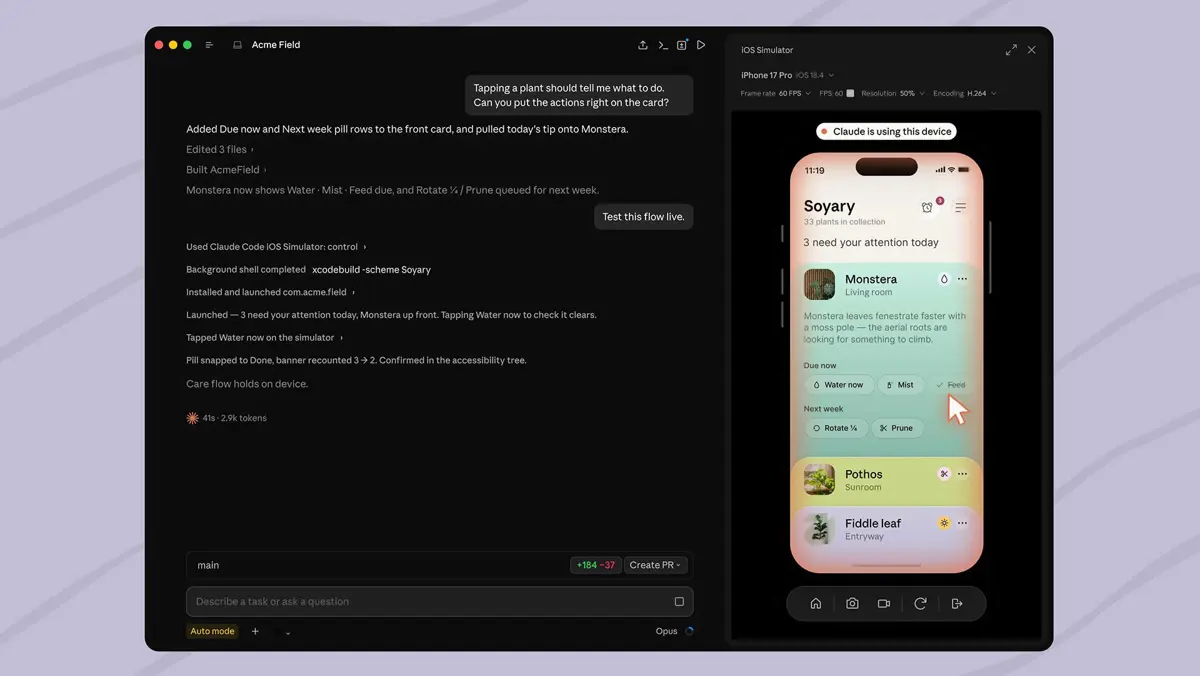
Anthropic updated Claude Code Desktop on Monday with iOS Simulator integration, now available in public beta. The Claude Code iOS Simulator pane opens automatically when Claude is told to build, run, or check an iOS app. Claude watches the simulator live, taps through the UI, and iterates on the code until the task is done - while the developer keeps full access to the simulator alongside it.
No Computer Use Required - and That Matters
Previous agentic setups that needed Claude to interact with a running app on-screen had to go through computer use - which means requesting macOS Accessibility and Screen Recording permissions, the same broad grants used to control the entire desktop. The iOS Simulator pane takes a different path. Anthropic built a direct integration that drives the simulator without touching those system permissions at all.
For developers shipping production apps, that distinction is real. Handing an AI agent Screen Recording access to a machine that handles credentials, source code, and staging environments carries risks that most teams would rather avoid. Keeping the integration scoped to the simulator pane is a tighter model. Claude Code picked up an in-app browser earlier this year using the same principle - direct integration beats broad system access.
What You Need to Run It
Claude Code Desktop on macOS is required. Xcode with the iOS platform installed must be present. The simulator pane works in local sessions only - not remote or cloud-hosted Claude Code instances. Anthropic notes that screenshots taken from the simulator are sent to Anthropic and retained under standard conversation settings, and advises against signing in to real accounts on any device Claude is actively using.
Documentation is at code.claude.com/docs/en/desktop-ios-simulator. No general availability date was given for when this exits public beta.
AI Coding Tools Are All Pushing Deeper Into Apple's Platform
Cursor launched a public beta of its iOS app in June, letting developers run AI agents from their phone. That was mobile access to an existing workflow. Claude Code's simulator integration runs the other direction - pulling the device environment into the desktop tool so Claude can see what the app actually looks like on hardware profiles before any real device testing happens. Both approaches reflect the same pressure: developers building for Apple's platforms want AI agents that understand native app behavior, not just source code.
Whether the simulator integration changes how solo or small-team iOS developers work day to day depends on how well Claude handles layout bugs and SwiftUI rendering edge cases - the places where a real device still catches things a simulator misses. Public beta is the right moment to find out.
