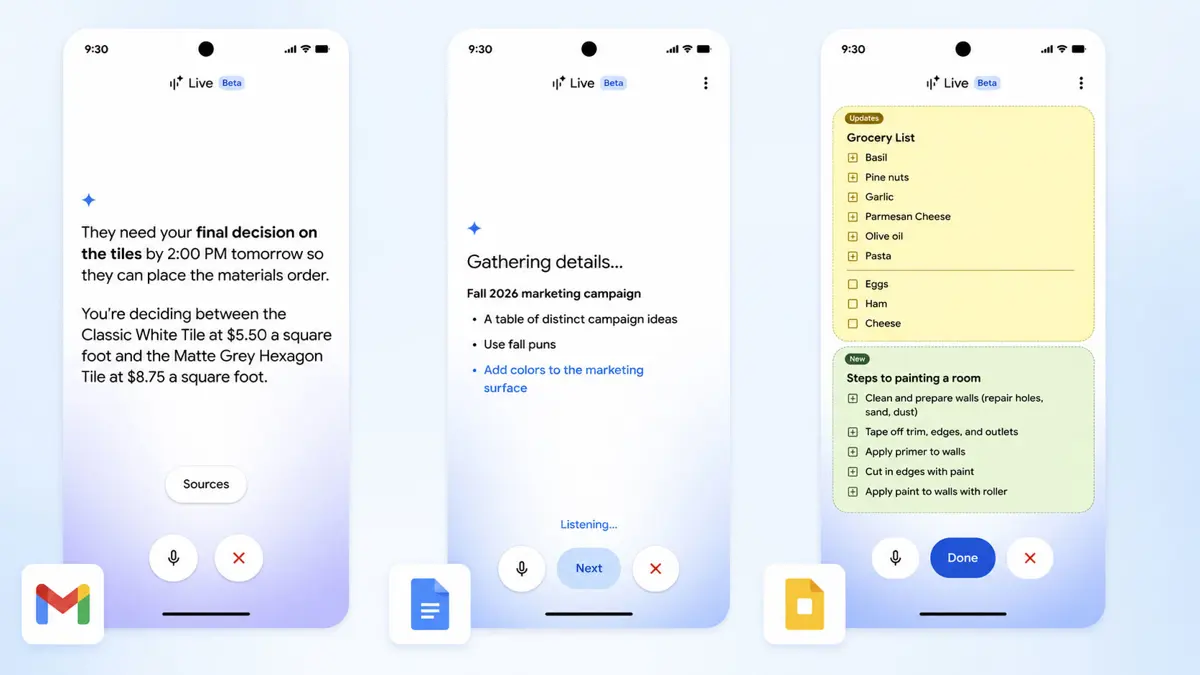
Talk, don't type. Google Workspace voice features arrive September 3 across Gmail, Google Docs, and Google Keep - all powered by Gemini Audio models previewed at I/O and now officially shipping. Three apps, three distinct use cases, one idea underneath: your voice should be enough to get work done. Claude gained voice mode with real Gmail and Slack actions earlier this year - Google's answer works inside Workspace itself, without a separate assistant layer.
Takeaways
- Gmail Live lets you search your inbox by voice - ask natural language questions, get answers without scrolling through threads
- Docs Live acts as a hands-free co-writer - talk through ideas, it structures and drafts alongside you, pulling context from Gmail, Drive, and the web with permission
- Keep Live converts spoken brain dumps into organized lists and structured notes automatically
- Rolling out this week - Gmail and Keep available for Google AI Plus, Pro, and Ultra subscribers; Docs Live requires Pro or Ultra
- Google Workspace business customers get all three features soon
Gmail Live: Your Inbox Answers Back
Searching Gmail for a specific number, date, or confirmation buried three screens deep is one of those tasks that takes longer than it should. Gmail Live replaces the search bar with a conversation. Ask "What's my flight's gate number?" or "What's happening at my kid's school this week?" and Gmail Live scans the inbox and returns an answer - no thread-diving required. Google Meet added AI-powered note-taking earlier this year with a three-person activation threshold - Gmail Live goes further, making the entire inbox queryable by voice on demand. Available for Google AI Plus, Pro, and Ultra subscribers.
"What's my flight's gate number?" - Gmail Live example query that scans your inbox and returns the answer without opening a single email thread
Google Workspace
Docs Live: Think Out Loud, Get a Draft Back
Staring at a blank document is the universal writing problem. Docs Live solves it by turning the cursor into a listener. Talk through an idea - rambling is fine - and Docs Live organizes the thought, structures the document, and refines the tone in real time. With permission, it pulls supporting context from Gmail, Drive, Chat, and the broader web to fill in what the voice alone leaves vague. Gemini Notebook launched earlier this year for structured AI-assisted research - Docs Live sits alongside that as the faster, more conversational path to a first draft. Docs Live requires Google AI Pro or Ultra - the more restricted tier of the three features.
Keep Live: Dump Your Brain, Get Organized Notes
Keep has always been for capturing ideas before they disappear. Keep Live upgrades that moment of capture: talk in stream of consciousness, and Keep processes it in the background, converting the mess into structured lists and actionable notes without a single keystroke. No editing required after the fact - the organization happens during the voice session. Available for Google AI Plus, Pro, and Ultra subscribers alongside Gmail Live.
Three features, one consistent bet: voice is faster than typing for the tasks most people do most often - searching, drafting, noting. Google previewed Gemini Audio models in Workspace at I/O and held them back until now. The plan gating is worth noting: Docs Live, the most capable of the three, stays behind the Pro and Ultra wall. Gmail Live and Keep Live open to AI Plus - Google's entry paid tier. Workspace business customers do not have a date yet, just "coming soon." Whether users actually reach for voice over keyboard in a quiet office or a crowded commute is a question no launch announcement answers.
