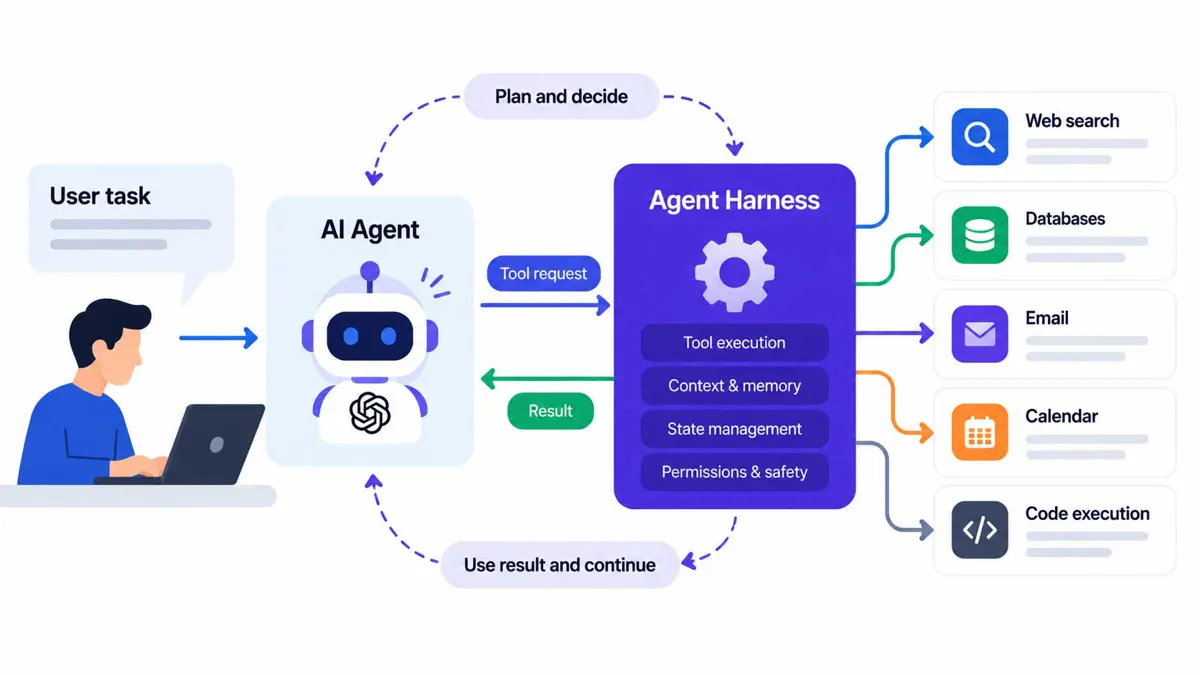
An AI agent harness is the software layer that lets an AI model do more than generate a convincing answer. It manages the cycle around the model: providing relevant context, executing approved tool calls, returning results, and deciding whether the task is finished or needs another step. The model supplies the reasoning; the harness makes that reasoning actionable.
That distinction helps explain why two products using similar models can feel very different. One may only suggest code, while another can inspect a repository, edit files, run tests, interpret errors, and try again. The difference is not necessarily a more capable model. It can be the system around it.
TL;DR: What an AI agent harness does
An AI agent harness is the runtime and control layer around an AI model. At a minimum, it manages context, tool execution, and the agent loop. More complete harnesses can also handle memory, planning, permissions, approvals, retries, logging, and long-running tasks. The harness does not make every model correct, but it gives the model a structured way to act, observe the outcome, and adjust.
What is an AI agent harness?
A language model receives input and generates output. In a plain chat, a person often supplies the missing pieces: copying in a file, running the suggested command, reading the error, and asking the model what to try next. An agent harness automates some or all of that handoff.
Suppose a developer asks an AI coding assistant to fix a failing test. The model might propose changing a function, but proposing a change is not the same as editing the file or verifying the fix. A harness can provide the repository context, let the model request a file edit, apply the edit, run the test suite, and return the output for another model turn. The process continues until a stopping condition is met or a human needs to intervene.
This is one practical way to understand the difference between an AI agent and the infrastructure that supports it. An agent is the system performing a task; the harness is the runtime that coordinates its interaction with tools, state, and the environment. In practice, the boundaries can overlap because products use these terms differently.
How an AI agent harness works
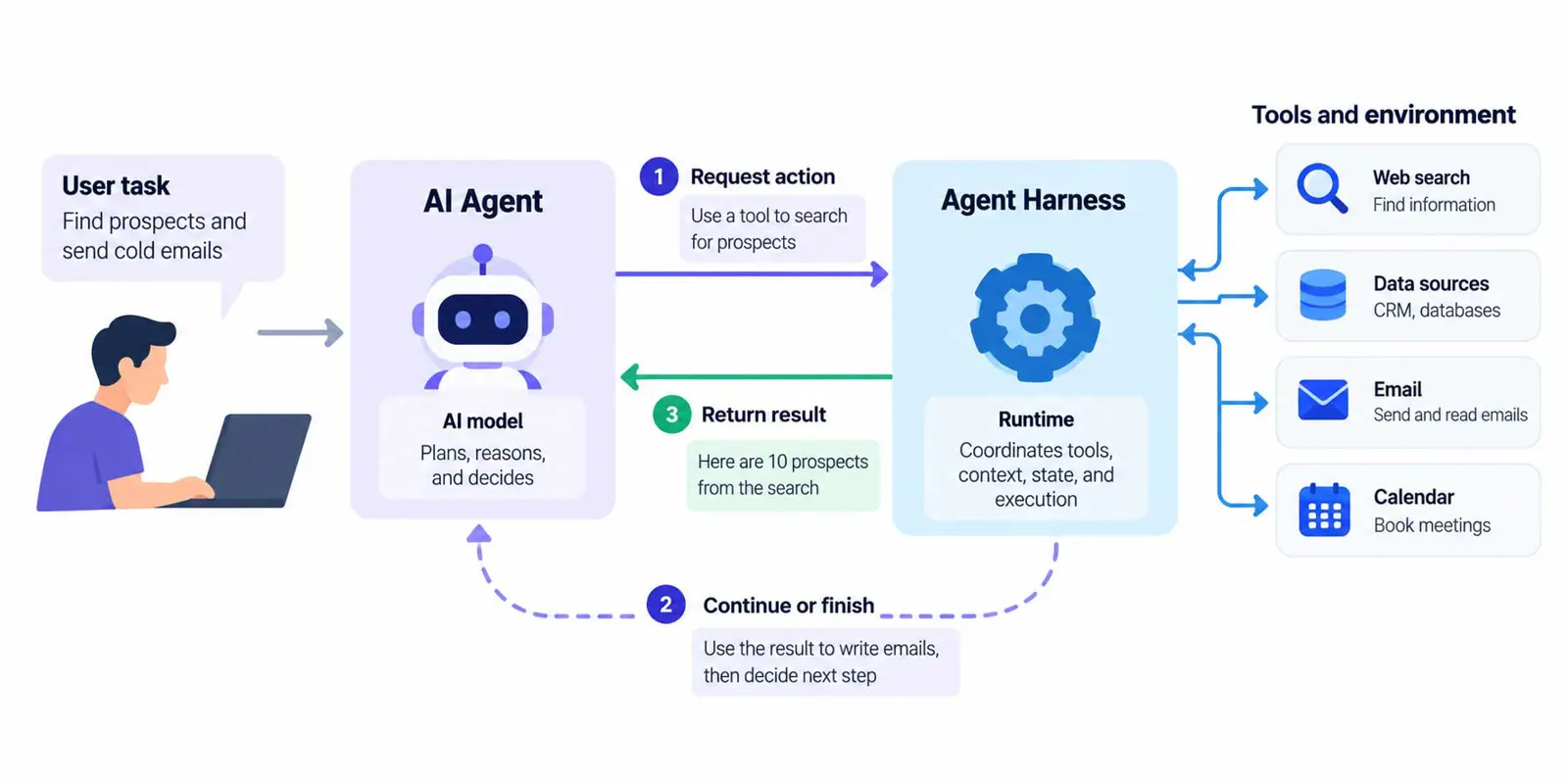
A harness typically runs a repeated cycle rather than making one model call and treating the first answer as final.
- Receive the task: Capture the user’s goal and any constraints, such as which files or services the agent may access.
- Prepare context: Supply relevant instructions, conversation history, files, tool descriptions, and previous results.
- Ask the model for the next step: The model may respond with text or request a tool call.
- Validate and execute the action: The harness checks that the requested tool exists and that the action is allowed, then runs it.
- Return the result: Output from the tool, such as a test failure or search result, is added to the next model input.
- Continue or stop: The harness repeats the cycle, asks for human approval, or finishes when the task is complete, blocked, or over its execution budget.
Microsoft’s Agent Framework harness documentation describes this kind of runtime as a composition of model access, tool invocation, conversation state, and approval policies. The exact implementation varies by product, but the underlying pattern is broadly useful.
The key components of an AI agent harness
1. The execution loop
The loop coordinates each model turn and its consequences. It tracks whether the model is asking to use a tool, whether the tool returned a result, and whether another step is needed. Without a clear loop, an application may stop too early, repeat the same failed action, or continue indefinitely.
2. Context and history management
Models only work with the information included in their current input and what their architecture otherwise makes available. The harness decides what information to include: the original request, relevant instructions, recent actions, tool results, and files or records needed for the next decision. Sending everything every time can be expensive and noisy; sending too little can make the agent forget a key constraint. Context management is the work of finding the useful middle ground.
For long tasks, a harness may summarize older turns, keep a compact task state, or store information outside the immediate conversation. That is related to memory, but the terms are not identical: conversation history is a record of what happened, while memory usually means information retained or retrieved to help future decisions.
3. Tools and execution environments
Tools let an agent interact with systems beyond text generation. They may include search, a database query, a calendar, a browser, a shell, or file operations. The model usually requests a tool action; the harness or connected service performs it and returns the result. The model should not be treated as if it directly executed a command just because it described one.
The environment matters. Running a command in an isolated workspace is different from running it on a developer’s main machine or against a production service. A well-designed harness limits which tools are available, validates arguments, and separates low-risk inspection from actions that can delete data, send messages, spend money, or affect other people.
4. State, planning, and task tracking
Multi-step work benefits from a durable record of the goal, completed steps, unresolved work, and important decisions. Some harnesses maintain a task list or plan; others rely on a simpler state machine. Planning can help with complex work, but it is not magic. Plans need to be updated when a tool fails or new information changes the next step.
5. Permissions and human approval
A useful agent needs enough freedom to act, but not unlimited access. The harness can restrict tools by task, require confirmation before sensitive actions, and record what was executed. For example, an agent might be allowed to draft an email automatically but require approval before sending it. This makes the harness part of the application’s safety boundary, not just a convenience wrapper.
6. Feedback, retries, and observability
The result of an action is often the most valuable information in the next turn. A compiler error, failed test, rejected API request, or incomplete search gives the model evidence to work with. The harness must return that evidence accurately, decide whether a retry is sensible, and avoid endless loops. Logs and traces help developers understand which tool ran, what it returned, and where a task went wrong.
A real example: fixing a failing test
Imagine an agent is asked to fix a test in a small Python project. A plain chatbot can suggest a patch, but a harness-backed coding agent can carry the task through a verification cycle:
- Read the project instructions and identify the failing test.
- Inspect the relevant source files and test output.
- Propose and apply a focused edit in the permitted workspace.
- Run the test command and capture its output.
- Send the result back to the model so it can decide whether the change worked.
- Stop when the test passes, the task is blocked, or an approval or execution limit is reached.
The test runner acts as a feedback source. The harness does not guarantee that the patch is correct, but it can replace guesswork with evidence and repeatable checks. OpenAI describes a related engineering approach in its article on building software with Codex and an agent-first environment, where the surrounding tools, repository conventions, and feedback loops are designed to help agents do reliable work.
For a deeper look at the model and product side of this ecosystem, see Saganote’s guide to OpenAI, its models, APIs, agents, and Codex. The important point here is not that every coding product uses the same architecture. It is that a dependable agent needs a way to inspect its work and respond to the results.
AI agent harness vs. agent, framework, and orchestrator
These terms overlap, and there is no single naming convention shared by every vendor. A practical distinction helps, as long as it is treated as a guide rather than a strict industry standard.
| Term | Main role | Example question |
|---|---|---|
| Model | Generates responses or decisions from input | What should happen next? |
| Agent | Uses a model and capabilities to pursue a task | Can the system complete this task? |
| Harness | Runs and controls the model-tool-feedback cycle | How are actions executed, checked, and continued? |
| Agent framework | Provides reusable components for building agents and workflows | What building blocks can developers use? |
| Orchestrator | Coordinates multiple agents, tasks, or workflow steps | Which worker or step should run next? |
An agent framework can include a harness, and a small agent can have a very simple harness. An orchestrator may call agents that each have their own harness. The useful question is not which label a vendor chooses, but which responsibilities the software actually handles. Saganote’s look at DeepSeek Harness and its plugin-based agent runtime is a useful companion example of how a concrete project organizes capabilities around an agent.
The execution environment is another important design choice. In its coverage of Vercel’s Eve and Sandbox approach, Saganote explores how agent infrastructure and sandboxing can be separated from the model itself. That separation matters when a harness needs to run tools or code without giving an agent unrestricted access to a host system.
This is also why a harness is not the same thing as agentic AI. Agentic AI describes a broader approach in which systems pursue goals through multi-step actions. The harness is one implementation layer that can make those actions possible and controllable.
Do you need to build your own harness?
Not always. If the task is a single model response or a small, predictable tool call, a custom loop may be enough. If the agent needs persistent state, multiple tools, approvals, context compaction, retries, or long-running execution, using a maintained framework or harness can save substantial engineering work.
A lightweight custom harness gives a team control over its behavior and dependencies, but the team owns the edge cases. It must handle malformed tool calls, timeouts, repeated failures, permission checks, logging, state recovery, and safe stopping. A prebuilt solution can provide more of these pieces, though developers still need to review its defaults and adapt it to the task.
For a first project, start with the smallest loop that solves a real problem. Add persistent memory, planning, parallel agents, or complex orchestration only when the use case requires them. Saganote’s beginner’s guide to creating an AI agent provides a useful starting point, while AI agent vs. chatbot explains why a multi-step workflow differs from a conversational interface.
Common harness mistakes
- Giving tools too much access: Expose only the tools and data the task needs, and require approval for consequential actions.
- Losing important context: Keep durable task state and include relevant instructions and recent tool results.
- Retrying without a limit: Use retry budgets, timeouts, and clear stop conditions.
- Trusting a tool call without validation: Check arguments, permissions, and expected output before execution.
- Calling a task complete without verification: Use tests, validators, or explicit success criteria where possible.
- Treating logs as optional: Keep enough information to investigate failures without unnecessarily storing sensitive data.
The same principles apply to business automation. A workflow that uses AI to automate everyday tasks still needs to know what it can access, how to handle unexpected results, and when a person must make the final call. More autonomy is only useful when the boundaries are clear.
The harness pattern is not limited to coding. A voice assistant may need to route a request, call a service, manage turn-taking, and recover when speech recognition is uncertain. Saganote’s explainer on how voice AI models work provides context for the model side of that interaction. Similarly, OpenAI Dots and always-on agents in ChatGPT Work illustrate why persistent tasks require more than a single prompt and response.
FAQ
Is an AI agent harness a framework?
Does every AI agent need a harness?
Does a harness make an AI model more intelligent?
Is memory the same as a harness?
What is the difference between an AI harness and an AI agent runtime?
The bottom line
An AI agent harness is the machinery between a model’s proposed next step and what actually happens in the world. It manages context, executes tools, returns feedback, enforces boundaries, and decides whether to continue. The more complex the task, the more important those details become.
The best harness is not necessarily the most elaborate one. It is the simplest system that can carry out the intended task, verify its work, recover sensibly from failures, and keep consequential actions under appropriate control.