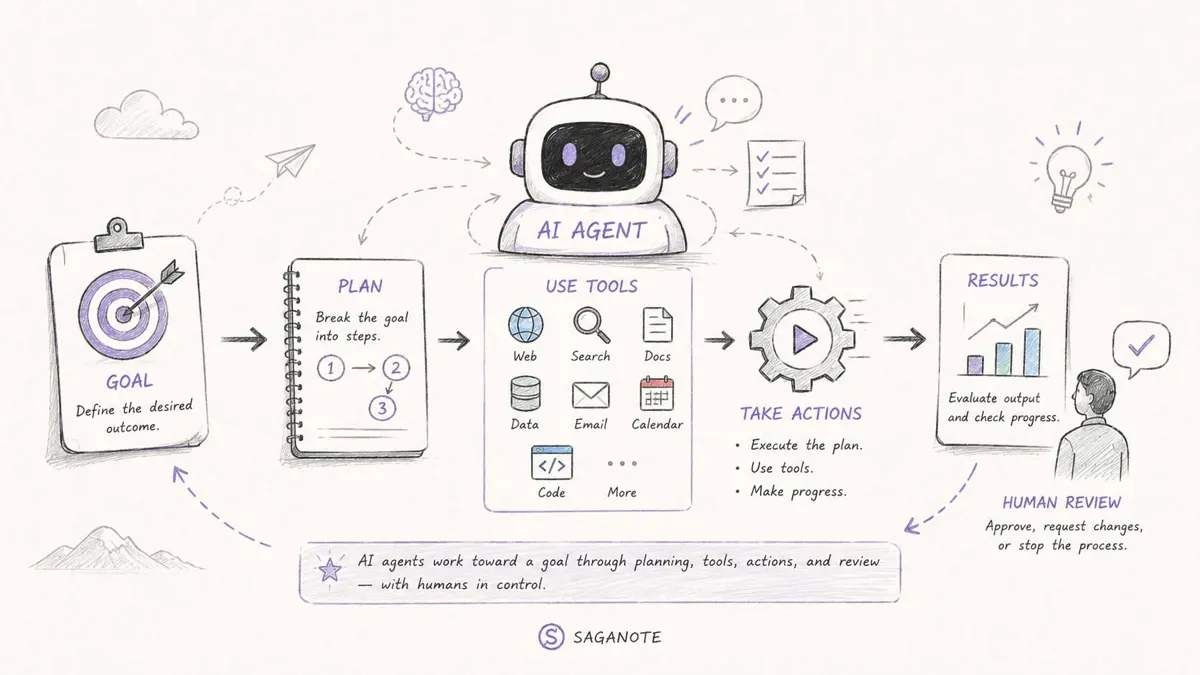
What is an AI agent? It is an AI system built to work toward a goal instead of stopping after one generated response. An agent can decide what information it needs, choose from approved tools, act on the result, and use what happens next to decide its following step.
That distinction sounds small, but it changes the shape of the software. A chatbot mainly waits for another prompt, an agent can carry a task forward through several steps without requiring a person to direct every move.
What is an AI agent?
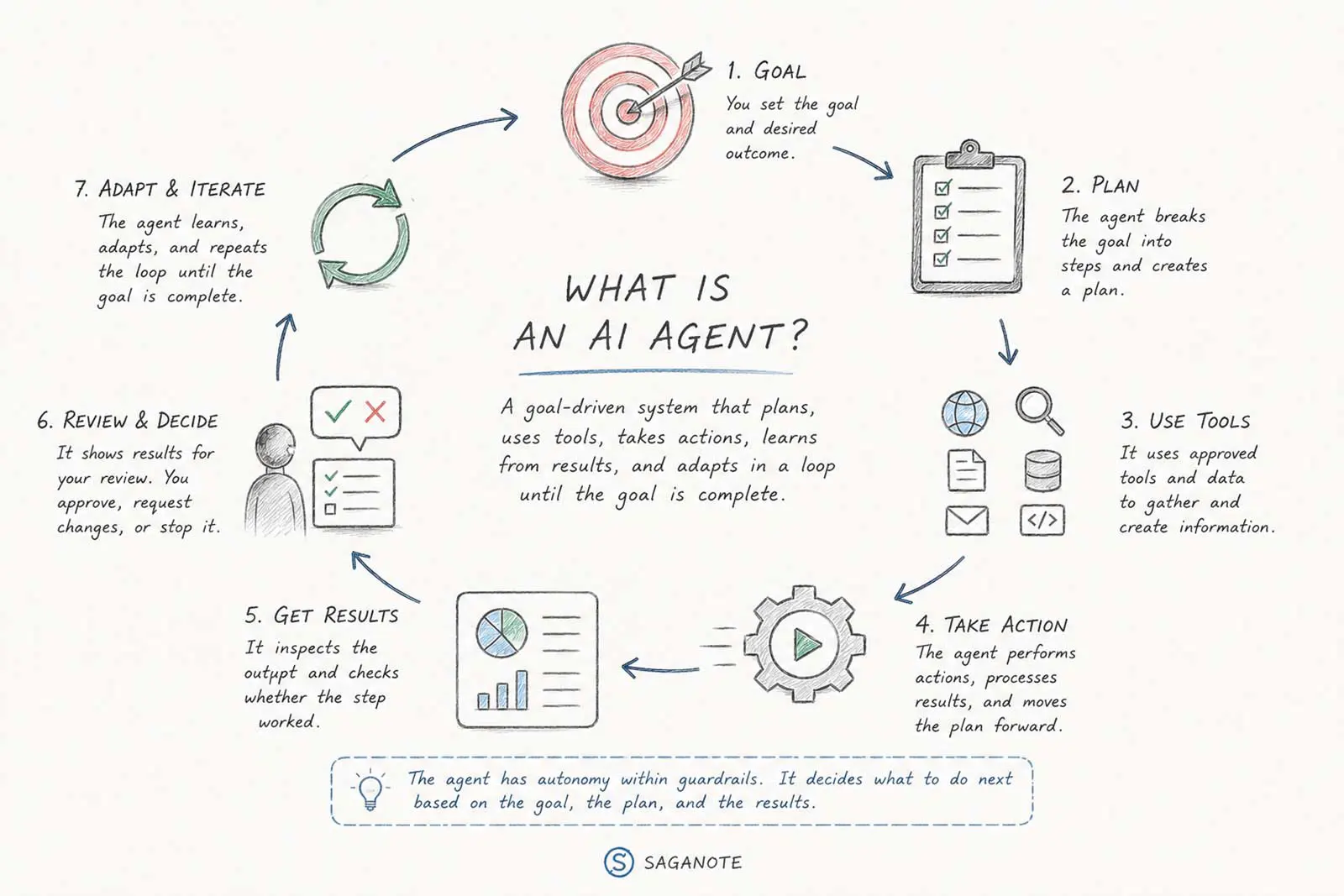
An AI agent is a software system in which an AI model directs part of the process needed to complete a task. The system gives the model instructions, context, tools, and boundaries, then lets it make bounded decisions about what should happen next.
Anthropic describes agents as systems where language models dynamically direct their own processes and tool use. OpenAI's current workspace-agent documentation similarly describes an agent around a trigger, a process or set of skills, and approved tools or connected systems. Anthropic's guide to effective agents and OpenAI's workspace-agent documentation both frame agents around multi-step work rather than simple question-and-answer exchanges.
No single architecture defines every AI agent. Some agents follow tight boundaries and operate for a few steps, while others can work through much longer tasks. The common feature is the system's ability to decide among permitted actions while pursuing a defined outcome.
The simplest way to picture an AI agent
Picture a research assistant with access to a search engine, a folder of documents, a spreadsheet, and a reporting template. A person gives the assistant a goal, but does not dictate every click.
Prepare a weekly report on the competitors we track.
A basic chatbot can explain how to create that report. An agent can potentially search for new information, read relevant sources, compare findings, organize the evidence, draft the report, check whether required sections are missing, and stop for review before anything sensitive happens.
- Start with the reporting goal.
- Find the relevant sources.
- Gather new information.
- Decide which findings matter.
- Organize the evidence.
- Draft the report.
- Check the required sections.
- Return the report or request human review.
The important part sits between the first instruction and the final output. The agent has room to choose the next useful step instead of waiting for a new prompt after every action.
How do AI agents work?
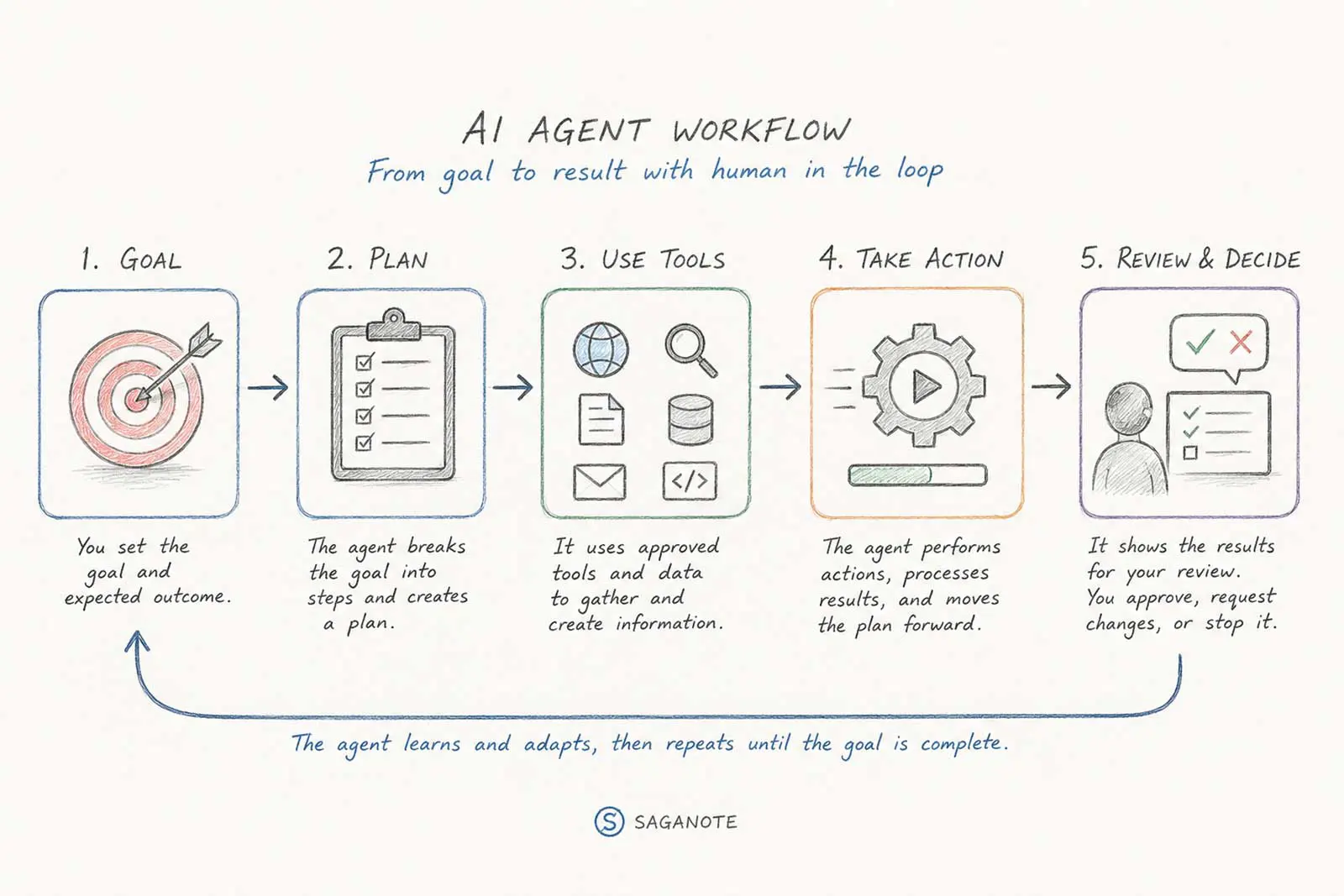
Most agents follow a loop. The exact implementation varies, but the pattern is straightforward: understand the goal, choose a step, use a tool when needed, inspect the result, and decide what happens next.
- Receive a goal or trigger. A person, schedule, or system event starts the task.
- Understand the context. The agent identifies the task, available information, constraints, and success conditions.
- Plan the next step. The model decides what action could move the task forward.
- Use a tool. The agent may search, read a file, call an API, run code, or interact with an application.
- Observe the result. The tool returns information or changes the environment.
- Evaluate the result. The agent decides whether the result is useful, incomplete, or wrong.
- Continue, change direction, or ask for help. The loop repeats until the task reaches its stopping condition.
Anthropic describes this pattern as an agent using tools in a loop and grounding each step in feedback from the environment. Google Cloud's current definition likewise describes an agent as an application that processes input, reasons with available tools, and takes actions based on its decisions. Anthropic's current explanation of trustworthy agents and Google Cloud's AI-agent glossary provide useful technical context.
Goals and instructions
A useful agent needs a clear objective. "Handle the inbox" leaves too much room for interpretation. "Summarize unread project emails from this week and prepare a draft action list" gives the system a narrower target and an easier success condition.
Instructions also define boundaries. They can specify which sources count, which tools are allowed, what output format to use, and which actions require approval.
Tools give the agent the ability to act
A model can generate text without tools. An agent needs tools when the task requires information or actions outside the model itself.
- Web or enterprise search
- File and document access
- Databases and knowledge bases
- APIs and application integrations
- Code execution
- Browser or computer interaction
- Task and ticket systems
- Messaging and collaboration tools
Tools also create the agent's practical limits. A system without email access cannot send email. A system without a payment tool cannot make a purchase. The model may reason about an action, but the surrounding software controls whether that action exists.
Anthropic notes that agents are often just language models using tools based on environmental feedback in a loop. That simple description is useful because it keeps the model in perspective: the surrounding tools, permissions, context, and controls determine what the agent can actually do.
Memory and context
Agents need enough context to avoid repeating work or losing the state of a task. That context can include the original request, previous tool results, documents, task state, or information retrieved when a later step needs it.
Memory does not necessarily mean permanent human-like memory. A system may store durable information, retain short-term task state, or retrieve relevant information only when a particular step requires it.
For agents that need standardized access to tools and external context, Saganote's guide to Model Context Protocol explains the protocol and why it matters for AI systems that connect models to outside capabilities.
Observation and feedback
The agent needs to see what happened after an action. A search can return poor sources. A code test can fail. An API can reject a request. Each result becomes evidence for the next decision.
That feedback separates a multi-step agent from a static sequence of generated text. The system can change course because the environment changed.
Stopping conditions
A capable agent still needs a clear stopping rule. Completion can end the loop, but so can a failed prerequisite, a maximum number of attempts, missing information, or a human approval checkpoint.
Without a stopping condition, a system can continue spending time and compute after the useful work has ended. OpenAI's current agent guidance also emphasizes defining stopping limits and controlling which tools an agent may call.
AI agent vs chatbot: what's the difference?
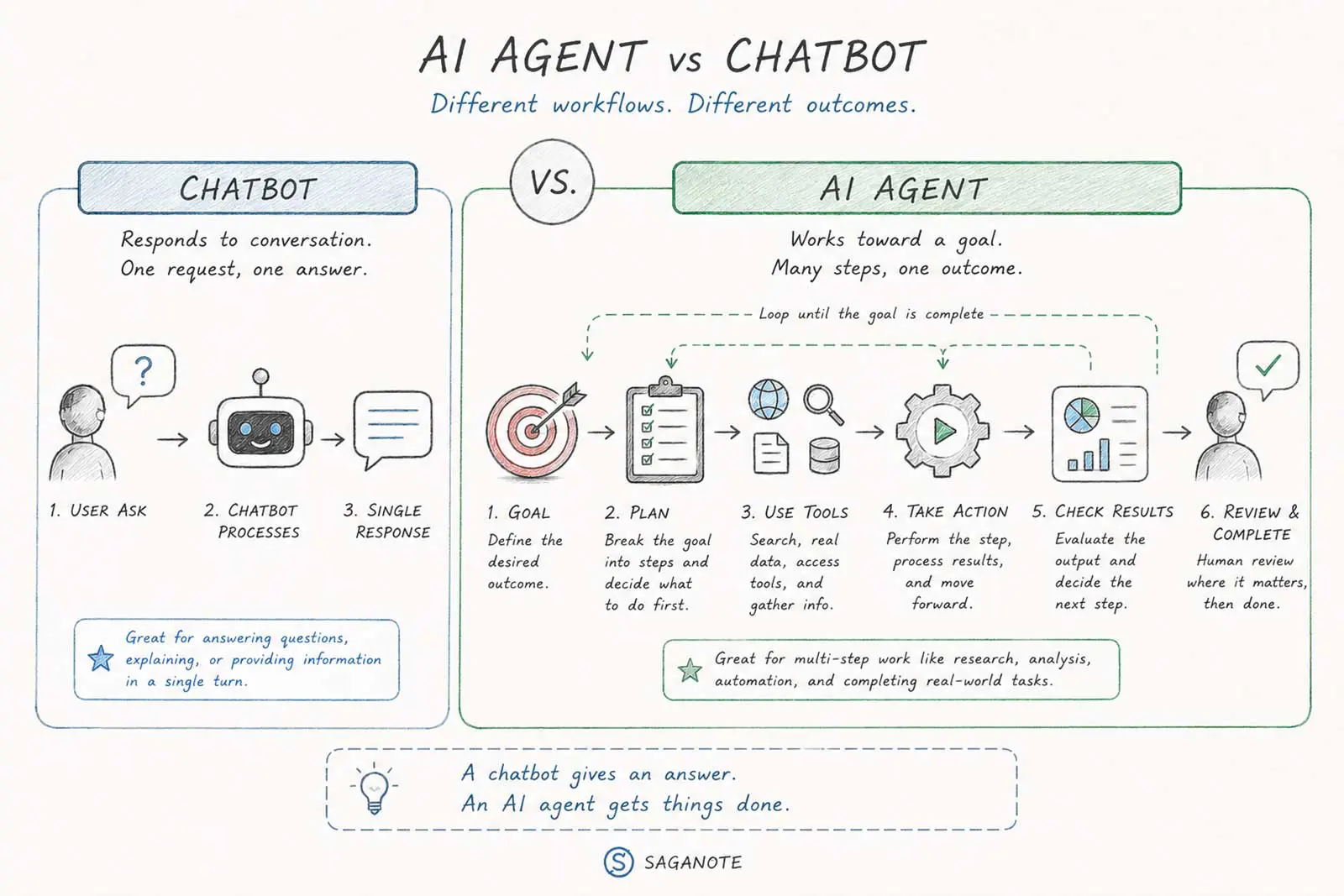
The cleanest distinction is the system's role. A chatbot primarily handles conversation and returns responses. An AI agent can take a goal and work through multiple steps toward an outcome.
Modern chatbots can use search, files, memory, and other tools, so the boundary is not absolute. The better question is whether the system can direct the next steps of the task rather than simply respond to the latest message.
| Capability | Chatbot | AI agent |
|---|---|---|
| Answer questions | Core use | Core use |
| Hold a conversation | Core use | Common |
| Use external information | Sometimes | Common |
| Choose among tools | Limited or configured | Common |
| Plan multiple steps | Limited | Core capability |
| Adapt after tool results | Limited | Core capability |
| Take actions in other systems | Sometimes | Common |
| Work toward a defined outcome | Sometimes | Core purpose |
Consider a calendar task. A chatbot might list tomorrow's meetings after reading a calendar. An agent could check those meetings, identify conflicts, inspect locations, compare travel requirements, and prepare a revised schedule for approval.
AI agent vs automation
Traditional automation follows rules that a developer or user defines in advance. A typical workflow might say: when an invoice arrives, extract the amount, save the file, and send a notification.
An agent introduces more flexibility. The model can interpret the situation and select among permitted paths based on what it finds. Anthropic distinguishes these approaches in similar terms: workflows use predefined code paths, while agents dynamically direct their own process and tool use.
That flexibility comes with trade-offs. Fixed automation usually offers more predictable execution, while agents can handle tasks whose exact sequence changes from one case to another. Anthropic recommends adding agentic complexity when it produces a measurable benefit rather than using an agent by default.
Saganote's guide to AI automation for everyday tasks covers the broader progression from simple AI assistance to automated workflows and more agent-like systems.
What can an AI agent do?
An agent's capabilities depend on the tools, data, and permissions surrounding its model. The same underlying model can power a simple assistant in one product and a multi-step agent in another.
- Research: Search sources, compare evidence, and assemble a report.
- Coding: Inspect a codebase, edit files, run tests, and respond to failures.
- Customer support: Retrieve account information, follow a procedure, and escalate unusual cases.
- Document work: Extract information, classify files, and produce structured outputs.
- Operations: Watch for events, update systems, and coordinate repeatable processes.
- Computer use: Navigate websites or applications when an API does not provide the required action.
A recent example makes the distinction concrete. Saganote's coverage of Claude in Chrome describes an AI system working directly inside a browser, where browser access expands what the model can accomplish beyond generating a text response.
When should an AI agent be used?
Agents make the most sense when a task has a clear goal but an unpredictable path. The work may involve several steps, changing information, tool selection, or decisions that depend on earlier results.
- The task has a defined outcome.
- The task contains several meaningful steps.
- The next step can depend on the previous result.
- The system has useful tools or data.
- Success can be checked.
- Errors can be contained or reviewed.
Simple tasks do not automatically need agents. A single question often fits a chatbot better. A fixed five-step process may fit traditional automation better. Anthropic's production guidance makes the same practical point: start with the simplest system that solves the problem and add agentic complexity when simpler approaches fall short.
That trade-off matters more than the label. For a predictable process, an agent can add latency, cost, and failure modes without adding useful flexibility.
When an AI agent is the wrong tool
A system should not become an agent just because it can. A fixed workflow can be easier to test, monitor, and audit when every case follows the same path.
Regular chat also remains useful. Brainstorming, summarization, explanation, and one-off writing do not always need autonomous tool use.
The strongest design often uses less autonomy, not more. A bounded agent with a narrow toolset can be easier to trust than a system that receives broad access to every connected application.
Why human approval still matters
The ability to act creates the main risk difference between a chatbot and an agent. A wrong paragraph can be edited. A wrong database update, deleted file, financial transfer, or customer message can create a much larger problem.
Good agent systems therefore separate reasoning from permission. An agent can prepare an email without sending it, draft a database change without applying it, or recommend a purchase without completing the transaction.
OpenAI's current agent guidance emphasizes guardrails, approved data sources, limits on where an agent can act, and human oversight for sensitive actions. Anthropic likewise identifies human control, secure interactions, transparency, and privacy as central principles for trustworthy agents.
For most real deployments, that boundary is probably more important than squeezing another percentage point from a benchmark. The useful agent is the one that can complete valuable work without turning a recoverable mistake into a real-world incident.
What is agentic AI?
Agentic AI is the broader idea behind systems that pursue goals through planning, tool use, feedback, and actions. An AI agent is one implementation of that idea.
The terms overlap because the industry has not settled on one universal boundary. Some vendors use "agent" for a tightly constrained workflow, while others reserve it for systems that dynamically choose their own steps.
Saganote's agentic AI explainer covers the broader shift from reactive AI systems toward software that can pursue goals and act across tools.
The agent loop in one picture
The easiest mental model is a seven-part loop:
- Goal: Define what needs to happen.
- Context: Gather the information and constraints that matter.
- Plan: Choose the next useful step.
- Tool: Retrieve information or take an approved action.
- Observe: Inspect what happened.
- Decide: Continue, change course, or request human input.
- Stop: Finish when the success condition is met or a boundary requires a pause.
Loop design becomes especially important as tasks grow longer. Saganote's loop engineering guide examines how repeated model decisions, feedback, validation, and stopping conditions shape agentic systems.
Frequently Asked Questions
Is an AI agent the same as a chatbot?
Does an AI agent need tools?
Does an AI agent need memory?
Are AI agents fully autonomous?
Is an AI agent better than automation?
Conclusion
An AI agent is a system that can pursue a goal by deciding among permitted steps, using tools, observing results, and continuing until the task reaches a stopping condition or needs human input.
The important distinction is not whether a product calls itself an agent. The useful question is how much control the AI has over what happens next, which tools it can access, and where people retain approval.
