TL;DR
- Claude in Chrome lets Claude read webpages, click, type, and fill forms.
- The extension can work across multiple tabs and handle tasks in the background.
- Anthropic warns that browser agents can face prompt-injection attacks and recommends avoiding sensitive workflows.
Claude in Chrome Brings AI Agents Into the Browser
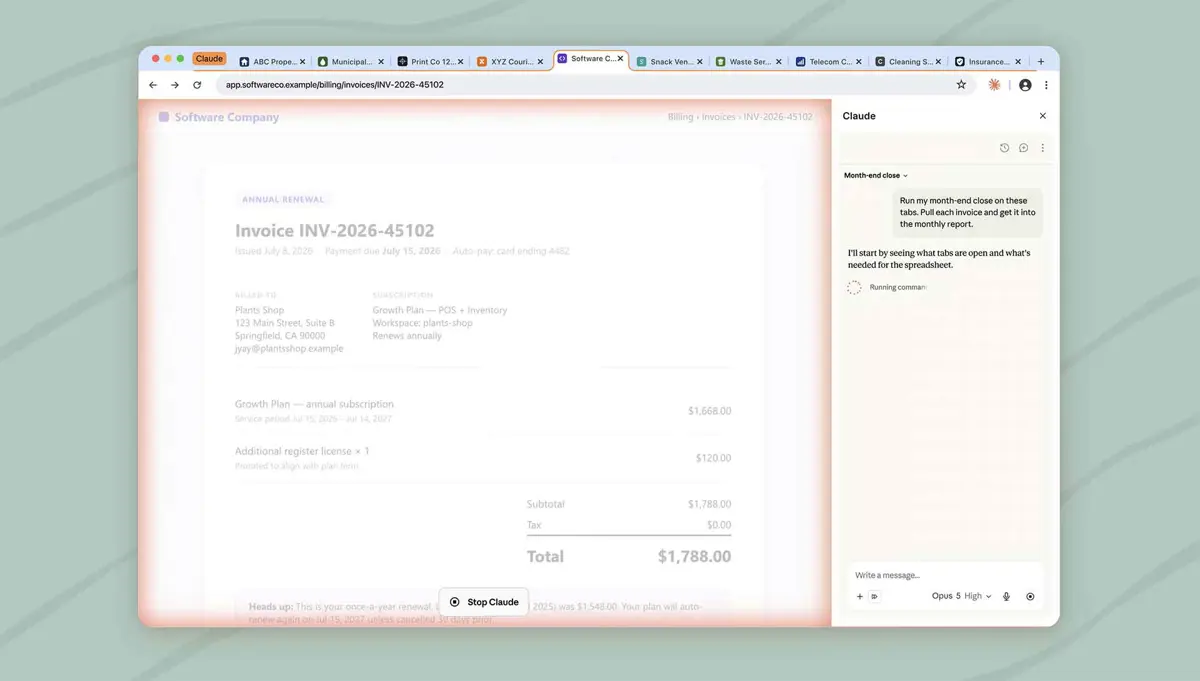
Claude in Chrome is turning Anthropic's AI assistant into a more hands-on browser agent. The extension can read webpages, click buttons, type, fill forms, and navigate websites while the user decides what happens next.
Instead of copying information between Claude and a browser, users can give Claude access to the page they are already working on. Anthropic says the extension can also work across multiple tabs, allowing it to handle tasks that require information from different websites.
What Claude in Chrome Can Do
Claude in Chrome is designed for tasks that normally require repeated browser actions. Anthropic shows examples including pulling information from analytics dashboards, organizing files in Google Drive, preparing information from calendars and email, researching competitors, and creating sales activity logs.
The extension can also run tasks in the background. Users can start a workflow and continue working elsewhere while Claude handles the browser portion of the task.
The browser agent can access websites that do not offer an API, including internal tools, legacy portals, admin consoles, and other systems that users already access through Chrome.
Claude in Chrome Keeps Users in Control
Anthropic says Claude in Chrome includes controls designed to limit risky actions. Users can choose a permissions mode that allows Claude to access specific websites, while sensitive actions such as purchases and financial transactions require the user to take over.
For Team and Enterprise customers, administrators can also control whether the extension is enabled and manage site allowlists and blocklists.
Anthropic is also warning users about the security risks of browser-based AI agents. A webpage can contain hidden instructions designed to manipulate an AI agent, a technique known as prompt injection.
Because of these risks, Anthropic recommends avoiding banking, health records, password management, and other sensitive workflows when using Claude in Chrome.
Claude in Chrome is therefore more than a chatbot sitting beside a browser. It is designed to let Claude interact directly with the web and handle multi-step tasks, while keeping users involved when actions could have serious consequences.
