Figma Code Layers Bring Executable Code to the Design Canvas at Config 2026
Code layers, a full animation timeline, AI-generated shader effects, and prompt-built plugins all land on the Figma canvas in one release.

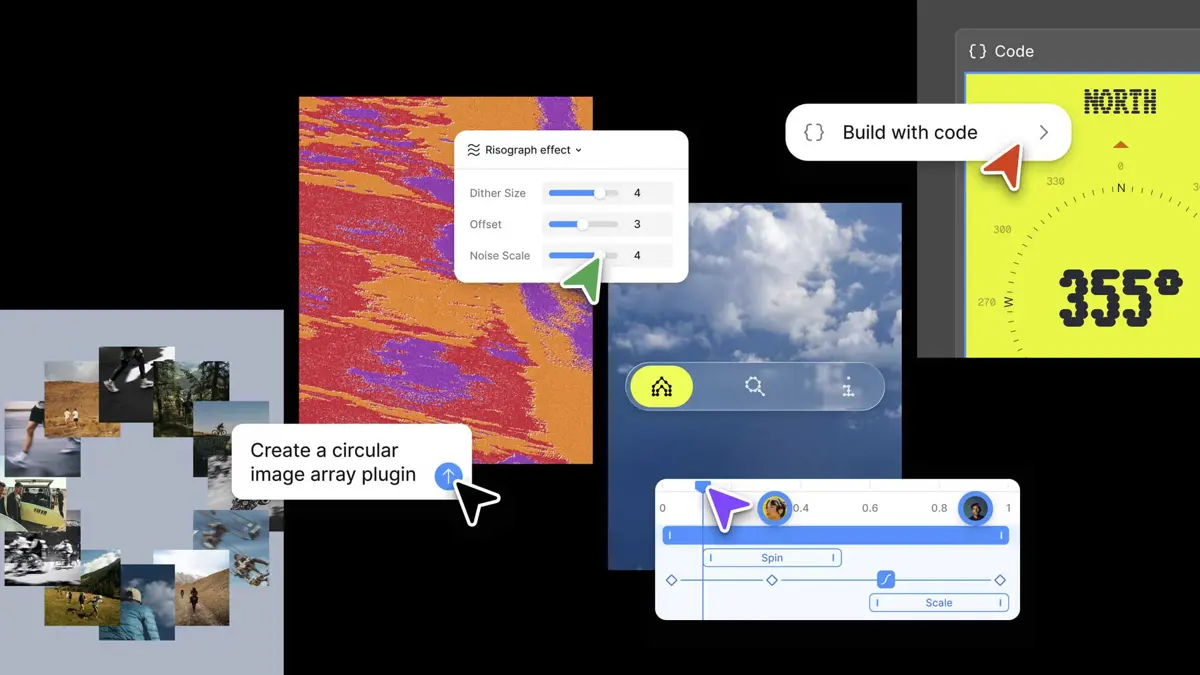
Figma code layers landed on June 24 at Config 2026, the company's biggest product release in years. Any design layer now converts to executable code on the collaborative canvas with one click or a prompt. CEO Dylan Field framed it plainly: code is material, the same as images or vectors, and Figma's canvas should treat it that way.
What Figma Code Layers Actually Do
Figma code layers let teams clone repositories and extract flows from code into design layers for testing. Duplicate a code layer side by side with another to explore multiple directions simultaneously. When designs change, one click syncs the update back to the code layer. When you need to go the other direction, one click extracts editable design frames from code. No separate handoff step between design and engineering.
Chief product officer Yuhki Yamashita said the feature is meant to change behavior across the whole team, not just for designers. "We think the multiplayer canvas is really powerful because this is an environment where you don't really care about the quality of the code. If you're rapidly exploring or need to explore a bunch of new directions, you can do that in this spatial way. We hope that this feature produces different behaviour not just with designers, but also with engineers and PMs," Yamashita said. Figma code layers begin rolling out in July. A waitlist is open at figma.com/config-betas.
Figma Motion and AI Shaders
Figma Motion adds a full animation timeline to the canvas: keyframes, presets, and 3D transforms. Motion designers previously built animations in separate tools and converted the output to usable code. Now animated components live inside Figma's platform and anchor design systems, traveling across every collaborator's file the same way fills and typography do. Dev Mode exposes the full timeline for inspection: every timing value, every easing curve, and every keyframe is readable without interpretation. Output options include CSS, JSON, React, MP4, WebM, Animated SVG, and GIF.
Shader fills and effects follow the same AI-first pattern. Describe an effect or supply a reference image and the Figma agent builds the shader, parameterized and stackable with other effects. Every shader converts to code automatically. Interactive shaders are coming once performance reaches production quality.
Build Plugins and AI Skills With a Prompt
Generative plugins let users describe a tool rather than build one. Specify the behavior, controls, and parameters in plain language and the agent creates a plugin that works natively on the canvas. No local dev environment. No plugin API knowledge required. Layout generators, vector path tracers, QR code generators — if a workflow can be described, it can become a shareable plugin. Publishing to teams, organizations, and the broader community arrives later this year.
Figma's AI agent also gains new connectors in this update. Notion, Slack, Granola, Hex, GitHub, and Atlassian all work as context sources the agent can pull from and write back to. Skills package team workflows as reusable instructions the agent executes across projects.
Figma has spent years narrowing the gap between what a design file contains and what a production environment needs. Figma code layers are the furthest that gap has ever closed. Whether engineers actually open Figma instead of their IDEs is a question the July rollout will answer.