Google Password Manager is making it easier to switch password managers on Android, with support for moving passwords and passkeys between Google’s manager and compatible third-party services.
Google says the change uses the Credential Exchange standard, giving Android a structured way to transfer stored credentials between supported password managers instead of relying only on older export-and-import methods.
Takeaways
- Google Password Manager can transfer passwords and passkeys between compatible managers on Android.
- The transfer uses the Credential Exchange standard.
- Support depends on the password manager participating in the exchange process.
Passwords and Passkeys Can Move Together
The update covers both passwords and passkeys, which matters because passkeys have traditionally been harder to move when someone changes password managers. Google Password Manager can now work with supported third-party managers for these transfers.
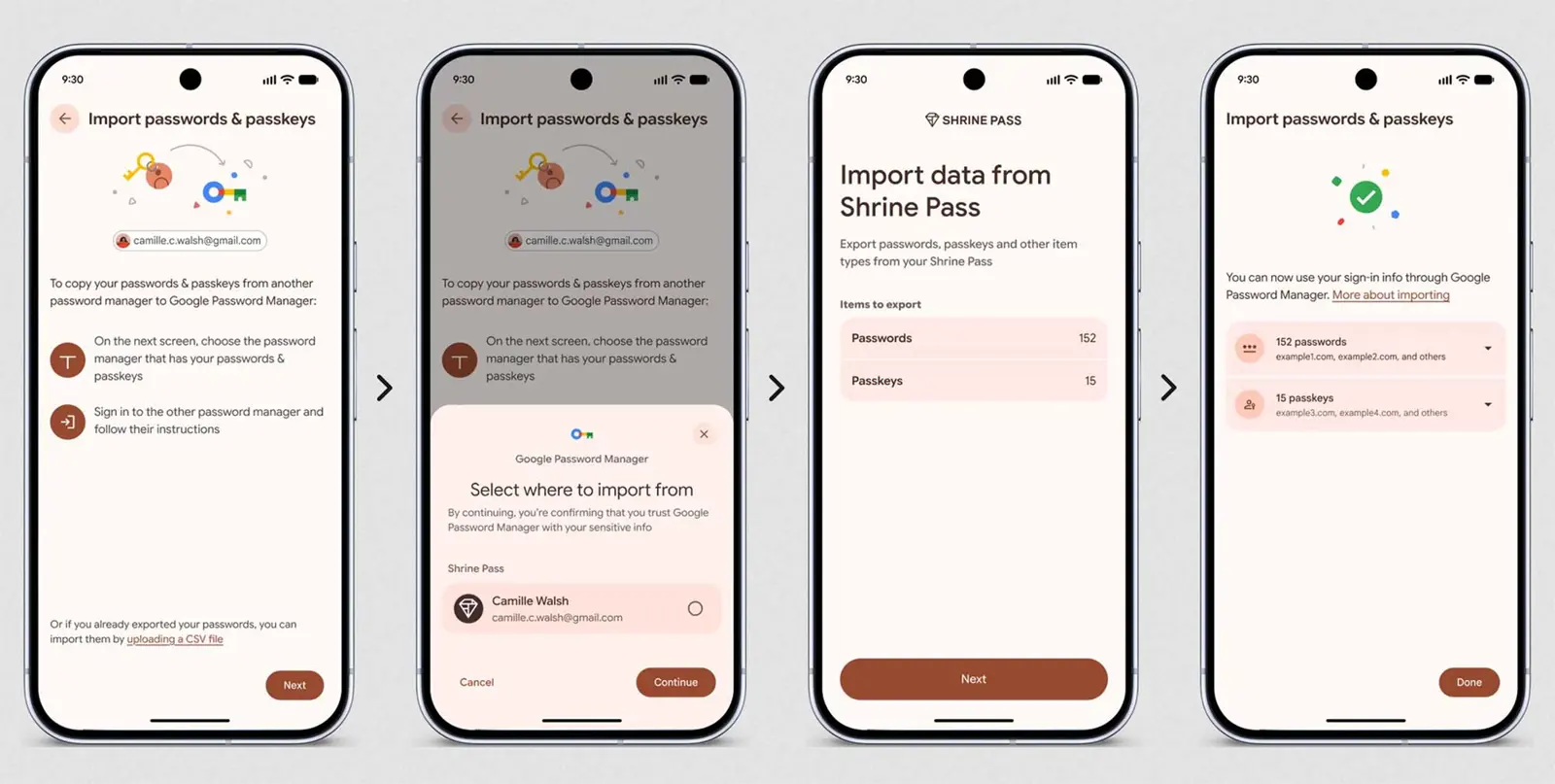
Google’s documentation says the transfer flow requires device authentication. Importing starts from Google Password Manager’s settings, while exporting to another manager can begin from that manager’s import flow.
Credential Exchange Handles the Transfer
Credential Exchange provides the common format and process that participating password managers can use to exchange credentials. It is designed to make moving stored passwords and passkeys between services more practical without treating every manager as a separate migration process.
The feature does not mean every password manager can exchange credentials automatically. Both sides of a transfer need to support the relevant Credential Exchange flow, and Google says users may need to authenticate and trust the third-party manager during the process.
The change is part of a wider set of Android improvements around passwords and account security. For related Android updates, see our coverage of the Google September Android Drop Adds 5 Useful Features.
What Android Users Need to Know
The main benefit is portability. Someone moving away from Google Password Manager can transfer supported credentials to a compatible password manager, while users moving to Google’s service can import supported passwords and passkeys.
Google’s announcement does not make the feature universal across every password manager, so compatibility remains the important limitation. Users should check that the manager they are moving from or to supports the exchange process before starting a migration.
Source: Google’s original announcement and Google Chrome Help.