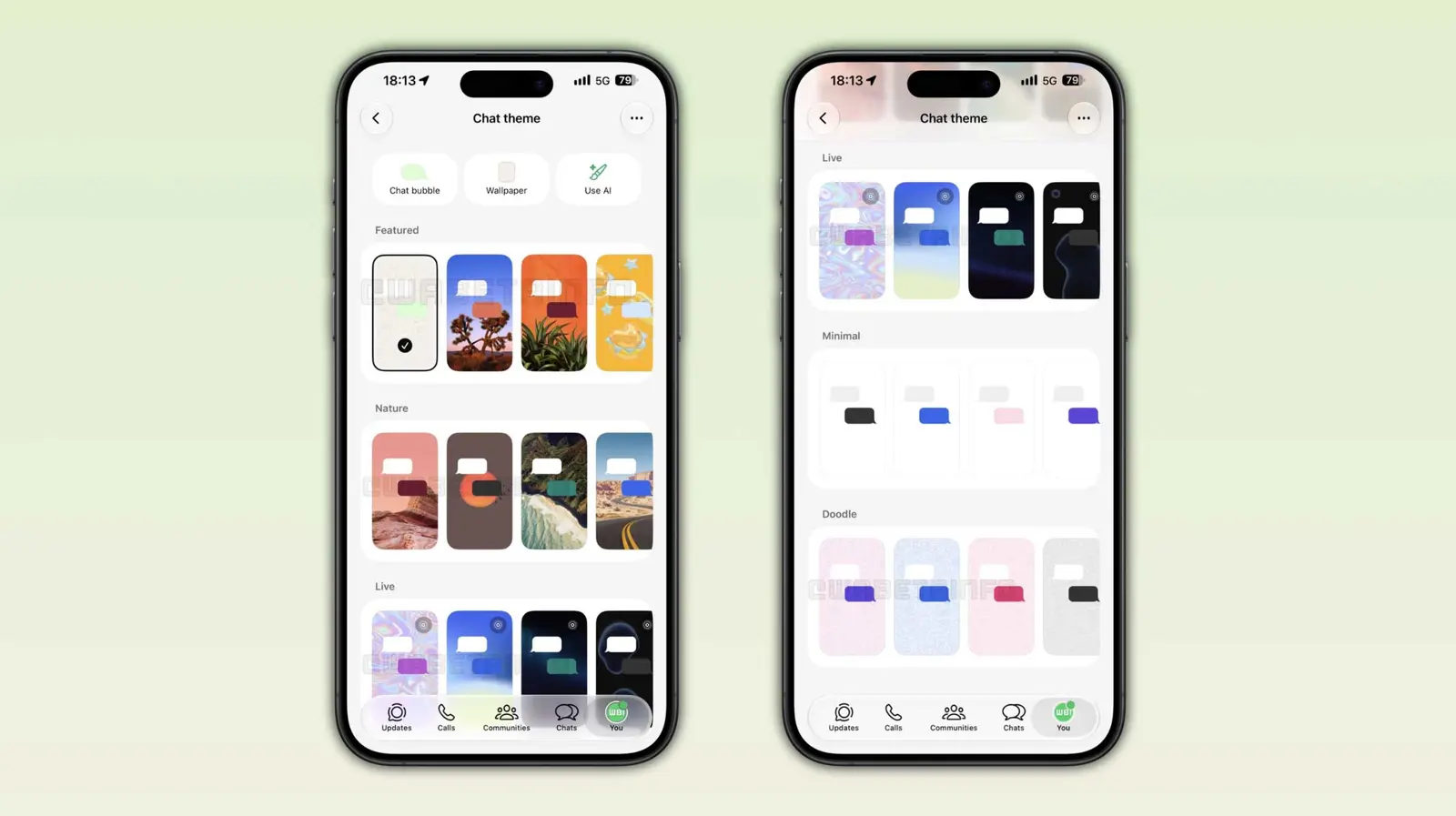
WhatsApp chat themes are getting a bigger refresh on iPhone, with five categories now rolling out to some users. The update adds Featured, Nature, Live, Minimal, and Doodle categories, giving users more ways to change the look of their conversations. WABetaInfo found the rollout in WhatsApp for iOS 26.33.73, which is available through the App Store.
The update builds on an earlier test that included three categories: Featured, Doodle, and Minimal. WhatsApp has now expanded that selection with Nature and Live, while also keeping automatic bubble colors so the messages remain readable against each wallpaper.
Five WhatsApp chat theme categories are rolling out
The new picker separates themes by visual style rather than simply giving users a longer list of wallpapers.
Featured works as a curated collection of WhatsApp's preferred themes. Nature focuses on landscapes such as mountains, forests, and ocean scenes, giving chats a more photographic look.
Live is the most distinctive addition. These themes use wallpapers with slow movement in the background. The animation is deliberately subtle, keeping the conversation readable instead of turning the wallpaper into the main focus.
Minimal goes in the opposite direction with plain backgrounds. The themes use white in light mode and dark backgrounds in dark mode, without patterns or animation.
Doodle brings back WhatsApp's familiar illustrated wallpaper style for users who want something closer to the app's classic look.
WhatsApp automatically chooses the bubble color
WhatsApp also automatically selects a message bubble color for each theme. The color is chosen to work with the wallpaper and maintain enough contrast for the text.
Users who want more control can still change the bubble color manually. The automatic option means most users can simply choose a theme without having to adjust the conversation colors separately.
The new themes are rolling out gradually
The five categories are available to some users running WhatsApp for iOS 26.33.73 from the App Store. Some beta testers can also access the feature through TestFlight.
The rollout is gradual, so installing the latest version does not guarantee that the new categories will appear immediately. WABetaInfo says WhatsApp has not announced when the feature will be available to everyone.
The update continues WhatsApp's recent focus on refreshing the iPhone conversation experience. That includes new pinned message notifications on iPhone, as well as the broader iPad and CarPlay update.
For now, Live is the standout change, but the bigger story is the expanded theme picker. WhatsApp is giving iPhone users more ways to personalize individual conversations while keeping the basic interface readable and familiar.