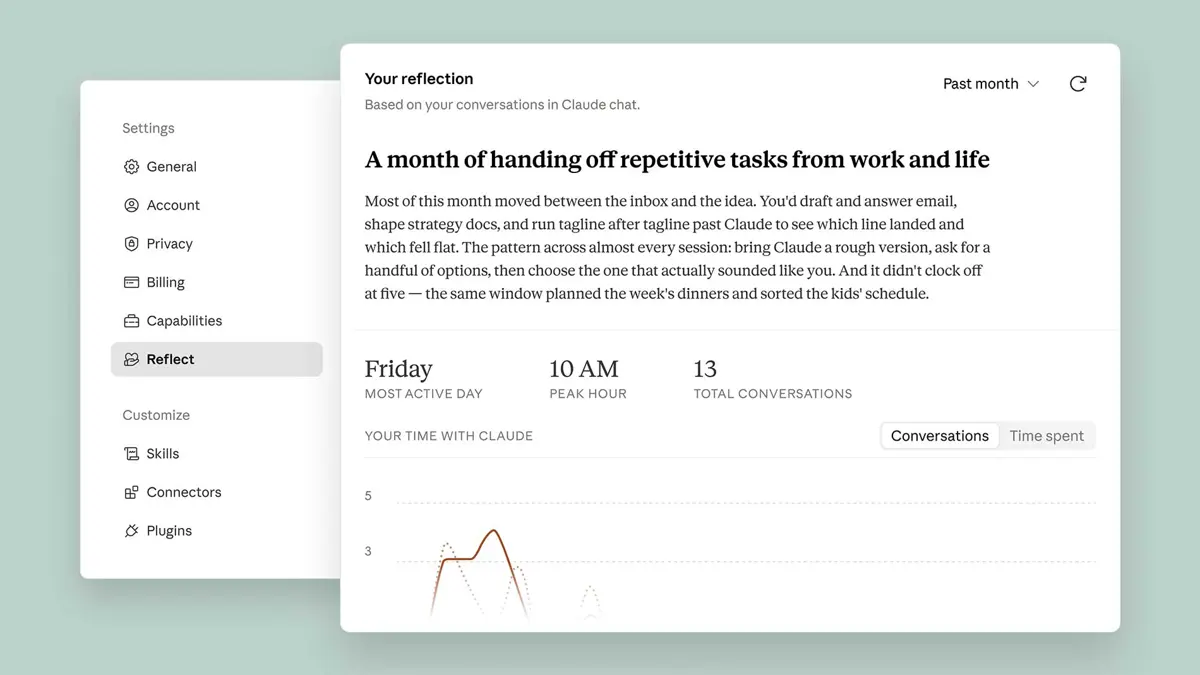
Claude Reflect launched in beta today - a dashboard inside Settings that shows Free, Pro, and Max users how they have been using Claude across topics, tasks, and time of day. Short version: Anthropic built a tool that might tell you to use their product less. Few companies do that.
How to Turn On Claude Reflect
Four steps to get your first report:
- Open Claude on the web or in the desktop app.
- Go to Settings.
- Select "Reflect on your usage" to generate your first report.
- If the option is greyed out, Memory is not enabled. Go to Settings → Capabilities → Memory and switch it on, then return to generate the report.
Once generated, you can view your activity across the past 1, 3, 6, or 12 months. Claude Reflect breaks down the topics you work on most, which task types you tend to delegate, and when during the day or week you use Claude most. Anthropic plans to add a total time-spent view - that metric is not live yet.
Reflection Questions and Break Nudges
Claude Reflect periodically surfaces questions to interrupt the automatic use pattern. One example from the launch post: "What's one thing you want to keep doing yourself, even if Claude could do it faster?" You can discuss the answer directly with Claude from inside the reflection view. Alongside those prompts, you can set quiet hours - times when Claude stays silent - or schedule a nudge to take a break after a set amount of use. Both are optional and dismissible. Anthropic frames them as reminders of your own stated preferences rather than hard limits imposed on you.
The 4D Framework Behind Your Report
Four dimensions organize each Reflect report, drawn from what Anthropic calls the 4D AI Fluency Framework: Delegation (deciding when and how to engage AI), Description (how effectively you write prompts), Discernment (how critically you assess AI output), and Diligence (taking responsibility for what you do with AI responses). Your report surfaces patterns specific to your usage - for example, noting that you tend to rework email drafts into your own voice after Claude generates a first version, or that you settle strategy before handing off execution. Practical suggestions follow each insight, such as starting a Project rather than re-explaining the same background across separate chats.
What Claude Reflect Cannot See
Claude Reflect skips incognito chats entirely. Files pulled in through connected tools stay out too - ask Claude to summarize your inbox and the summary may appear in Reflect, but the source emails stay out. Health integration conversations never surface in Reflect under any circumstances. Sensitive personal conversations can appear, but only at a high level - Anthropic worked with MIT Media Lab's Advancing Humans with AI program, Boston Children's Hospital's Digital Wellness Lab, and the Family Online Safety Institute to set those thresholds.
Claude Reflect data stays inside the feature and Anthropic uses it for no other purpose. Claude Cowork conversations are not yet included but Anthropic lists that support as coming soon. ChatGPT crossed 1 billion monthly users in April - at that adoption scale, building tools that help people step back from AI is almost certainly going to become standard across every platform that reaches mainstream users.
