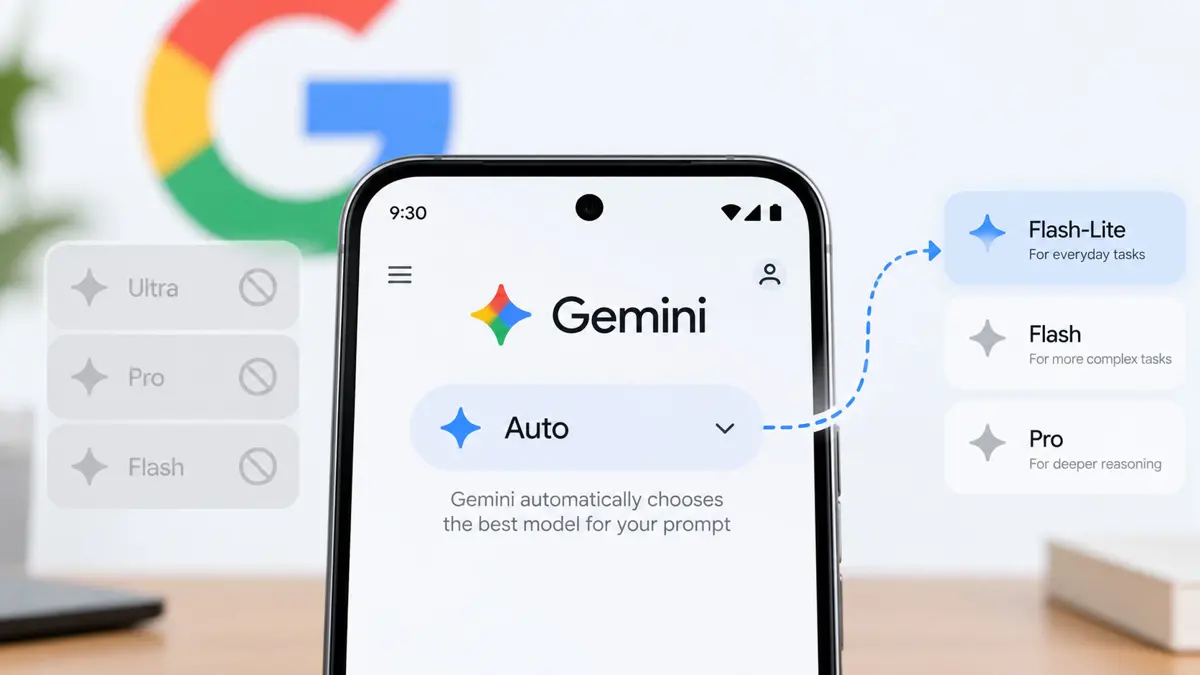
Google is rolling out a change to Gemini that removes manual model selection for users on the free plan. Instead of choosing a model from the picker, free users see Auto, which lets Google decide which model handles each prompt. Google’s support documentation says the change for accounts without an AI subscription began taking effect on October 9, 2026.
The change is more than a different menu. It shifts control over model selection from the user to Google’s routing system, while making the exact model behind a response less predictable unless users check the response details.
How Gemini Auto chooses a model
Google says Auto sends each prompt to the model it considers most suitable. Most prompts will go to Flash-Lite, described by Google as its fastest model. Prompts that need deeper reasoning may be routed to Flash or Pro. That does not mean every free prompt gets Pro access, and Google has not promised that a particular request will always use a specific model.
For users who want to understand the difference between available models and subscriptions, Saganote’s Gemini pricing guide compares Google AI Plus, Pro, and Ultra plans. The practical distinction is that free users no longer have the same direct choice of model that they had before this rollout.
What free users lose - and what remains
The clearest change is manual control. A free user cannot simply select Flash or Pro from the model picker as before. Under Auto, Google decides when a prompt should use Flash-Lite and when it may need a stronger model. That can make routine use simpler, but it also means users have less control over which model answers a particular question.
This is a model-selection restriction, not proof that every advanced capability has disappeared from every free account. Google’s stated routing behavior leaves room for some prompts to be handled by Flash or Pro when deeper reasoning is needed. The available model and usage limits can still depend on the account and the current product rollout.
Auto may route some prompts to stronger models, but free users no longer choose those models directly. Do not assume that every response uses Flash-Lite, or that every free user has guaranteed access to Pro.
New thinking levels add another control
Google is also rolling out Low, Medium, and High thinking or effort levels. They replace the previous Extended option and let users adjust how much effort a response should use. Google describes Low as quick and efficient, Medium as balanced, and High as more thorough. The controls are rolling out to subscribers as well as free users.
- Low: prioritizes quick, efficient responses.
- Medium: balances response depth and efficiency.
- High: asks for a more thorough response and may use more of the available usage allowance.
Thinking levels do not restore manual model selection for free accounts. They are a separate control: one affects the requested depth of reasoning, while Auto determines which model handles the prompt. Google’s model-access documentation explains the broader limits and subscription differences in its Gemini Apps help center.
Why the change matters for everyday Gemini use
For simple questions, summaries, and everyday writing, Auto may be convenient because users do not have to decide which model to pick. For coding, complex analysis, or multi-step tasks, users may care more about knowing which model is responding and how much reasoning effort is being used.
The change also makes the free and paid tiers easier to distinguish by control, not just by usage limits. Saganote has covered other changes across Google’s AI products, including the new Gemini models and Google’s model roadmap and Gemini Notebook usage limits. Those changes show why model names, access rules, and usage allowances are worth checking separately.
Users can also explore Google’s expanding AI features beyond the main chat interface, including Gemini Spark in Chrome. However, those product additions do not change the central point of this rollout: free Gemini users have less direct control over model choice.
How to check which model answered
Gemini can show which model generated a response in its response details. Open a conversation, use the More menu below a response, and look for the model or response details option available in that version of the app. The exact label can vary by platform and rollout.
For free users, the key question is no longer simply which model to select. It is how Google’s Auto routing handles different prompts, and whether the answer is good enough for the task. Checking response details can help users understand what handled a particular request, while the new thinking levels provide a separate way to ask for a quicker or more thorough answer.
Frequently Asked Questions
Can free Gemini users still manually select Flash or Pro?
Does Auto mean every free prompt uses Flash-Lite?
What are Gemini’s new thinking levels?
Where can users verify the change?
