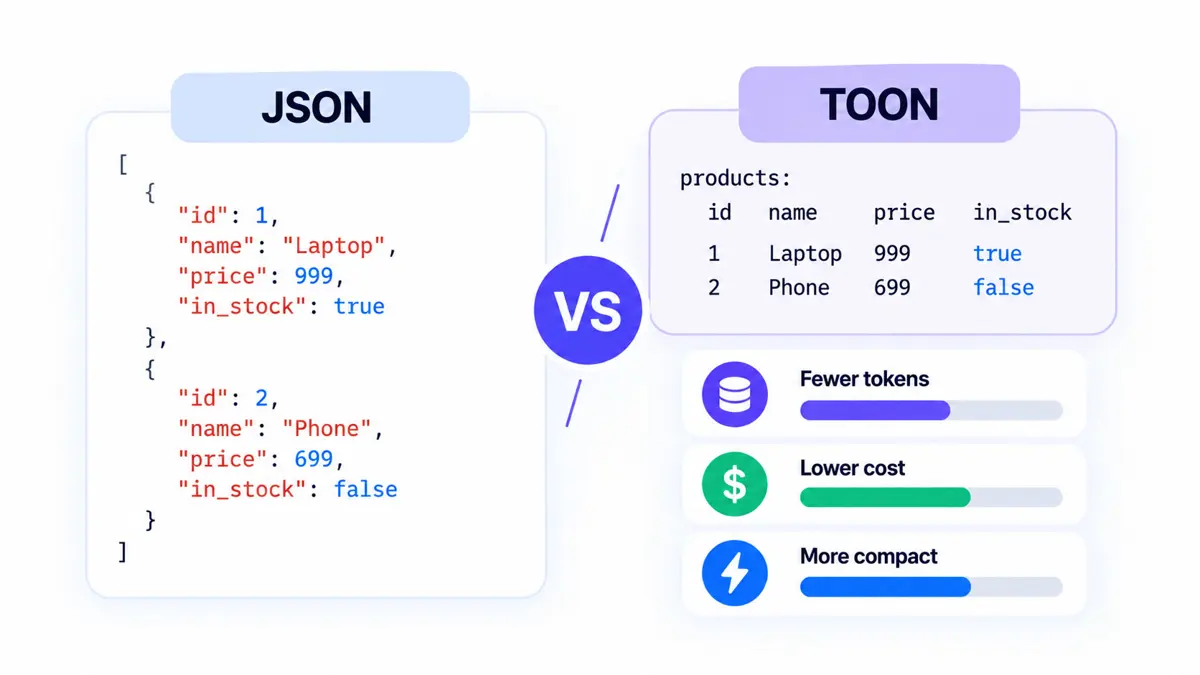
JSON vs TOON is a practical choice for developers who pass structured data into large language models (LLMs). TOON is designed to reduce the repeated punctuation and field names that make JSON verbose in prompts. It can lower input-token use for regular datasets, but the size of the saving depends on how the data is shaped—and a smaller prompt does not automatically mean a faster or more accurate response.
The short answer: keep JSON as your default interchange format, and test TOON as a prompt representation when you send many similar records to a model. The official TOON project publishes token-efficiency and retrieval-accuracy benchmarks, but its results are project-maintained benchmarks, not a guarantee for every application.
What Is JSON?
JSON (JavaScript Object Notation) is a text format for representing structured data with objects, arrays, strings, numbers, booleans, and null values. It is widely supported by programming languages, web APIs, databases, logging systems, and developer tools. Its explicit braces, brackets, commas, and quoted keys make the structure clear to software, but those characters also contribute to the text an LLM must process when JSON is included in a prompt.
{
  "users": [
    { "id": 1, "name": "Ada", "role": "admin" },
    { "id": 2, "name": "Lin", "role": "user" },
    { "id": 3, "name": "Sam", "role": "user" }
  ]
}
JSON's verbosity is not necessarily a problem. Minified JSON removes unnecessary whitespace, and ordinary application tooling already understands it. JSON is especially useful when a system needs predictable parsing, schema validation, broad interoperability, or a standard request and response format.
What Is TOON?
TOON stands for Token-Oriented Object Notation. It is a line-oriented, indentation-based encoding of the JSON data model, designed primarily for structured data placed in LLM prompts. It replaces much of JSON's braces and repeated object-key syntax with indentation and compact declarations. For arrays of objects with a consistent set of fields, TOON can declare the fields once and represent each record as a row.
users[3]{id,name,role}:
  1,Ada,admin
  2,Lin,user
  3,Sam,user
The header users[3]{id,name,role} indicates the array name, the number of rows, and the shared fields. Each following row contains values in that field order. This tabular representation is where TOON is often most efficient: the same field names do not need to be repeated in every record.
TOON also supports primitive arrays, nested objects, and less uniform structures. However, when records vary substantially or contain deep nesting, its compact tabular form may not apply and its token advantage can shrink or disappear. The official TOON specification defines its syntax and validation rules; implementations and supported versions should be checked before adopting it in production.
JSON vs TOON: The Same Data in Both Formats
The examples below encode the same three users. JSON represents each user as an object with its own keys. TOON lists the shared field names once and places the values in rows.
| Factor | JSON | TOON |
|---|---|---|
| Structure | Objects, arrays, braces, and quoted keys | Indentation, compact headers, and row values |
| Repeated records | Usually repeats field names in each object | Can declare shared field names once |
| Token use | Depends on whitespace, data shape, and tokenizer | Often lower for uniform arrays; not always lower for irregular data |
| Interoperability | Broad native support across APIs and tools | Usually requires a TOON encoder or decoder |
| Best use | APIs, storage, system integration, and general data exchange | Candidate format for structured LLM prompt input |
The main distinction is not that TOON contains different information. It is a different way to serialize JSON-shaped data for a specific context. For many applications, a useful architecture is to keep JSON inside the application and convert selected data to TOON only at the boundary where it is inserted into an LLM prompt.
Does TOON Actually Reduce Token Usage?
It can. The official TOON repository reports results for multiple datasets and compares TOON with both formatted JSON and minified JSON. In one example published by the project, a weather forecast representation uses approximately 66 tokens in TOON versus 117 in formatted JSON. That is an example from the project's documentation, not a universal conversion ratio.
The repository's benchmark methodology uses the o200k_base encoding through gpt-tokenizer and includes retrieval questions across several models. Its results show that the format and data structure affect both token count and retrieval performance. The benchmark is useful evidence that TOON can help in selected cases, but it is maintained by the TOON project and should not be treated as an independent guarantee for other data, models, or production workloads. See the project's benchmark documentation for the datasets and method.
Why the dataset matters
TOON's strongest case is a large array of similar records: search results, product listings, analytics rows, employee records, or other objects with the same primitive fields. Declaring those fields once can avoid repeated keys and punctuation. The more consistent the records are, the more opportunity there is to use the tabular representation.
The benefit is less predictable for deeply nested objects, arrays containing different kinds of values, or records with many missing and extra fields. In those cases, TOON may need a less compact representation. For a simple flat table, CSV may also be smaller, although CSV does not preserve the full range of nested JSON data without flattening or adding conventions.
Formatted JSON versus minified JSON
A fair test should compare TOON with both pretty-printed JSON and minified JSON. Formatted JSON includes indentation and line breaks that make it easier for people to read, but minification removes most whitespace without changing the data. Comparing TOON only with formatted JSON can make the token advantage look larger than it is against the compact JSON many applications already send.
Token counts also vary by tokenizer and model provider. A benchmark using one tokenizer is useful for a consistent comparison, but its absolute counts may not match another provider's API. Run the comparison with the tokenizer or token-counting method relevant to your target model when possible.
Does Fewer Tokens Mean Lower API Costs?
Potentially. If an API charges for input tokens and TOON represents the same prompt data with fewer tokens, the input-token portion of the bill can fall. The saving applies to the portion of the prompt that changes format—not automatically to output tokens, reasoning tokens, tool calls, cached input, or the entire request cost. Actual billing depends on the model and provider's pricing rules.
For example, suppose a structured payload accounts for 10,000 input tokens in JSON and 7,000 in TOON with the same model tokenizer. That payload uses 30% fewer tokens. If the input-token rate stays the same, the input charge attributable to that payload would also be 30% lower. This is an illustration of the arithmetic, not a measured TOON benchmark or a claim about any specific model's prices.
To estimate the effect on a real application, start with its current input-token bill and measure what share comes from the structured data you can convert. Then apply the measured reduction to that share. For current model rates and cost differences, see Saganote's AI API pricing comparison and Claude pricing guide. Pricing changes over time, so verify rates before making a production estimate.
Does TOON Improve LLM Accuracy?
Not by definition. A more compact representation can make relevant data cheaper to include, and a consistent tabular layout may make repeated records easier for a model to scan. But model accuracy depends on the model, prompt, data structure, task, and evaluation method. Token savings alone do not prove that a model will retrieve facts more reliably.
The TOON project publishes retrieval tests alongside token counts. Treat those results as a starting point, then test the questions your application actually asks. Include exact lookups, aggregation, missing-value cases, nested records, and malformed or truncated inputs if those occur in production. Compare accuracy as well as token count, latency, and total cost.
Key Trade-Offs: JSON vs TOON
Advantages of TOON
- Can reduce input-token use when many records share the same fields.
- Removes repeated keys and some structural punctuation from regular data.
- Keeps a readable text representation that can be inspected during prompt debugging.
- Declared array lengths and field lists provide explicit structural cues that implementations can validate.
- Can be introduced as a prompt-layer encoding without requiring an entire application to stop using JSON internally.
Limitations of TOON
- Token savings depend on data shape; irregular or deeply nested objects may not benefit.
- It is less universally supported than JSON and may require an additional conversion step.
- Developers need compatible encoders, decoders, and validation tests to avoid format mismatches.
- Token counts and model behavior vary across tokenizers and LLMs.
- A smaller prompt does not guarantee lower end-to-end latency or better answers.
- The format specification and surrounding ecosystem continue to evolve, so teams should pin and test versions.
When Should You Use JSON or TOON?
| Situation | Recommended starting point | Why |
|---|---|---|
| Public APIs and service-to-service communication | JSON | Broad compatibility and established tooling |
| Data storage or exchange between applications | JSON | Easier integration with existing systems |
| Many uniform records placed in an LLM prompt | Test TOON | Shared field declarations may cut token overhead |
| Deeply nested or irregular objects | JSON first; benchmark both | TOON's tabular advantage may be limited |
| Small prompts where tokens are not a meaningful cost | Keep the current format | Conversion and maintenance may not be worth it |
| Large, flat tabular data | Compare TOON with CSV too | CSV can be smaller when its limited structure is sufficient |
| Model output that must follow a strict schema | Use the model/provider's supported structured-output mechanism | A serialization format alone does not enforce output compliance |
For teams building AI agents, this can be a narrow optimization in the data pipeline: keep reliable application data in JSON, then test whether converting retrieved records to TOON improves prompt efficiency. It does not replace the broader work of designing the agent's tools, context, and execution flow. Saganote's explainer on what an AI agent harness does provides context for where such a prompt-format choice might fit into a larger runtime.
How to Convert JSON to TOON
The official TypeScript/JavaScript implementation provides an encoder and decoder. The exact API can change across package versions, so check the project's current installation and usage instructions before copying an example into production. The following shows the general workflow using the package's encode function:
import { encode } from "toon-format";

const data = {
  users: [
    { id: 1, name: "Ada", role: "admin" },
    { id: 2, name: "Lin", role: "user" },
    { id: 3, name: "Sam", role: "user" }
  ]
};

const toonText = encode(data);
console.log(toonText);
Use the official TOON repository for current installation instructions, API details, and CLI options. In a production pipeline, add round-trip tests: encode representative JSON data, decode it again, and compare the result with the original data. Also test nulls, strings containing delimiters, nested values, and inconsistent records where applicable.
How to Benchmark TOON for Your Application
- Select representative production data, including both regular and irregular examples.
- Serialize the same data as formatted JSON, minified JSON, and TOON.
- Count tokens using the target model's tokenizer or the provider's supported token-counting method.
- Calculate the reduction:
(JSON tokens - TOON tokens) / JSON tokens × 100. - Run the same real prompts and questions against each representation.
- Compare answer accuracy, token usage, latency, and total cost—not just the shortest input.
- Keep TOON only where the measured improvement outweighs conversion, validation, and maintenance costs.
If TOON saves 25% of tokens in a synthetic example but only 3% in your real workload, the real result should guide the decision. The same is true if a shorter prompt causes more mistakes or does not improve latency. Optimize for the behavior and cost of the full application rather than a format benchmark in isolation.
Frequently Asked Questions
Is TOON better than JSON?
How many tokens does TOON save compared with JSON?
Does TOON automatically reduce AI API costs?
Can TOON replace JSON in an API?
Is TOON more accurate for language models?
Should I use TOON for deeply nested data?
The Verdict: Use TOON Selectively
TOON can reduce token use when an LLM prompt contains many records with a consistent structure. That can translate into lower input-token charges for the converted data, but the size of the saving is workload-specific. Claims based on formatted JSON should also be checked against minified JSON, and token efficiency should be measured alongside model accuracy and latency.
For most developers, the practical path is to keep JSON as the system-wide data format and experiment with TOON at the prompt boundary. Adopt it only when tests on representative data show a meaningful improvement without adding unacceptable complexity. The result is a targeted optimization—not a reason to replace JSON everywhere.