The touchscreen MacBook Pro is now official, ending Apple's long resistance to putting touch input directly on a Mac display. Announced on October 28, 2026, the new 14-inch and 16-inch models combine a tandem OLED screen branded PROLED XDR with touch controls, Dynamic Island, and Apple's M5 Pro or M5 Max chips. Preorders are open, with customer deliveries and retail availability scheduled to begin November 6.
The change is more specific than turning a MacBook into a large iPad. Apple is adding touch as another way to work with macOS, while keeping the keyboard, trackpad, desktop interface, and conventional laptop design. That distinction matters: the new Mac is intended to make selected tasks more direct, not force users to abandon the input methods they already know.
What Apple actually announced
Apple calls the product MacBook Pro with PROLED XDR Display, not MacBook Ultra. It comes in 14.2-inch and 16.3-inch sizes and introduces touch input on a Mac for the first time. Both models use tandem OLED technology, which stacks two self-emitting pixel layers to improve brightness and contrast while maintaining more consistent screen performance.
Apple lists up to 2,000 nits of peak HDR and SDR brightness, a 10,000,000:1 contrast ratio, and adaptive ProMotion refresh rates up to 120Hz. The display also supports both P3 and Adobe RGB color spaces, a useful addition for photography, design, and print workflows that depend on accurate color.
The new models are thinner and lighter than their predecessors. Apple says the 14-inch version weighs 3 pounds and the 16-inch version weighs 4 pounds. Battery life is rated at up to 24 hours, although actual runtime will depend on configuration, workload, display brightness, and other conditions.
How touch works without replacing the trackpad
The touchscreen is designed to work alongside the Mac's existing controls. Apple describes familiar actions such as swiping to scroll, pinching to zoom a photo, dragging slides between presentation pages, and using touch gestures to resize or arrange windows. Keyboard shortcuts and trackpad gestures remain available, so users can choose the input method that suits the task.
One hardware detail is important: Apple says the touch sensor is integrated into the display panel rather than added as a separate layer above it. The company says this reduces latency, making interaction feel closer to touching the content itself. Apple has also redesigned the hinge to provide more stability when someone taps or draws on the screen.
That hinge change addresses a practical issue with touch laptops. A display that moves noticeably every time a user taps it can make direct interaction frustrating, especially when selecting small controls or drawing. Apple's new hinge is intended to keep the screen steadier during those actions.
Which Mac tasks could benefit most?
The strongest case for touch is in work where the screen already acts as a visual canvas. Apple highlights several examples:
- Photo and graphic work: Pinch to zoom, select objects, draw, paint, and make direct adjustments on the image or design.
- Video editing: Mark ranges, place clips, and zoom into a timeline with touch gestures in supported editing apps.
- Presentations: Drag slides and other visual elements directly on the display.
- Music production: Play software instruments and use onscreen chord or drum pads in compatible music apps.
- App development: Test touch behavior in iOS and iPadOS apps directly on the Mac display.
Apple says its own apps are optimized for touch and that many existing Mac apps can respond immediately because macOS translates touch input into clicks. Developers can also use updated system gesture APIs to build interfaces specifically for touch. Apple names apps including Notion, Canva, Microsoft Word, Excel, PowerPoint, Outlook, Adobe Lightroom, DaVinci Resolve, Blender, and Shapr3D among the third-party tools expected to support new touch workflows.
That does not mean every Mac app will suddenly become a good finger-first experience. An app built around dense menus, tiny controls, or precise pointer movement may still feel better with a trackpad or mouse. The quality of the experience will depend on how individual developers adapt their interfaces.
Dynamic Island brings a new layer to macOS
The new MacBook Pro also brings Dynamic Island to the Mac. Apple positions it as a compact place for Spotlight search, Live Activities, and Siri AI. Users can interact with information such as calls, music playback, AirDrop requests, and live updates without treating every notification as a separate window.
This is more than a visual change. Dynamic Island gives Apple a touch-friendly area for quick actions while preserving the desktop layout around it. Its usefulness will depend on how well Apple's apps and third-party services use Live Activities and other supported integrations.
The laptop ships with macOS 27, also known as Golden Gate. Saganote's Apple October 2026 product roundup places the MacBook launch in the context of Apple's wider hardware cycle. The touchscreen model adds a hardware-specific input layer to macOS 27.
Touchscreen MacBook Pro price and availability
Apple's US starting prices are higher than the standard MacBook Pro range. The new touchscreen configurations are priced as follows:
| Configuration | US starting price |
|---|---|
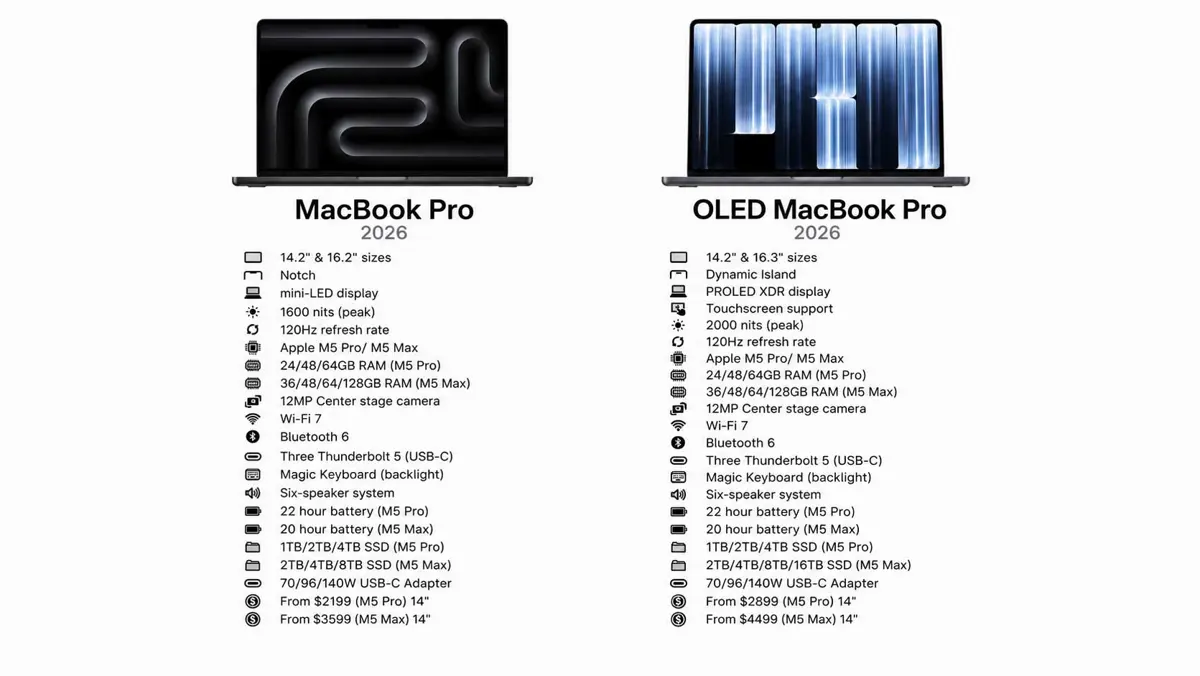
| 14-inch M5 Pro | $2,899 |
| 16-inch M5 Pro | $3,399 |
| 14-inch M5 Max | $4,499 |
| 16-inch M5 Max | $4,799 |
Apple opened preorders on October 28, 2026, in 30 countries and regions, including the United States. The company says deliveries, Apple Store availability, and authorized reseller sales begin Friday, November 6. Prices and availability outside the United States can differ by market.
The configuration list in the social graphic circulating online should not be treated as a substitute for Apple's live store options. Memory, storage, power adapter, and regional pricing can vary by selected chip and configuration. Check Apple's official MacBook Pro announcement and product store before ordering.
What this means for Mac users
For designers, video editors, musicians, and developers, touch could make certain direct-manipulation tasks faster or more natural. The benefit is easiest to understand when an action involves moving, marking, drawing on, or manipulating something already visible on the display. It may also make touch testing more convenient for developers who build apps for iPhone and iPad.
For people who mainly write, code, manage spreadsheets, browse the web, or work with multiple windows, the keyboard and trackpad may remain the primary controls. Touch is an extra option, not a requirement. The new display and interface will matter more to some workflows than others.
The price also makes this a decision for buyers who can use the display and touch features regularly. Anyone choosing between a MacBook and an iPad should still compare the software they need, their preferred working posture, and whether they need a full desktop operating system. The touchscreen does not turn macOS into iPadOS, and Apple has not announced a detachable or convertible design.
This launch follows months of reports about a redesigned high-end Mac. Saganote previously covered Apple's first touchscreen MacBook reports, the MacBook Ultra feature reports, and Apple's wider Mac roadmap through 2028. The confirmed product is now a touchscreen MacBook Pro with PROLED XDR, rather than a separately named MacBook Ultra.
The practical test begins when the laptops reach customers on November 6. Until then, Apple's announcement establishes the hardware and software features, but real-world reviews will show whether touch improves everyday Mac work enough to justify the higher starting price.