Windows 11 26H2 is available to PCs running versions 24H2 and 25H2, and Microsoft's lifecycle page puts end of servicing for 24H2 on Home and Pro editions at October 13, 2026. General availability came on September 29. Installing takes a few clicks and one restart.
Support Dates for 24H2, 25H2, 26H1, and 26H2
Dates come from Microsoft's release-health page, last updated on October 28. Each version has its own end date. Home and Pro editions get 24 months of support, and Enterprise and Education editions get 36 months, according to that page.
| Version | Released | Home and Pro end of updates | Enterprise and Education end of updates |
|---|---|---|---|
| 24H2 | October 1, 2024 | October 13, 2026 | October 12, 2027 |
| 25H2 | September 30, 2025 | October 12, 2027 | October 10, 2028 |
| 26H1 | February 10, 2026 | March 14, 2028 | March 13, 2029 |
| 26H2 | September 29, 2026 | October 10, 2028 | October 9, 2029 |
Outlets disagree by a day on a few dates. Windows Latest lists 26H2 Home and Pro as ending October 9, 2028, while Microsoft's own release-health table says October 10, so Microsoft's table is the source used here.
24H2 Home and Pro Stopped Getting Updates on October 13
Windows 11 version 24H2 reached end of servicing for Home and Pro on October 13, 2026, according to Microsoft's lifecycle page. Monthly security updates stopped for those PCs. Enterprise and Education editions of 24H2 keep updates until October 12, 2027.
Moving up is cheap. A PC on 24H2 or 25H2 can reach 26H2 through the same Windows Update page, with no reinstall. Earlier versions are different: 23H2 Enterprise and Education support ends on November 10, 2026, and 23H2 needs a full upgrade instead of the small package.
Windows 10 follows a separate clock. Microsoft extended that program to October 12, 2027, as Saganote covered in how to enroll in Windows 10 ESU, where PCs already enrolled carry over automatically.
26H2 Arrives as a 174 KB Enablement Package
Installation is quick, Microsoft says. IT-Connect, quoting the support page for KB5121794, describes a 174 KB enablement package that activates features already present in recent cumulative updates and moves the build to 26300. Eligible PCs need the September 22 update, KB5124010, or a newer one installed first.
Delivery is not forced. Windows Latest describes it as an optional update, and Microsoft's September 29 post says safeguard holds can block devices with known compatibility problems. Reports that Microsoft plans automatic installs closer to end of support remain unconfirmed.
How to Install 26H2 From Windows Update
- Open Settings > Windows Update and install any pending updates, then restart.
- Turn on Get the latest updates as soon as they're available.
- Select Check for Windows updates.
- If Windows 11, version 26H2 appears, select Download & install.
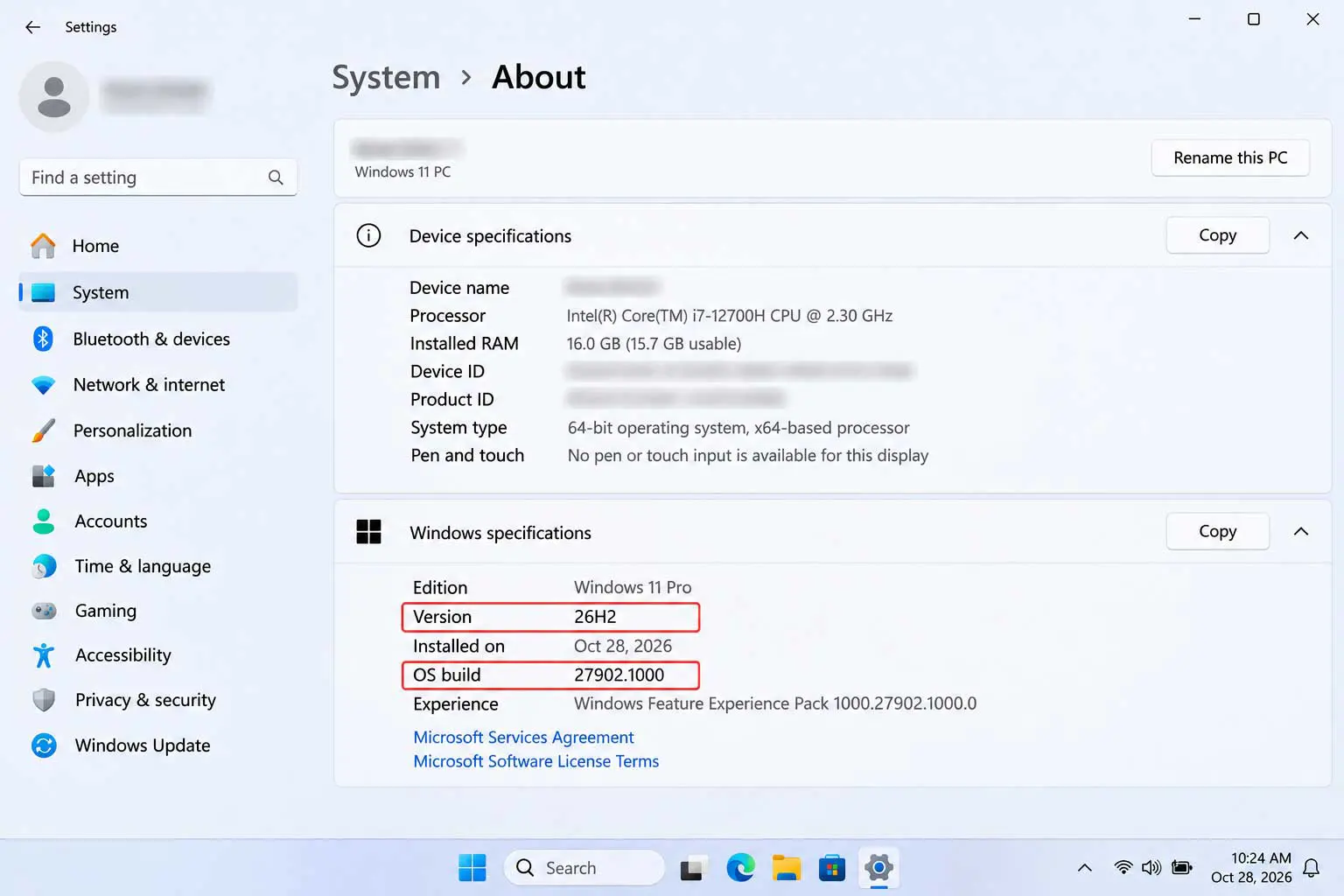
- Restart when prompted, then open Settings > System > About and confirm the version reads 26H2.
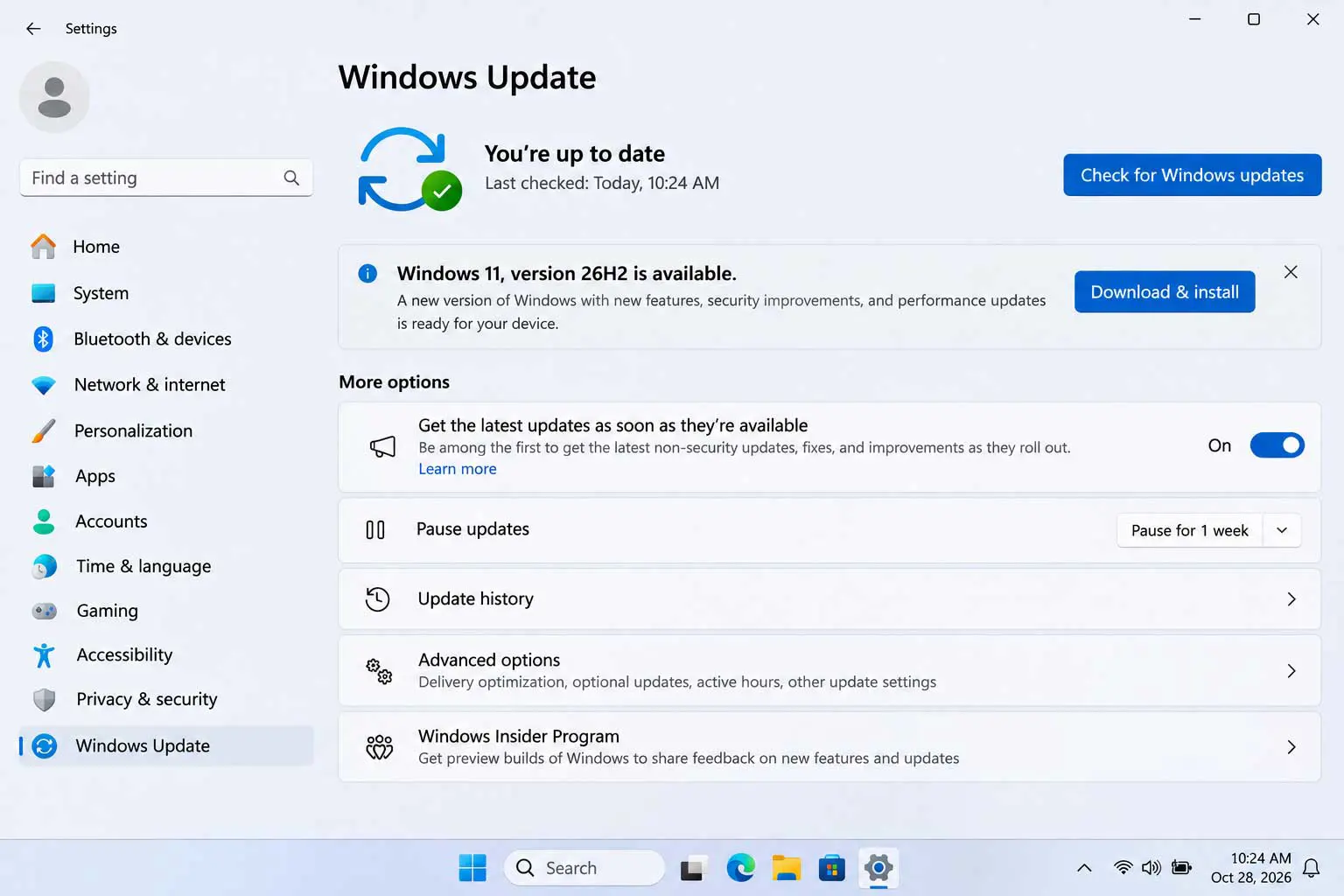
Patience helps. Anyone chasing Windows 11 26H2 right away may not see it at first, because Microsoft says the toggle does not guarantee immediate delivery and the rollout expands in stages. Microsoft's release-health page calls the update available for all eligible devices.
What 26H2 Changes: Taskbar, Start Menu, Search, and File Explorer
Windows Latest calls it "a nothingburger release" for consumers, because it turns on features that have been rolling out gradually. Practical changes still exist. Taskbar placement can move to the top or sides of the screen, Start menu sizes vary, and Windows Search handles typos and partial names better.
- Taskbar: top, bottom, left, or right placement, plus an option to shrink the taskbar height
- Start menu: resizable, with Pinned, Recent, and All apps sections that can each be shown or hidden
- Search: result previews, better typo handling, and automatic indexing of frequently used folders
- File Explorer: AI actions for compatible images and more compression formats
- Security: a built-in Sysmon (off by default) and a Smart App Control toggle that no longer needs a clean install
Some AI features carry conditions. XenoSpectrum reports that summarizing OneDrive and SharePoint files needs a compatible Microsoft 365 subscription and a Copilot license, and Voice Access natural-language commands need a Copilot+ PC. Microsoft's October 15 post, as quoted by WindowsForum, claims up to 20% more responsiveness, though results vary by PC.
Related coverage exists. Administrator Protection, which moved to Release Preview after a year in testing, ships off by default in 26H2, per XenoSpectrum, and Saganote also covers restoring the old right-click menu in Windows 11. Microsoft scheduled an October 7 Windows and Surface event with local AI in focus days after the rollout.
Known Issues and Workarounds Microsoft Lists
Microsoft's 26H2 status page, current as of October 28, lists five items, and most of them hit managed business PCs rather than home users. Consumers are more likely to notice the audio ones.
| Issue | Affects | Status | Workaround |
|---|---|---|---|
| USB audio devices fail to start or play no sound (Code 10, USB Audio Class 1.0) | Any edition | Mitigated; fix in progress | None general; IT admins contact Microsoft Support for Business |
| Apps needing AC-3 audio decoding close unexpectedly | Any edition | Resolved by KB5127648 (October 13) | Install the update |
| Black screen after sign-in | Mostly Azure Virtual Desktop with FSLogix | Resolved by KB5127648 | Task Manager > Run new task > explorer.exe |
| Remote Desktop error 0xC000000D for non-admin users | Hosts with Administrator Protection | Resolved by the October 28 update, KB5127936 | IT admins can reset the User Account Control admin approval policy |
| Domain-joined PCs lose trust with the domain | Managed PCs | Resolved by KB5124010 (September 22) | Known Issue Rollback policy or a registry change, for admins |
Installing every pending update comes first, since several fixes shipped in the October cumulative updates and older builds still carry the original bugs. Older problems predate those builds. Anyone still hitting audio trouble after Windows 11 26H2 should note that Microsoft lists no general workaround.
26H1 PCs Cannot Move to 26H2
Windows 11 version 26H1 is a separate branch. Microsoft says it is scoped to new devices that started shipping in early 2026, is not a feature update for existing PCs, and is not offered as an in-place update from 24H2 or 25H2. Windows Latest adds that new Arm PCs with Snapdragon X2 or Nvidia RTX Spark ship with 26H1 and cannot upgrade to 26H2, and expects the two lines to merge in 27H2 next year.
A hardware note applies too. Microsoft's lifecycle page says 26H2 is the last version that will support devices with Snapdragon 850 processors. Mac owners face their own version cutoffs, covered in what macOS 27 Golden Gate is, and Apple's Tahoe 26.7 and Sequoia 15.8 show the same monthly update rhythm. iPhone owners have a tracker of their own in iOS 27 problems and fixes.
Windows 11 Moves to a Yearly Cadence Through 27H2
Microsoft's own table shows the pattern: one feature update each fall, 24 months for consumer editions. 25H2 ends in October 2027, 26H2 in October 2028, and a 27H2 release would follow the same schedule if Microsoft keeps it. Windows Latest expects that release to arrive in 2027.
Frequently Asked Questions
Is 26H2 a full reinstall?
When did 24H2 stop receiving updates?
How can a PC confirm it is on 26H2?
Does 26H2 install automatically?
Can a PC with 26H1 install 26H2?
