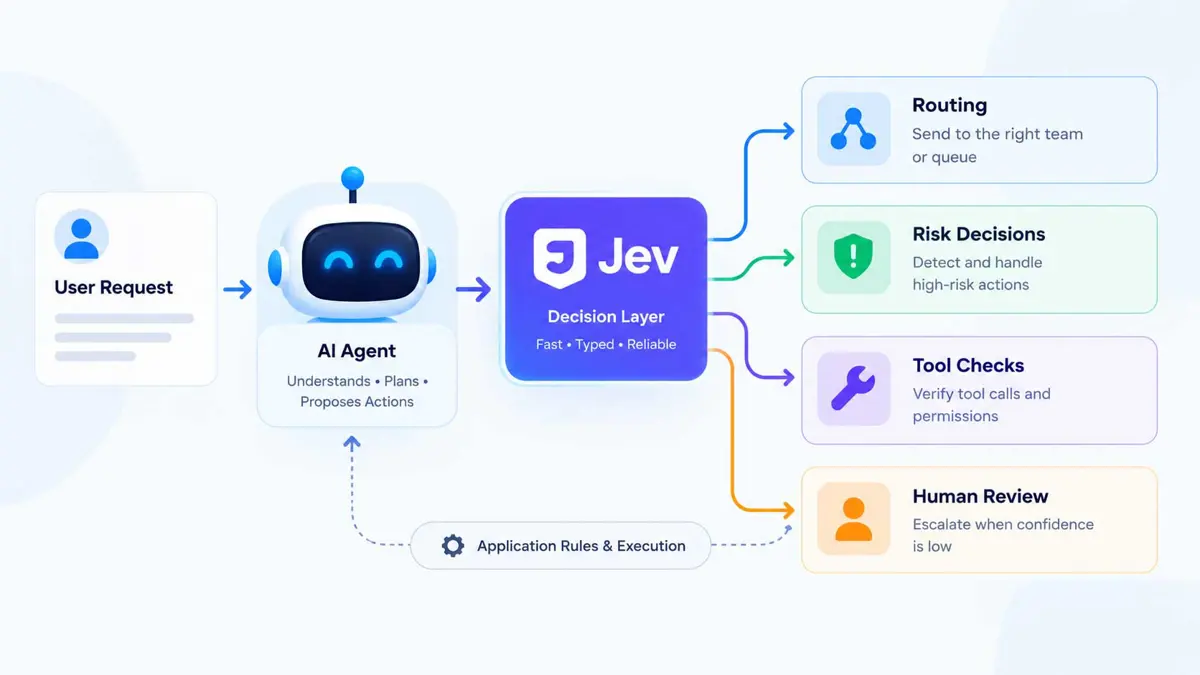
How to Build AI Agents With Jev: Routing, Risk, and Tool Checks
A practical architecture for putting Jev inside an agent loop without handing model decisions control of execution.

How to Build AI Agents With Jev starts with a simple separation of responsibilities: a generative model can interpret a request and propose what to do, while Jev can evaluate a focused decision and return a typed result that application code can use. Jev supports Choice, Score, and Boolean-style evaluations through current AI SDK and AI Gateway integrations. The application still controls permissions and tool execution.
This pattern works well for routing requests, assessing risk before an action, checking proposed tool calls, and sending uncertain cases to human review. Vercel's current guidance places Jev at a decision point inside an agent loop rather than treating it as the component that runs the workflow. Vercel's Jev agent-loop guide describes the same boundary between model judgments and application-controlled execution.
How to Build AI Agents With Jev Around Clear Responsibilities
An agent becomes easier to reason about when each component has one job. The generative model handles open-ended language and planning. Jev handles bounded questions over the supplied state. Application code validates the result, checks authorization, executes tools, and updates state.
User request
    ↓
AI agent interprets and plans
    ↓
Jev evaluates a bounded decision
    ↓
Application validates the result
    ↓
Tool execution or human review
    ↓
Application updates state
    ↓
Agent continues or responds
If the workflow already has fixed rules, keep those rules in code. Jev is most useful when the application needs a model judgment over supplied context, but the possible outcomes are still defined enough for software to consume.
For background on the agent itself, see what an AI agent is. For the Jev request and response model, see how to use Jev AI.
Step 1: Define the Decision Before Calling Jev
Start with the decision the application needs, not with an API request. A useful Jev question has a bounded output that the next part of the application already understands.
- Which team should handle this request?
- Should this action go to human review?
- Should the agent continue, retry, ask the user, or stop?
- How risky is the proposed action?
- Which allowed tool or next step fits the current state?
A vague request such as "understand this customer" does not give application code a clear branch. A question such as "Which team should handle this request?" can define explicit destinations such as billing, technical, or sales.
Step 2: Route Agent Tasks With Jev
Routing is a natural first pattern because the application can define the destinations and map each returned choice to a known queue, subagent, or workflow.
const result = await evaluate({
  model: "typesafe-ai/jev",
  state: {
    subject: "Unexpected charge",
    message: "My invoice includes an extra seat.",
  },
  questions: {
    team: {
      type: "choice",
      instructions: "Which team should handle this request first?",
      criteria: {
        billing: "Invoice amounts, charges, and payment questions",
        technical: "Product errors, outages, and integration failures",
        needs_review: "Unclear requests or overlapping responsibilities",
      },
    },
  },
});

const team = result.answers.team.choice;
The current AI SDK integration uses experimental_evaluate with the typesafe-ai/jev model ID. Vercel's current example defines a Choice question with criteria and reads the selected value from result.answers..choice. The application can then map that value to a queue or another controlled destination. See Vercel's Jev integration guide.
if (team === "billing") {
  return routeTo("billing-queue");
}

if (team === "technical") {
  return routeTo("technical-queue");
}

return sendToHumanReview();
The important part is the final mapping. Jev selects among the choices the application defined. It does not get to invent a queue or execute the routing action itself.
Step 3: Use Jev for Risk Decisions Before Sensitive Actions
An agent may propose an action that deserves extra scrutiny. Examples include refunds, account changes, data deletion, external messages, and deployments. Jev can evaluate a bounded risk question over the current state, while the application decides what the result means.
const riskResult = await evaluate({
  model: "typesafe-ai/jev",
  state: {
    request: "Refund the duplicate payment",
    account: "Customer has an active subscription",
    proposedAction: "issue_refund",
  },
  questions: {
    needsReview: {
      type: "boolean",
      instructions: "Does this proposed action require human review?",
    },
  },
});

const needsReview = riskResult.answers.needsReview.boolean;Treat a Jev result as an input to an application rule, not as authorization. The application should still verify identity, permissions, arguments, account state, and any business rules immediately before a sensitive tool executes.
Vercel's current agent-loop guidance explicitly separates permission checks and tool execution from Jev's judgment. That boundary matters because a model decision can be wrong even when its answer is structured.
Step 4: Check Tool Calls Before Execution
A useful agent pattern is to let the model propose a tool call, then evaluate the proposed action before the tool runner executes it.
Agent proposes:
  refundCustomer(orderId)

        ↓

Jev evaluates:
  Does this action require review?

        ↓

Application checks:
  identity
  permission
  order state
  tool arguments

        ↓

Execute tool
or
Send to human review
Keep the authorization check close to the tool execution path. If a tool can change data, send a message, move money, delete information, or affect production systems, every route to that tool should pass through the same application-controlled checks.
Step 5: Send Uncertain Decisions to Human Review
Jev can return probabilities or confidence information alongside typed decisions. Use those values as inputs to an explicit application policy rather than treating a probability as permission by itself.
if (answer.confidence >= 0.80) {
  continueWorkflow();
} else {
  requestHumanReview();
}
The exact threshold depends on the cost of mistakes in the workflow. A support-ticket route may tolerate a different threshold from an automated account change. Test the rule against real examples, including ambiguous cases, before allowing it to control production actions.
A human-review path also gives the agent somewhere to go when the state does not contain enough evidence. That is often better than forcing a low-confidence answer into an irreversible action.
Step 6: Combine Routing, Risk, and Tool Checks in One Agent Loop
The patterns become more useful when they work together. A support agent, for example, can route a request, assess a proposed action, verify permissions, and escalate uncertainty without asking one generative model to own every decision.
User request
    ↓
Agent interprets the request
    ↓
Jev: choose team
    ↓
Application routes the case
    ↓
Agent proposes a tool call
    ↓
Jev: assess review requirement
    ↓
Application checks permissions and arguments
    ↓
 ┌───────────────┬────────────────┐
 │               │                │
Execute tool   Human review    Ask user
 │               │                │
 └───────────────┴────────────────┘
    ↓
Update application state
    ↓
Agent continues
This division also makes debugging easier. If routing is wrong, inspect the decision state and criteria. If an unauthorized action executes, inspect the application permission check. If the agent gives a poor explanation, inspect the generative model and the evidence supplied to it. Each responsibility has a clearer failure boundary.
Keep Jev Separate From Agent and Tool Code
A small application can keep these responsibilities in separate modules. The exact names are up to the project, but the boundary is useful.
| Responsibility | Suggested owner |
|---|---|
| Interpret the user's request | Generative model |
| Plan an open-ended task | Generative model |
| Make a bounded classification or risk judgment | Jev |
| Validate the returned decision | Application code |
| Check identity and permissions | Application code |
| Execute tools | Tool runner |
| Update workflow state | Application code |
| Write the final response | Generative model |
| Approve high-impact actions | Application and, when required, a human |
This architecture follows the current Vercel guidance for Jev in agent loops: use focused model judgments at decision points, while code remains responsible for permissions, execution, and state updates.
When Jev Is Not the Right Layer
Not every agent step needs Jev. Use ordinary application code when a rule is deterministic and already expressed as a condition. Use a generative model when the task requires open-ended reasoning, prose, explanation, or broader tool-driven work.
- Fixed permission rules belong in application code.
- Free-form replies belong with a generative model.
- Bounded classifications and evaluations are a good fit for Jev.
- High-impact actions still need application-level authorization.
- Uncertain decisions can branch to human review.
For a broader introduction to building agents, see how to create an AI agent. For the underlying Jev model, see what Jev AI is and how System One works.
Troubleshooting an Agent + Jev Workflow
The agent gets a valid Jev answer but takes the wrong action
Check the application mapping after the Jev response. A correct billing choice is not useful if the routing code sends that value to the wrong queue. Test the mapping separately from the model evaluation.
Sensitive actions bypass review
Move the permission and approval check into the tool execution path. Do not rely on the agent prompt or Jev result as the only control.
Too many cases go to human review
Review the decision criteria, the state supplied to Jev, and the threshold policy. Test the workflow on a representative set of clear and ambiguous examples before changing the threshold.
The decision does not have enough information
Add the missing state only when the application can reliably provide it. If the required information is unavailable, ask the user or route the case to review rather than inventing context.
Frequently Asked Questions
Frequently Asked Questions
Can Jev execute an AI agent's tools?
What decisions work well with Jev?
Should every AI agent decision use Jev?
How should an agent handle an uncertain Jev result?
Does Jev replace the main model in an AI agent?
Build the Boundary Before the Agent
The useful pattern is not to make Jev responsible for the whole agent. Give each component a clear boundary: the generative model interprets and plans, Jev handles bounded decisions, and application code validates, authorizes, executes, and updates state. That separation gives routing, risk checks, tool approval, and human review a clear place in the workflow.