
How to Use Jev AI: A Practical Guide for Developers and AI Agents
A step-by-step guide to defining Jev decisions, sending state, reading typed results, and connecting them to application code.

How to Use Jev AI depends on one simple pattern: send application state, define the decisions the software needs, and use Jev’s typed results inside your application. Jev is TypeSafe AI’s System One evaluation model for structured decisions. Its current interfaces let applications send shared state and ask typed questions such as choices, scores, or Boolean-style evaluations, then use the results in routing, classification, verification, and other workflows. TypeSafe’s API documentation
Jev supplies a decision signal. Keep permissions, validation, tool execution, and other deterministic business rules in application code rather than treating a model result as authorization.
What You Need Before Using Jev AI
A Jev integration needs three things: state, questions, and an application path for the answer.
- State: the text, JSON object, or array of information Jev should evaluate.
- Questions: the specific decisions the application needs to make about that state.
- Application logic: the code that interprets the returned answer and decides what happens next.
The exact integration depends on the stack. Current options include TypeSafe’s own SDKs and HTTP API, Vercel AI Gateway, AI SDK, TanStack AI, Cloudflare, LangChain, and eve. The right choice is usually the one that fits the application already being built.
Step 1: Define the Decision
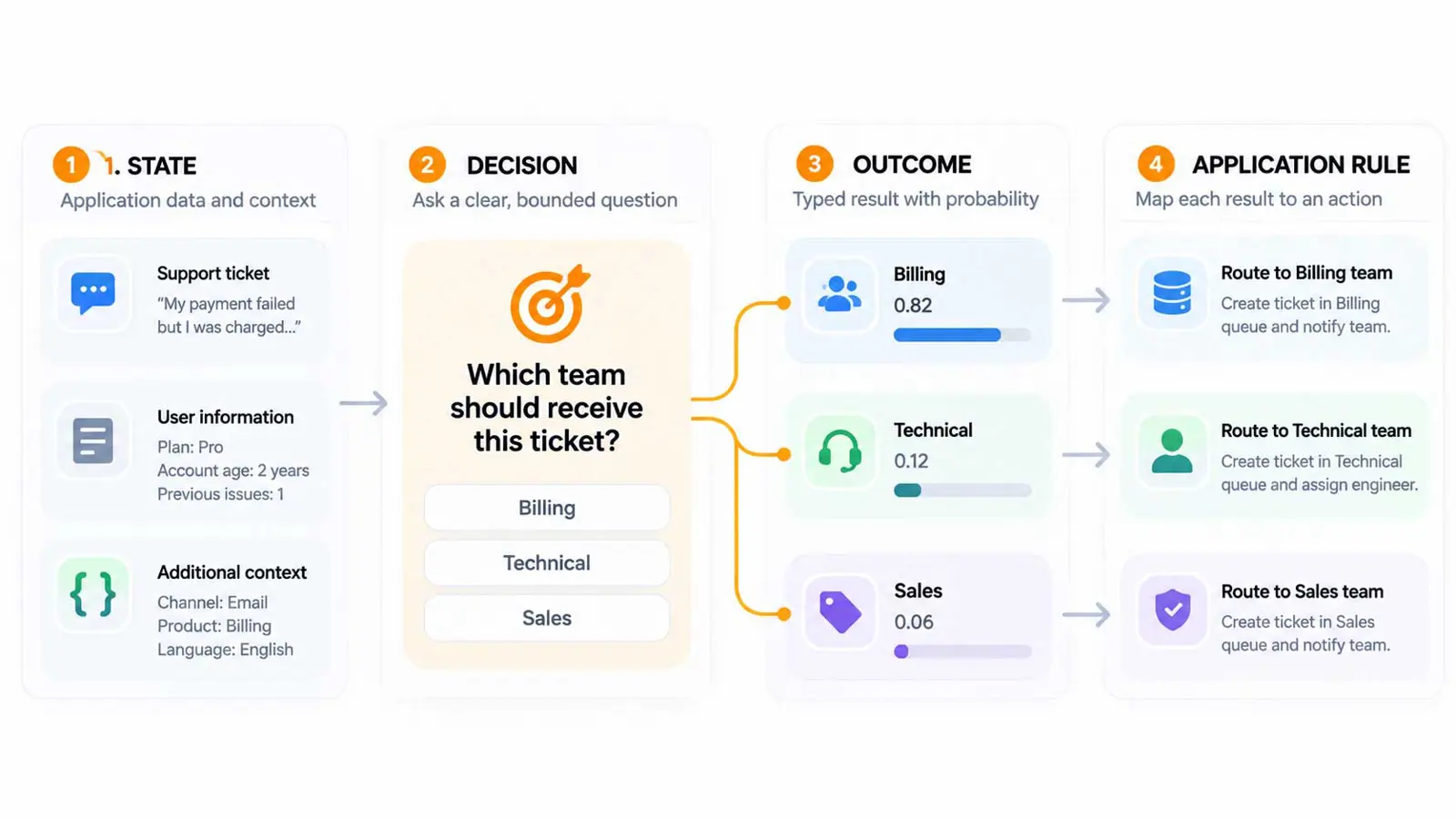
Start with the decision, not the API request. Ask what the software actually needs to know.
For example, a support application might need to answer:
- Which team should receive this ticket?
- How urgent is the request?
- Should a human review it?
These are bounded questions because the application can define the possible answers. A vague request such as “understand this customer” does not give the software a clear output to use.
A good decision definition also makes the next step easier. Once the application knows the possible outcomes, it can map each result to a queue, threshold, review path, or other application rule.
Step 2: Prepare the State
State is the information Jev evaluates. The TypeSafe API accepts state as part of a System One request, while current integration guides show shared state represented as text, an object, or an array.
For a support router, the state could be as simple as the customer message:
Our latest invoice includes an extra seat we never added.A structured application can also send more context:
{
  "message": "Our latest invoice includes an extra seat we never added.",
  "account_type": "business",
  "plan": "team"
}
Send the information that is relevant to the decision. Extra state is not automatically useful. The goal is to give the evaluation enough context to answer the declared questions without turning the request into an unstructured data dump.
Step 3: Choose the Question Type
Current Jev integrations expose three common decision shapes.
| Question type | Use it for | Example |
|---|---|---|
| Choice | Select one option from a defined set | Which support team handles this? |
| Score | Rate something against an ordered scale | How urgent is this request? |
| Boolean | Estimate whether a statement is true | Should this case be reviewed? |
The native TypeSafe API uses the name Noul for its yes/no question and answer type. Vercel AI Gateway exposes the same decision shape as Boolean in its evaluation interface. When writing code, use the terminology documented by the integration being called.
Step 4: Test the Decision Before Production
Before connecting a Jev result to an important workflow, test the decision against representative examples. Include obvious cases, borderline cases, and examples where the correct outcome is known.
- Collect representative examples from the workflow.
- Define the decision and possible answers.
- Run the same question against different states.
- Inspect the returned answers and probabilities.
- Check where the model is uncertain or wrong.
- Adjust the decision criteria or application thresholds before connecting the result to an action.
The point of testing is not just to see whether Jev can answer one example. It is to understand how the decision behaves across the cases that matter to the application.
Step 5: Call Jev Through the API
The native TypeSafe API exposes a POST /v1/systemone endpoint and a GET /v1/models endpoint. Authentication uses an API key in the Authorization header.
A direct HTTP request follows this general shape:
curl https://api.typesafe.ai/v1/systemone \
  -H "Authorization: Bearer $TYPESAFE_API_KEY" \
  -H "Content-Type: application/json" \
  -d '{
    "state": "Our latest invoice includes an extra seat we never added.",
    "questions": {
      "team": {
        "type": "choice",
        "instructions": "Select the team responsible for resolving this request.",
        "criteria": {
          "billing": "Questions about invoice amounts or charges",
          "account": "Problems signing in or accessing an account",
          "other": "Requests outside billing and account access"
        }
      }
    }
  }'
The API documentation should be treated as the source of truth for the current request and response schema. Model identifiers can also change, so discover available models through the documented models endpoint when building a direct integration.
Step 6: Use Jev With AI SDK
If the application already uses Vercel AI SDK, Jev can be called through the SDK’s current experimental evaluation API. Vercel documents the model identifier typesafe-ai/jev for this path.
import { experimental_evaluate as evaluate } from 'ai';

const result = await evaluate({
  model: 'typesafe-ai/jev',
  state: 'Our latest invoice includes an extra seat we never added.',
  questions: {
    team: {
      type: 'choice',
      instructions: 'Select the team responsible for resolving this request.',
      criteria: {
        billing: 'Questions about invoice amounts or charges',
        account: 'Problems signing in or accessing an account',
        other: 'Requests outside billing and account access'
      }
    }
  }
});

const team = result.answers.team.choice;
Vercel currently describes the evaluation API as experimental, so the integration contract should be checked when upgrading the AI SDK. The same documentation also describes AI SDK, TanStack AI, TypeSafe clients, and HTTP API paths for Jev.
Step 7: Read the Result and Apply Your Rules
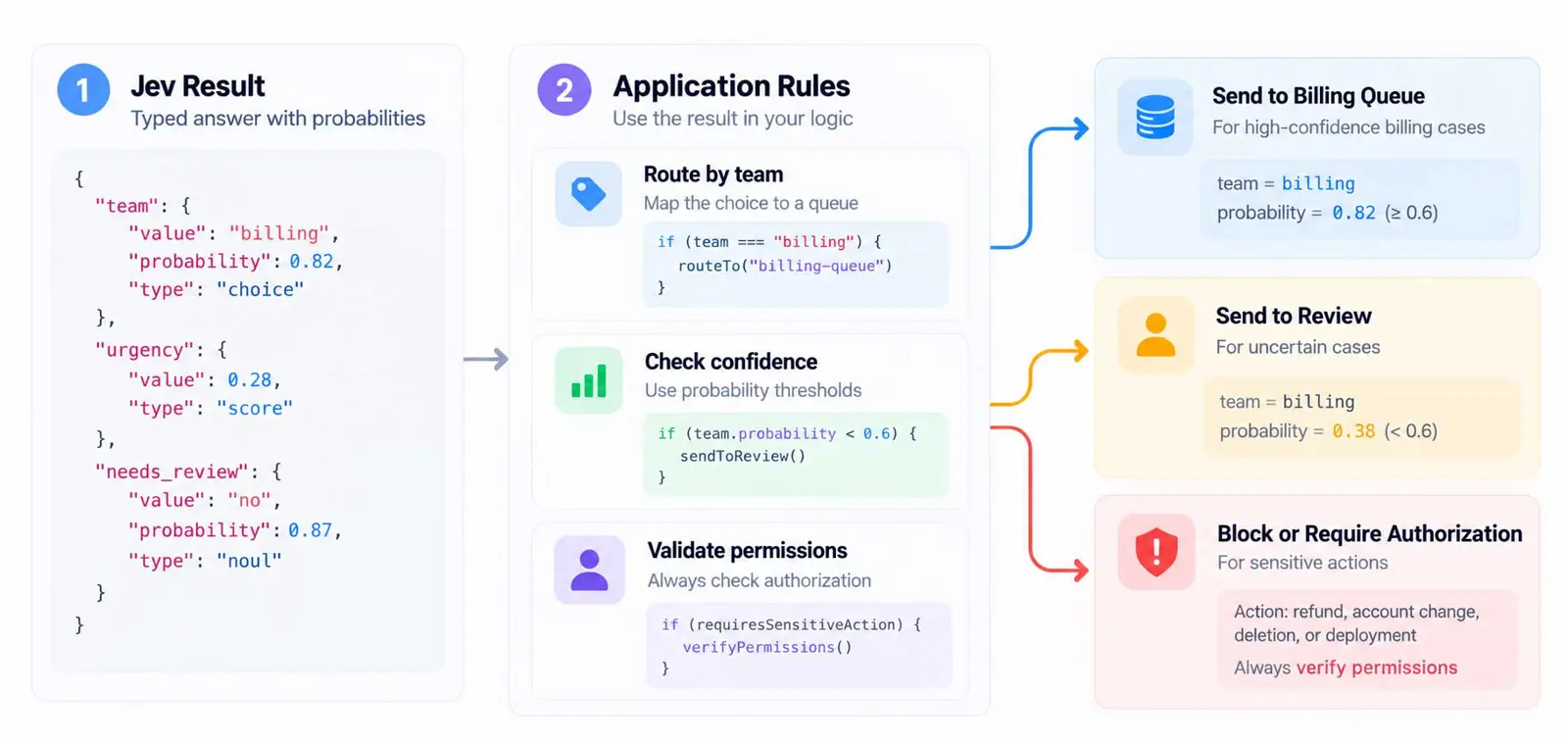
A Jev answer is useful because the application can consume the result directly. For example, a support router can map a billing choice to the billing queue.
Jev result
    ↓
team = "billing"
    ↓
Application rule
    ↓
Send ticket to Billing queue
For decisions that depend on uncertainty, use the returned probability or confidence information as an input to an explicit application rule. For example, an application might automatically route high-confidence cases and send uncertain cases to review. The threshold should be tested against real examples rather than chosen arbitrarily.
Do not let the model result bypass fixed permissions. If the workflow involves a refund, account change, deletion, deployment, or another sensitive action, the application should still verify authorization and validate the action before execution.
Step 8: Put Jev Inside an AI Agent
Jev can also sit at a decision point inside an AI agent. The generative model can interpret the user request and propose a next step, while Jev evaluates a bounded question around that step.
User request
      ↓
AI agent / LLM
      ↓
Jev decision
      ↓
Application rules
      ↓
Tool, model, or human review
For example, an agent could ask Jev whether it should continue, retry, choose another model, or request human review. Vercel’s current Jev guidance describes these decision points and emphasizes keeping tool permissions and execution in application code. Where Jev fits in an AI agent loop
Readers who are new to the architecture can first review Saganote’s guide to what an AI agent is or beginner’s guide to creating an AI agent. For the broader concept, Saganote also has an introduction to agentic AI.
Step 9: Handle Uncertain Results
A structured result is not the same as a guaranteed correct result. An application needs a plan for cases where the answer is uncertain, missing, or outside the expected operating range.
- Route uncertain classifications to another model or a human.
- Use a fallback path when evaluation fails.
- Keep deterministic rules for hard requirements.
- Record the decision and relevant application context for later evaluation.
- Test thresholds against the actual cost of mistakes in the workflow.
For example, a form router can use Jev for clear cases and send uncertain classifications to a fallback model or review path. Vercel’s current Jev examples use this pattern for routing and tool approval workflows.
Step 10: Keep the API Key and Permissions Safe
For direct API use, keep the Jev credential on the server side. A browser or other untrusted client should not receive a long-lived secret that can call the evaluation service.
Authentication is only one part of the boundary. Application code should also check permissions, validate tool arguments, and enforce rules independently of Jev. A model can help decide whether an action appears appropriate, but it should not become the authority that grants the application’s underlying permission.
Which Jev Integration Should You Use?
| Application setup | Starting point |
|---|---|
| TypeScript app using AI SDK | AI SDK evaluation API |
| TanStack AI application | TanStack AI Jev adapter |
| Python application | TypeSafe client or HTTP API |
| Other language or framework | TypeSafe HTTP API |
| Existing TypeSafe client | TypeSafe SDK or compatible gateway path |
| Agent built with eve | Jev evaluation and approval helpers |
The integration choice does not change the basic workflow: define the decision, send state, receive a typed result, and let application code control the next action. Current integration options and model identifiers should be checked in the documentation for the selected service before implementation. 6 ways to integrate Jev into an application
Troubleshooting Common Jev Integration Problems
The answer type does not match the application
Check the question definition and the interface being used. Native TypeSafe APIs and gateway adapters can use different names for similar answer types, so make sure the code matches the selected API’s schema.
The result is too uncertain
Do not simply lower the threshold. Review the examples that produced uncertain results, check whether the decision criteria are clear, and decide whether uncertain cases should go to a fallback or human review.
The application executes an action too easily
Move the hard permission and validation checks into application code. Jev should provide an evaluation signal, not replace authorization or deterministic safeguards.
The integration breaks after an SDK update
Check the current integration documentation and rerun the evaluation examples. Vercel currently marks its AI SDK evaluation API as experimental, so version changes can affect its interface.
Frequently Asked Questions
What is the basic way to use Jev AI?
Can Jev process JSON?
Can Jev return probabilities?
Should Jev directly execute tools?
Can Jev replace an LLM?
Conclusion
Using Jev AI is mainly a matter of defining the decision clearly and giving the model the state needed to answer it. From there, the workflow is straightforward: choose the question type, test representative cases, call Jev through the integration that fits the application, and connect the typed result to explicit application rules.
The important boundary stays the same throughout the workflow: Jev evaluates, application code decides what the software is allowed to do.