Choosing between Ollama vs LM Studio vs llama.cpp is less about raw power than about how much setup each person wants, because all three run the same kind of open models on the same kind of hardware. Ollama's docs name llama.cpp as its supported backend, and LM Studio's site says llama.cpp runs under the hood alongside MLX. Packaging is where they differ.
Three Runtimes, Three Kinds of User
llama.cpp is the engine, an MIT-licensed C/C++ project whose stated goal is inference with "minimal setup and state-of-the-art performance" across many kinds of hardware. Ollama builds on it with a background service. LM Studio adds a desktop app with a model browser, and uses MLX as well as llama.cpp on Apple Silicon.
Ollama is a company-backed project, and Saganote reported its $65 million Series B and a count of 8.9 million developers. Adoption numbers say nothing about speed. Readers new to the idea can start with what a large language model is, since every runtime here loads one into memory and generates text from it.
Setup and Interface Compared
Setup effort differs sharply. Ollama installs as a desktop app or a one-line script, runs as a background service, and answers on port 11434, and Saganote's Ollama setup guide walks through Windows, Mac, and Linux. LM Studio is a desktop application where model search, download, and chat happen in one window, while llama.cpp offers a script installer, Docker images, pre-built binaries, or a source build.
| Feature | Ollama | LM Studio | llama.cpp |
|---|---|---|---|
| Interface | Command line, desktop app, REST API | Desktop app, lms command line, local server | Command-line tools and an API server |
| Install | App installers or a one-line script | Desktop installer | Script, Docker, binaries, or source build |
| Default API address | localhost:11434 | localhost:1234/v1 | OpenAI-compatible server started with llama serve |
| Model source | Ollama library, plus Modelfile imports | Hugging Face browser inside the app | Any GGUF file, or a direct Hugging Face download |
| License | MIT | Closed source, free for home and work as of July 8, 2025 | MIT |
| Strongest fit | Background service for apps | Browsing and trying models | Control and benchmarking |
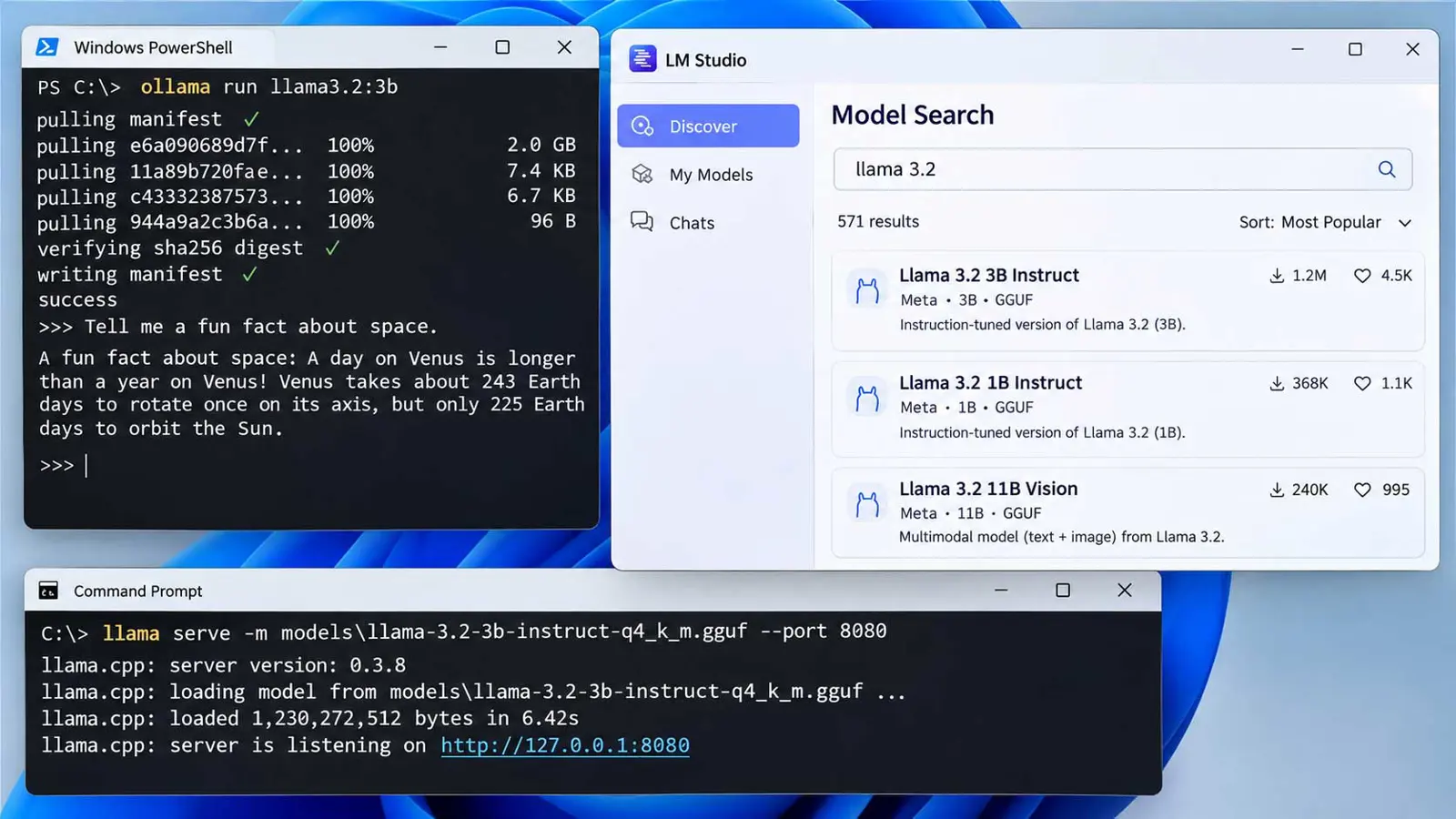
Check the README first. Commands below come from each project's README as read for this article, and older guides refer to llama-server for the llama.cpp API server instead.
# Ollama: download a model and chat
ollama run gemma4

# llama.cpp: download from Hugging Face and chat
llama cli -hf ggml-org/Qwen3.5-0.8B-GGUF

# llama.cpp: start an OpenAI-compatible API server
llama serve -hf ggml-org/Qwen3.5-0.8B-GGUF
Speed: Published Tests Disagree on the Order
Speed claims need care. Only two published tests read for this article include numbers, and each has limits, so the table is a snapshot of those runs and not a ranking.
| Test (tokens per second) | Hardware | Model | llama.cpp | LM Studio | Ollama |
|---|---|---|---|---|---|
| InventiveHQ, June 2026 | RTX 5060 Ti 16 GB | Qwen2.5-Coder-7B, Q4 | 77.0 | 76.8 | 69.1 |
| InventiveHQ, June 2026 | Apple M3 Max | Qwen2.5-Coder-7B, Q4 | 53.5 | 38.2 | 46.2 |
| LlamaStash author, mid-2026 | RTX 3050 Ti Laptop, 4 GiB | gemma-3-4b, Q3_K_M | 36.6 | 48.7 | 40.7 |
| LlamaStash author, mid-2026 | Apple M1 | Qwen2.5-0.5B, Q4_K_M | 92.3 | 88.0 | 79.1 |
Methods differ. InventiveHQ's team ran 12 prompts at greedy decoding with 256 tokens each through the OpenAI-compatible endpoint, and its metric counts whatever overhead each layer adds. Runtime versions went unreported, and on the Mac LM Studio served the GGUF file through its bundled llama.cpp, not MLX. In the Ollama vs LM Studio comparison, the sign of the gap depends on the machine: LM Studio led on the RTX 5060 Ti by 7.7 tokens per second and trailed on the M3 Max by 8.0.
A conflict of interest applies to the second test. Its author maintains LlamaStash, a rival tool, and reports results at default settings, where raw llama-server was slowest on the RTX 3050 Ti Laptop at 36.6 tokens per second. He ties his own tool's out-of-box lead over raw llama-server to defaults such as offloading all layers and flash attention, and matched flags narrow those gaps, which is why default behavior matters as much as the engine.
Prompt handling shows larger gaps than generation. On a long document prompt on the M1, the same author measured Ollama's time to first token at 2,849 ms against 40 to 86 ms for the other runtimes. On an AMD Strix Halo system, he reported Ollama 38% to 72% slower than raw llama-server on ROCm, and LM Studio's ROCm runtime crashed on three of four models.
Startup and memory went unmeasured. No source read here tested startup time or memory use per runtime, and blog figures for them are unmeasured claims repeated from guide to guide.
Both tests used single machines, one model per row, and builds that have since been updated. The InventiveHQ team itself advises re-measuring on the target hardware before trusting any ordering.
Model Formats, GPU Support, and Licenses
llama.cpp runs GGUF files. Ollama builds its own library and imports from Safetensors directories or GGUF files through a Modelfile, and LM Studio supports GGUF plus MLX on Apple Silicon. Memory still decides what fits, as Saganote's VRAM chart for local LLMs shows by model size and quantization.
llama.cpp's README and Popular AI list backends including CUDA, Metal, HIP, Vulkan, SYCL, and plain CPU, with CPU and GPU hybrid use for models larger than VRAM. Ollama's own pages read for this article did not list GPU backends. One guide names CUDA, ROCm, and Metal for Ollama, and the LlamaStash author says mainline Ollama lacks Vulkan. LM Studio showed CUDA, ROCm, and Vulkan runtimes there.
Licensing splits two ways. Ollama and llama.cpp are MIT-licensed on GitHub, and LM Studio is closed source and, according to Popular AI, free for home and work use as of July 8, 2025. Model weights carry their own licenses, which are a separate check.
API and Developer Integration
All three expose OpenAI-style endpoints. Ollama has a native API under /api and accepts OpenAI and Anthropic clients, according to its docs, and LM Studio serves /v1/chat/completions, /v1/embeddings, and /v1/responses. One guide says LM Studio's server runs only while the app is open, while Popular AI describes a headless mode called llmster, so the current docs should settle it.
Defaults can surprise a new user. Ollama unloads models after 5 minutes by default, and Popular AI, citing Ollama's docs, says its default context window scales with VRAM, starting at 4k below 24 GiB. Teams weighing a local runtime against hosted models can compare per-token prices in Saganote's AI API pricing comparison.
How to Run a Fair Speed Test
- Use the same GGUF file in every runtime, not each tool's own download.
- Match quantization, context length, GPU layers, and flash attention across tools.
- Run one warm-up request, then at least three measured runs, and keep the median.
- Record generation speed and time to first token as separate numbers.
- Test a short prompt and a long document prompt, since the long prompt exposed the largest gaps above.
- For llama.cpp itself, use
llama-bench, which Popular AI names as the right tool.
Which Runtime Fits Which Use
- Developers building apps: Ollama, for the background service, the local API, and the Modelfile workflow
- People who want to try models in a window: LM Studio, for the in-app model search and chat
- Users who need maximum control or the widest hardware list: llama.cpp, for flags, backends, and benchmarking
- Apple Silicon owners chasing speed: test LM Studio's MLX path, which none of the measured tests covered
Mixed setups are common. Most guides land on one, with LM Studio for finding models, Ollama for apps, and llama.cpp for speed tests. In the Ollama vs LM Studio decision, the practical tie-breaker is whether a terminal or a window feels more natural, since speed gaps flip with hardware and settings.
Both projects are changing shape. LM Studio's homepage now leads with Bionic, an agent built on its runtime, and Ollama's docs add cloud models that run without a local GPU.
Frequently Asked Questions
Is llama.cpp faster than Ollama?
Do Ollama and LM Studio use llama.cpp?
Is LM Studio free for work use?
Which runtime is best for beginners?
Can existing OpenAI client code talk to these runtimes?