VRAM for LLM inference comes down to three numbers: the weights, the KV cache, and a fixed runtime overhead of about 0.7 GB at short context, according to computingforgeeks. Weights depend on parameter count and quantization. Context length drives the cache.
Weights Set the Floor: Memory by Model Size and Quantization
Each cell below is parameters times bits per weight, divided by eight, using the llama.cpp bits-per-weight figures for Llama 3.1 8B. Real files track the math closely. A Llama 3.3 70B Q4_K_M file measures 42.5 GB against a calculated 42.8 GB, per computingforgeeks.
| Model size | Q4_K_M | Q5_K_M | Q6_K | Q8_0 | FP16 |
|---|---|---|---|---|---|
| 8B | 4.9 GB | 5.7 GB | 6.6 GB | 8.5 GB | 16.0 GB |
| 14B | 8.6 GB | 10.0 GB | 11.5 GB | 14.9 GB | 28.0 GB |
| 32B | 19.6 GB | 22.8 GB | 26.3 GB | 34.0 GB | 64.0 GB |
| 70B | 42.8 GB | 49.9 GB | 57.4 GB | 74.4 GB | 140.0 GB |
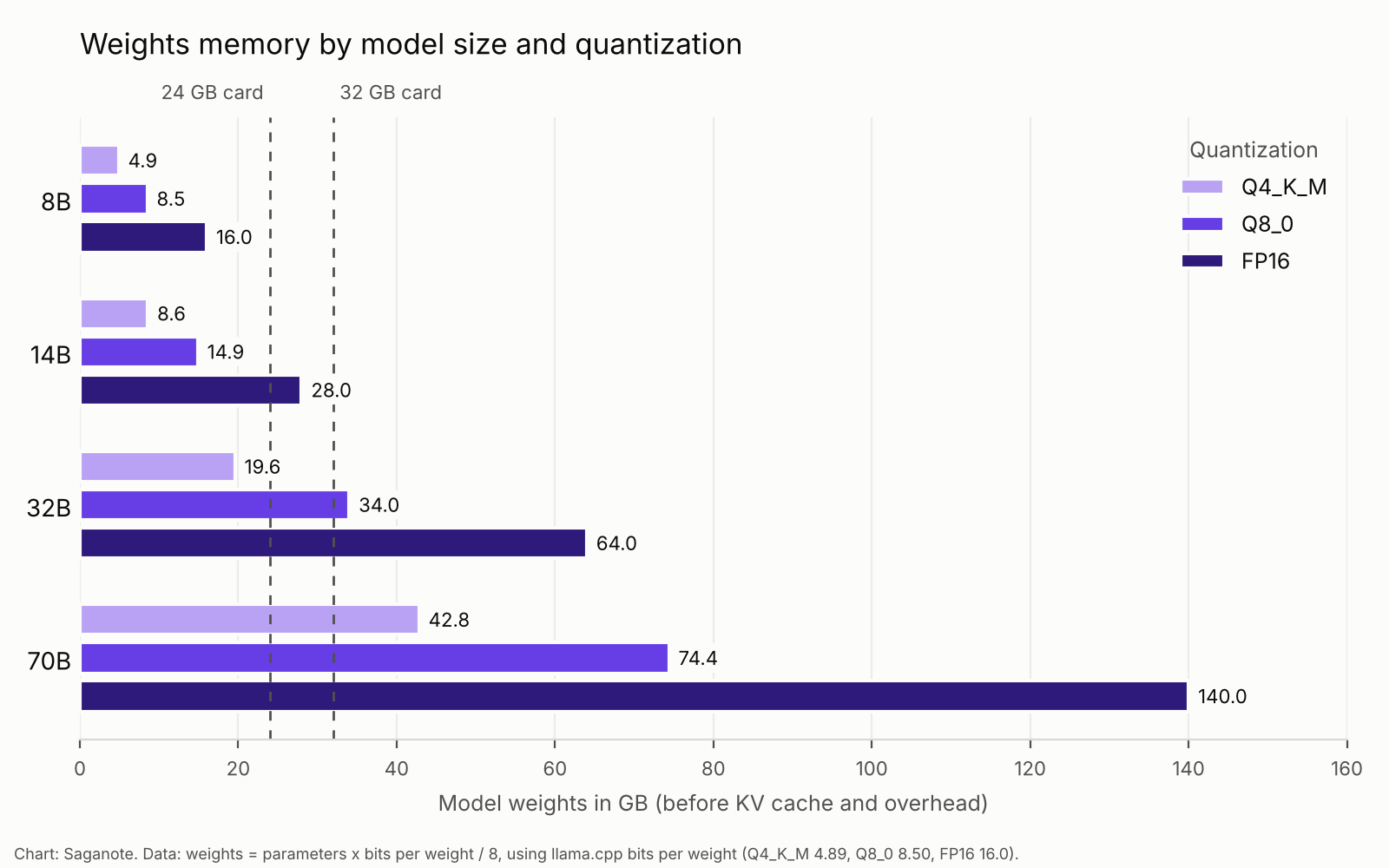
Totals run higher than weights alone. Saganote's Ollama setup guide gave rounder ranges from two third-party guides, and this page splits those ranges into their parts. Add the cache and overhead from the sections below before choosing a card, because a model that fits on paper can still fail once a long chat begins.
Each Quantization Level Stores Fewer Bits Per Weight
Quantization shrinks a large language model by storing each weight in fewer bits. llama.cpp's table lists 4.89 bits per weight for Q4_K_M, 5.70 for Q5_K_M, 6.56 for Q6_K, 8.50 for Q8_0, and 16.0 for FP16. Q4_K_M is the common default. ToolHalla and DEV Community both assumed it in their own tables.
Lower bits cost some quality, and the guides read for this page measure memory rather than accuracy, so no benchmark data backs a quality claim here. Flavio Copes calls Q4_K_M a common sweet spot. A 70B model at FP16 needs about 140 GB, which no consumer card holds.
Context Length Adds a KV Cache That Grows With Every Token
A KV cache stores attention data for every token. Computingforgeeks puts Llama 3.1 8B at 128 KiB per token at f16, which works out to about 1.1 GB at 8K context, 4.3 GB at 32K, and 17.2 GB at 128K. Qwen3 32B uses 256 KiB per token, and Llama 3.3 70B uses 320 KiB.
Servers allocate that cache up front. Per computingforgeeks, it is sized for the maximum context configured and "grows linearly with that length and with every concurrent request." Long chats and large documents cost memory too, and retrieval pipelines that stuff documents into prompts, such as retrieval-augmented generation with embedding models like NVIDIA's Nemotron 3 Embed, push context upward fast.
Apple Silicon Shares One Memory Pool With the GPU
Macs have no separate VRAM. Their GPU draws from unified memory, and macOS caps how much of it the GPU can use. Computingforgeeks says the cap is about two thirds of RAM on smaller Macs and three quarters on larger ones, so a 64 GB Mac behaves like a 48 GB GPU.
Flavio Copes uses about 72%, which gives roughly 11.5 GB on a 16 GB Mac and 46 GB on a 64 GB Mac. Guides differ by a couple of gigabytes. Treat Mac figures as ranges. Ollama's quickstart recommends 8 GB of VRAM, or unified memory on a Mac, for its example model.
Computingforgeeks says the cap can be raised with the iogpu.wired_limit_mb setting through sudo sysctl, but gives no safe value. Giving the GPU too much memory can starve macOS and other apps, so leave room for the system.
GPU Memory Tiers and the Models That Fit
Cards come in a few memory sizes, and each tier maps to a model class, using recommendations from computingforgeeks, Flavio Copes, and Plugable at Q4_K_M and short context. Anything beyond that needs the cache math above.
| GPU memory | Example cards | What fits at Q4_K_M |
|---|---|---|
| 12 GB | RTX 3060 12 GB | 7B to 8B models; Plugable calls 12 GB a sweet spot |
| 16 GB | RTX 4060 Ti 16 GB, RTX 5060 Ti 16 GB | 12B to 14B models such as Gemma 4 12B (7.1 GB file) |
| 24 GB | RTX 3090, RTX 4090 | 27B to 32B at short context; a 70B does not fit |
| 32 GB | RTX 5090 | 32B with longer context; a 70B still does not fit |
| 48 GB | RTX 6000 Ada | 70B at Q4_K_M with about 16K context |
| 96 GB | RTX PRO 6000 Blackwell | gpt-oss-120b, or 70B with long context |
Guides disagree on one point. Flavio Copes says a 32B model fits a 24 GB card, while computingforgeeks finds that Qwen3 32B at 32K context needs about 29 GB and spills off the card unless context is capped or the cache is quantized. Both statements hold, because context length decides the outcome.
Mixture-of-experts models change the picture again. Computingforgeeks lists gpt-oss-120b at 62.6 to 65.4 GB at every quantization level, and DeepSeek V4 Flash, a 284B MoE, at 90.9 GB even at a 2-bit-class quant. Saganote covered the DeepSeek V4.1 Flash launch with native vision, and NVIDIA's Nemotron agent models for PCs and servers target the same hardware range.
A Formula Estimates Any Model Before Downloading
Three pieces combine into one estimate when sizing VRAM for LLM use, with the same cache formula published by both Flavio Copes and computingforgeeks. Plugable's article uses a flat 1.4 multiplier. Its own 7B figures disagree with that formula.
weights_gb  = parameters_in_billions x bits_per_weight / 8
kv_cache_gb = 2 x layers x kv_heads x head_dim x bytes_per_value x context_tokens / 1e9
total_gb    = weights_gb + kv_cache_gb + 0.7

8B,  Q4_K_M, 8K context: 4.9 + 1.1 + 0.7 = 6.7 GB
32B, Q4_K_M, 8K context: 19.6 + 2.2 + 0.7 = 22.5 GB
70B, Q4_K_M, 8K context: 42.8 + 2.7 + 0.7 = 46.2 GB
Per-token cache sizes come from computingforgeeks: 128 KiB for 8B, 256 KiB for 32B, and 320 KiB for 70B. Runtimes vary. Keep 2 to 4 GB of headroom, the margin DEV Community advises when sizing VRAM for LLM workloads. Google is also building a chip with Gemini baked into the hardware, a sign that inference hardware keeps changing faster than these tables.
Frequently Asked Questions
How much VRAM does an 8B model need?
Can a 24 GB card run a 70B model?
Does a longer context window use more memory?
How much of a Mac's memory can the GPU use?
Is Q4_K_M good enough?