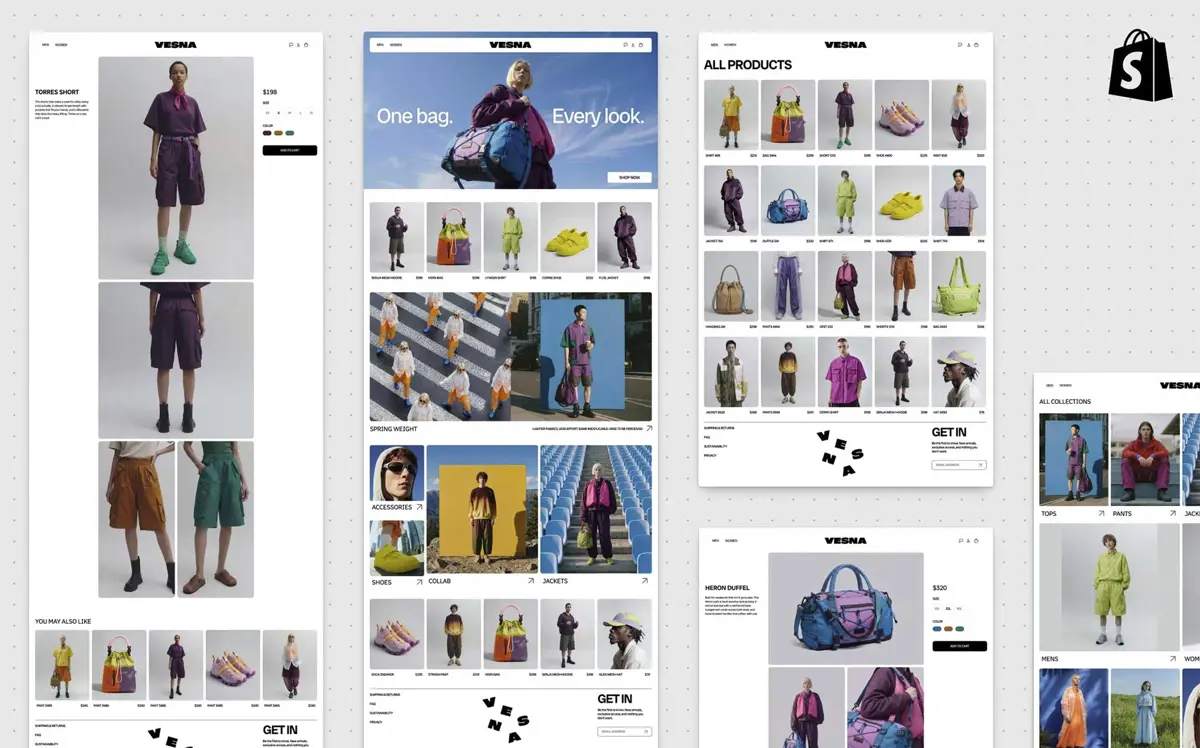
Shopify Canvas is turning Sidekick from a general commerce assistant into a more direct part of the online store design workflow. The new workspace lets merchants see store templates together, zoom into individual pages, make edits themselves, or ask Sidekick to change the theme through conversation.
Shopify introduced Canvas on October 1, 2026, describing it as a new design surface for merchants. The rollout is happening gradually, and Shopify says Canvas is still early rather than a replacement for its existing theme editor.
Shopify Canvas Puts the Whole Store on One Design Surface
The main change is how the store is presented. Instead of treating each theme template as a separate editing task, Canvas shows the store's templates side by side. Merchants can pan around the overview, zoom into a template, and switch into a larger preview when they want to inspect a page more closely.
The workspace also supports different preview widths, including desktop, tablet, and mobile views. That gives merchants a way to review how a change behaves across layouts before they publish it. Shopify's documentation says Canvas saves changes automatically, while customers do not see those changes until the theme is published.
This visual approach connects with a broader shift in creative software. Saganote has also covered Figma Code Layers, where executable code is brought directly into a design canvas, and Google Pics, Google's AI design tool for Workspace.
Sidekick Can Work on the Theme, Not Just Explain It
Canvas matters because Sidekick can now be used directly against the theme workflow. A merchant can describe a change in natural language, and Sidekick can work on the theme rather than simply explaining which setting to change.
Shopify says Sidekick can work across the theme and individual blocks. A merchant can select a block and request a change, or use the main Sidekick field to describe a change to the wider theme. The result can then be inspected in Canvas before it is published.
That puts Shopify's AI assistant closer to the editing surface itself. It also extends a direction Shopify has been taking with Sidekick, including capabilities for generating content, building apps, and completing tasks inside the Shopify admin.
Shopify Canvas Keeps the Merchant in the Review Loop
The workflow is conversational, but it is not presented as a one-click autonomous store launch. Sidekick can ask questions, propose an approach, make changes, and respond to feedback while the merchant remains responsible for reviewing the result.
Shopify says Canvas is in early access and available only to certain stores. It is desktop-only, works with Shopify-developed and custom themes, and has additional theme and permission requirements.
That distinction is important. AI can generate a theme change quickly, but the merchant still has to decide whether the design fits the brand, works across pages, and is ready to publish. Shopify's Canvas documentation says changes are saved automatically, but customers only see them after publishing.
What Merchants Can Ask Sidekick to Change
Canvas is designed for both broad and targeted requests. A merchant can work on a whole theme or focus on a specific block, while direct editing remains available for supported settings and text.
| Workflow | What the merchant can do |
|---|---|
| Whole theme | Ask Sidekick for a change that affects the wider theme |
| Individual block | Select a block and ask Sidekick to change it |
| Direct editing | Change supported text and block settings in Canvas |
| Visual review | Inspect templates and preview widths before publishing |
| Publishing | Review the result and publish when the theme is ready |
Shopify also says Sidekick can fix publishing errors when the platform identifies a problem. The merchant still controls when the changes become live.
Why This Matters Beyond Shopify
Canvas is part of a larger movement toward AI systems that operate inside creative and business tools rather than sitting beside them. Saganote has covered Facebook Creator Studio as Meta brings AI and personalized growth tools into creator workflows, alongside OpenAI Dots as an example of always-on AI agents in ChatGPT Work and Meta Muse as Meta expands an AI agent for small-business workflows.
The same pattern appears in visual creation. Grok Imagine Image 2 adds more direct editing controls to image generation, while Shopify is applying a similar idea to storefronts: describe what you want, inspect the generated result, and continue refining it.
Shopify's approach also fits with the broader move toward AI being embedded into product interfaces. Saganote has tracked that shift through iOS 27's public beta changes and its broader iOS 27 feature guide, where AI features are increasingly presented as part of everyday software rather than as separate tools.
Shopify Canvas Is Not a Full Replacement for the Theme Editor Yet
Shopify is explicit that Canvas is early. It is currently available only to certain stores and only on desktop devices. Shopify also lists restrictions around theme sources, permissions, app blocks, translations, market-specific customization, and downloading theme files.
That makes the current release more useful to understand as a new design workflow than as a finished replacement for every existing Shopify theme-editing capability.
The direction is nevertheless clear: Shopify is putting more of the design loop into a shared space where the merchant and Sidekick can work from the same visual representation of the store.
Shopify Canvas and the Broader AI Workflow
The shift is not limited to storefront design. Saganote has also covered Claude Cowork on web and mobile, showing how AI assistants are moving toward longer-running business tasks, and Grok Build, which brings AI-assisted creation into a broader product workflow.
For Shopify merchants, the practical difference is that the AI is now closer to the theme itself. Instead of switching between a chat assistant and a separate editor, Canvas combines the conversation, the visual preview, and the theme changes in one workspace.
What Shopify Canvas Means for Store Design
Shopify Canvas does not remove the need for design decisions. It changes where those decisions happen. Merchants can describe a direction, see the result across the store, refine it with Sidekick, and decide when the work is ready to publish.
That makes the most notable part of Canvas less about generating a single storefront from a prompt and more about creating a continuous loop between conversation, code, visual review, and merchant approval.
FAQ
What is Shopify Canvas?
Is Shopify Canvas available to everyone?
Can customers see Canvas changes immediately?
Does Shopify Canvas work on mobile?
Can merchants still review and edit changes themselves?
Shopify is positioning Canvas as an early step toward a more conversational way to build and refine online stores. The current release combines Sidekick's natural-language workflow with a visual theme workspace, while keeping review and publishing decisions with the merchant.
