Picking the best local LLM comes down to one number first, the video memory on the graphics card, and then to context length, speed, and license. Saganote read six VRAM guides from BestLLMFor, RunAIHome, and LocalAIMaster, plus its own earlier reports, and the picks below follow what those sources agree on. Last verified November 11, 2026, with quarterly refreshes planned.
How the Picks Were Chosen
Every guide read is three to four months old, so model names and Ollama tags may have moved. Speed figures are the weakest data: BestLLMFor publishes none per card, LocalAIMaster says it has not measured its cards, and RunAIHome's numbers are single-source community results. Treat any tokens-per-second number below as a rough hint.
Model size is the second input. Saganote's VRAM chart for local LLMs lists Q4_K_M weights of 4.9 GB for an 8B model, 8.6 GB for 14B, 19.6 GB for 32B, and 42.8 GB for 70B, plus about 0.7 GB of runtime overhead. That chart places 12 GB cards at 7B to 8B models, 16 GB at 12B to 14B, and 24 GB at 27B to 32B with short context, and context memory is extra on top.
8GB VRAM: What Fits
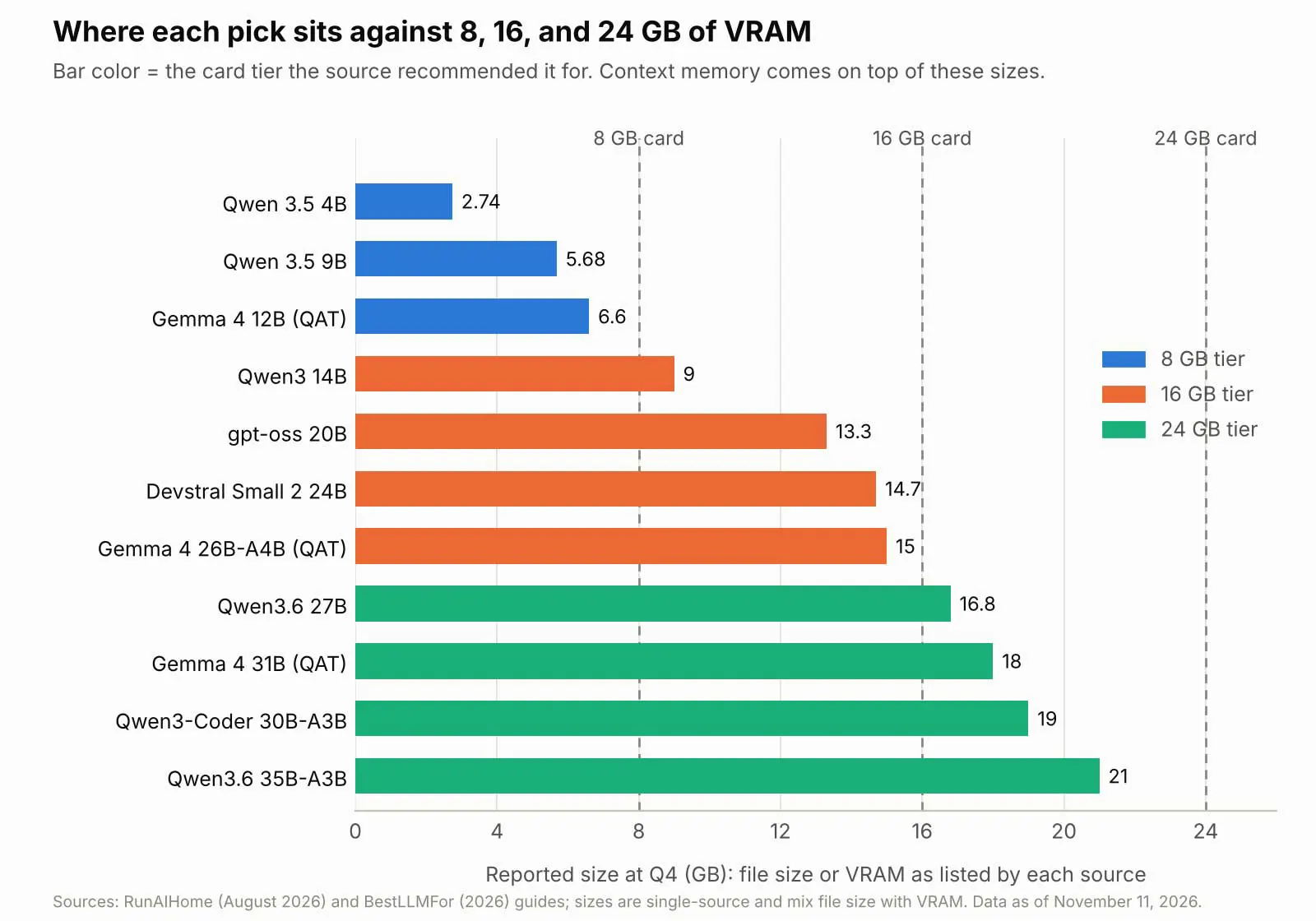
Qwen 3.5 9B leads both guides as the best local LLM pick for 8GB cards. Size is modest. RunAIHome lists a 5.68 GB Q4_K_M file that needs about 7 GB of VRAM at 8K context, and cites about 38 tokens per second on an RTX 4060-class card from a single source. Context beyond 4,096 to 8,192 tokens gets tight, which is why both sites advise keeping it short.
Gemma 4 12B in a quantization-aware build is the vision-capable stretch. Size is the catch. RunAIHome puts it near 6.6 GB, BestLLMFor lists 7 GB and says it barely fits, and the two disagree by enough to matter on an 8GB card. Qwen 3.5 4B at 2.74 GB is the fast option for agent loops, and RunAIHome says new buyers should skip 8GB cards entirely.
16GB VRAM: The Sweet Spot
Sixteen gigabytes opens up 20B to 24B models. BestLLMFor calls Mistral Small 24B at 14 GB its sweet spot, and RunAIHome favors gpt-oss 20B at 13.3 GB, Devstral Small 2 24B at 14.7 GB, and Gemma 4 26B-A4B at about 15 GB. Qwen3 14B at about 9 GB leaves room for longer context.
Context decides the fit. BestLLMFor says gpt-oss 20B offers 131k context, while RunAIHome says a 128K window collapses to about 9 tokens per second and recommends 8K. RunAIHome also reports 82 tokens per second for gpt-oss 20B on an RTX 5060 Ti 16GB, a single community benchmark, and Devstral's 68% SWE-bench Verified score is a vendor figure. Saganote's best AI for coding ranking puts open-weight coding models in a wider context.
24GB VRAM: Room for 27B to 35B Models
Twenty-four gigabytes fits dense 27B models and mixture-of-experts models. RunAIHome lists Qwen3.6 27B at 16.8 GB, Gemma 4 31B in a QAT build at about 18 GB, Qwen3-Coder 30B-A3B at about 19 GB, and Qwen3.6 35B-A3B at 21 GB. BestLLMFor lists a 27B dense model at 16 GB as Qwen 3.8 27B, which may be the same model under another name, and calls the 35B model a barely-fits case at short context.
Speeds on a used RTX 3090 look high. RunAIHome cites about 40 tokens per second for the dense 27B, 73 for Qwen3-Coder 30B-A3B, and 107 for the 35B-A3B through Ollama, each from one source. A dense 70B at Q4 needs about 40 GB, which BestLLMFor says takes two cards or unified memory.
| VRAM tier | Model | Reported size at Q4 | Source's use case | Caveat |
|---|---|---|---|---|
| 8GB | Qwen 3.5 9B | 5.68 GB file | General, coding, vision | About 7 GB VRAM at 8K context |
| 8GB | Gemma 4 12B (QAT) | 6.6 to 7 GB | Writing, vision | Sources disagree on size |
| 8GB | Qwen 3.5 4B | 2.74 GB file | Fast agent loops | Smaller model, lower quality |
| 16GB | Mistral Small 24B | 14 GB | General | Single-source speeds |
| 16GB | gpt-oss 20B | 13.3 GB | Reasoning, agents | Long context slows it sharply |
| 16GB | Devstral Small 2 24B | 14 to 14.7 GB | Coding | Tight fit, vendor benchmark |
| 24GB | Qwen3.6 27B | 16.8 GB | Coding, general | May be listed as Qwen 3.8 27B |
| 24GB | Gemma 4 31B (QAT) | About 18 GB | General | Speed is an estimate |
| 24GB | Qwen3.6 35B-A3B | 21 GB | Fast mixture-of-experts | Barely fits, short context |
Guides disagreed on Ollama's default context (4,096 versus 2,048), on gpt-oss context limits, and on what a 27B model is called. Confirm each tag in the Ollama library and test on the actual card before downloading large files. Verified November 11, 2026.
Apple Silicon Macs
Macs share one memory pool. Saganote's VRAM chart says the GPU on smaller Macs can use about two-thirds of RAM by default, and BestLLMFor notes that an 8GB Mac's memory is shared with the system. Saganote's RAM guide by use case calls 16 GB workable for local AI and 32 GB comfortable.
Newer Macs raise the ceiling. Saganote's report on the Apple M6 and M5 Ultra lists the M6 with up to 32 GB of unified memory at 170 GB per second, and the M5 Ultra with up to 512 GB at 1.2 TB per second, per Apple. Memory prices matter here too, and the explainer on high RAM prices covers the supply side.
Commands to Try
Installation on Windows, Mac, and Linux is covered in Saganote's Ollama setup guide, and the Ollama vs LM Studio vs llama.cpp comparison covers the runtimes. Tags change. Commands below use tags from those sources.
ollama pull qwen3.5:9b
ollama pull gemma4:12b
ollama pull gpt-oss:20b
ollama pull qwen3:14b
ollama pull qwen3:32b
ollama ps
OLLAMA_CONTEXT_LENGTH=8192 ollama serve
Check the load. Run ollama ps after loading a model and look for 100% GPU, because RunAIHome treats anything less as CPU spill, which it puts in single digits of tokens per second without a source. Saganote's Ollama guide lists a 4,096-token default context and an environment variable to raise it, and every extra token costs more memory.
Open Source vs Open Weight
Open weights means downloadable. Open source in the stricter sense would also cover training code and data, and licenses vary model by model, so the best local LLM for commercial work still needs a model card read first. Ollama and llama.cpp are MIT-licensed runtimes, per Saganote's runtime comparison, while LM Studio is closed source.
No guide read states Gemma or Qwen license terms. RunAIHome calls gpt-oss 20B, Devstral Small 2, and Codestral 2 Apache 2.0, and BestLLMFor says its catalog lists GLM 4.7 Flash as MIT, but none of that was checked against model cards. Saganote's GLM-5.2 report covers an MIT-licensed model with about 750B total parameters, which no consumer card can load.
Headline open models often are not downloadable at all. Saganote's Qwen3.8 launch report says open weights have no date or license terms, its Qwen3.8-Max report describes release through Alibaba Cloud, and the Kimi K3.1 Pro report states no weights. NVIDIA says Nemotron 3.5 Bolt 74B-A9B is designed to fit in 24 GB at 2-bit quantization, a company claim covered in Saganote's Nemotron report, and no weights were confirmed there.
Frequently Asked Questions
How much VRAM is enough for a local model?
Can an 8GB card run a useful model?
Are the speed numbers reliable?
Do 70B models fit on one card?
Is open weight the same as open source?