
Android 17 hidden features go well beyond the headline changes, and several only show up after a long press or a trip into Settings. Saganote read three feature roundups from May and June 2026 plus its own reports through early November. Rollout is staged. A phone may lack some items, and everything here was last verified November 12, 2026.
Android 17 Features Most Owners Miss
Android Authority says stable Android 17 began rolling out to Pixel 6 and later alongside the June 2026 Pixel Drop. Droid Life's May 14 list covered bubbles, one-time location, per-app dark theme, and an assistant volume slider, which makes it one of the earliest roundups. Both predate November. Confirm each menu path below on the phone, since labels move between builds.
| Feature | Where to find it | Status in the sources |
|---|---|---|
| Bubbles for any app | Long-press an app icon | Stable on Pixel, per Android Authority |
| Screen Reactions | Screen recorder, Show selfie camera | Beta on eligible Pixels per 9to5Google, stable per Android Authority |
| One-time precise location | Location permission dialog | Stable on Pixel, per Android Authority |
| Per-app dark theme | Settings, Display and touch, Dark theme | Stable on Pixel, per Android Authority |
| Assistant volume slider | Path not given | Droid Life and Android Authority |
| Controller button mapping | Path not given | Droid Life and Android Authority |
| Motion Assist | Settings, Personal and device safety | Rolling out on Pixel and Samsung, per 9to5Google |
| Contacts Picker | App permission flow | Android Authority only |
App Bubbles for Any App
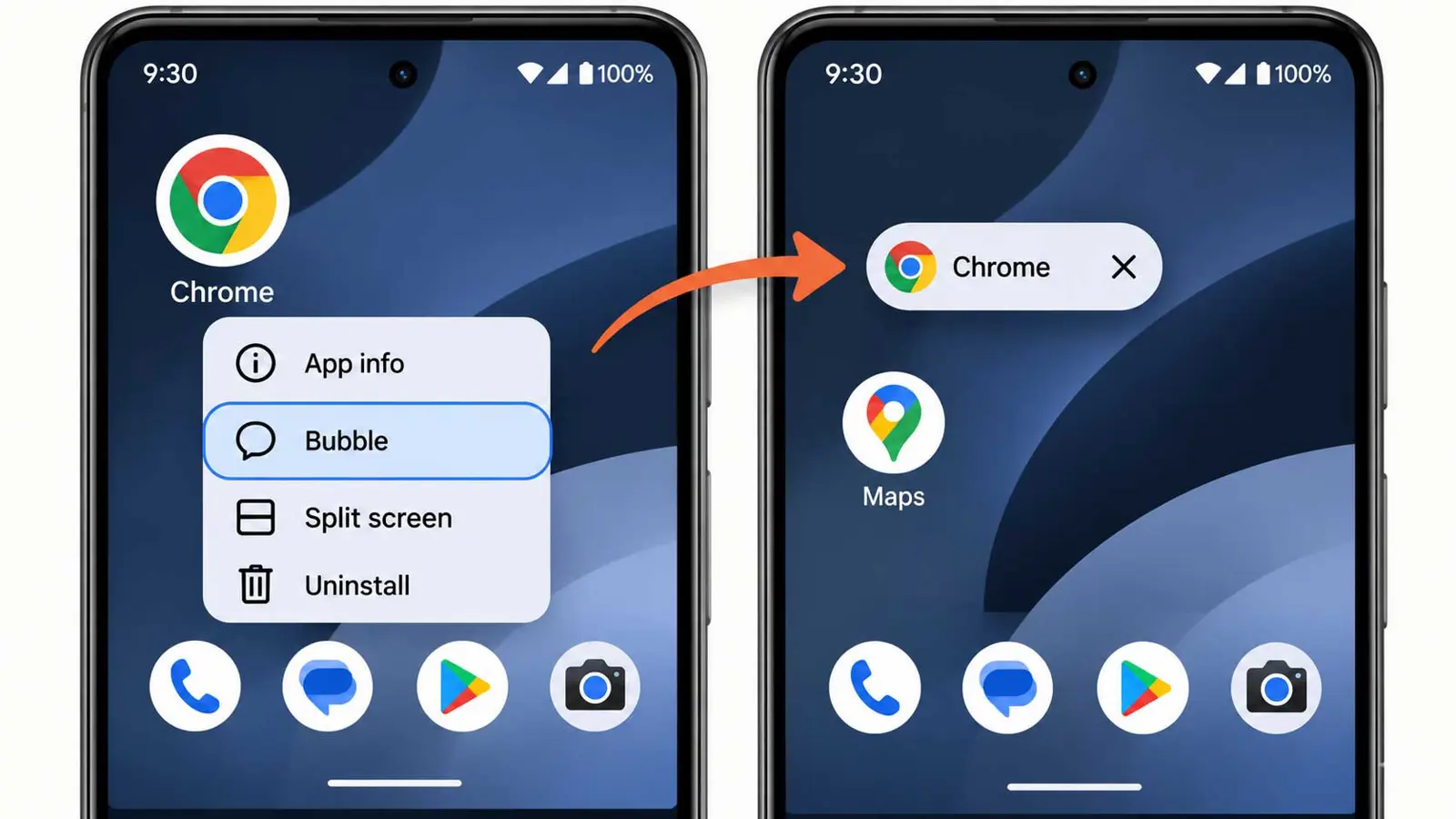
Bubbles used to be limited to messaging apps. Droid Life says Android 17 opens them to any app, and Android Authority says to long-press an app icon on the launcher to start one. On large screens, a bubble bar sits in the taskbar.
Screen Reactions: Record the Screen With a Selfie Overlay
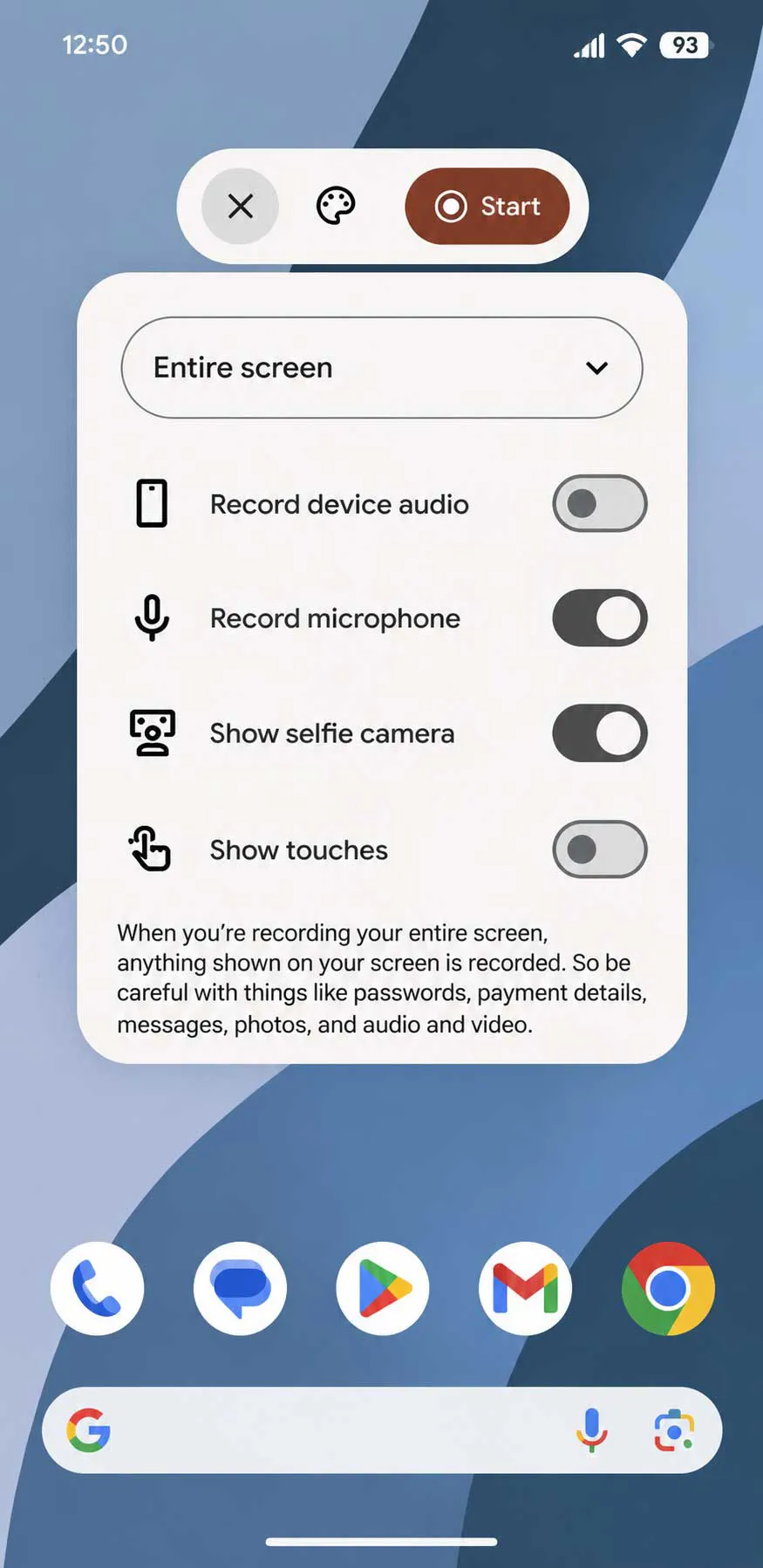
9to5Google reported on June 11 that the system screen recorder gains a Show selfie camera option next to the built-in video controls. That option works only when recording the entire screen, not a single app. A preview appears before recording starts. Android Authority gives the same path and adds a background cutout and color picker.
- Start a screen recording.
- Choose Entire screen as the recording area.
- Select Show selfie camera and check the preview.
- Pick a background color if the option appears.
- Start recording and turn the microphone off if it is not wanted.
Status is unclear. 9to5Google tied Screen Reactions to Android 17 QPR1 Beta 4 for eligible Pixel phones, while Android Authority lists it among stable features. 9to5Google also lists six background colors and says the microphone turns on automatically, both single-source details, so confirm on the phone.
One-Time Precise Location
Android Authority describes a one-time precise location button in the permission dialog, with access lasting until the app is closed. A persistent indicator shows when a non-system app uses location. Tapping it opens a Recent app use dialog. Coarse location now follows local crowd density instead of a fixed 2 km grid, which Droid Life describes as precision that widens or shrinks by place.
No source gives a Settings path. Instead, the button appears whenever an app asks for location, and Samsung's One UI 9 update for the Galaxy S26 includes a location access indicator of its own.
Other Settings Worth Changing
- Per-app dark theme: Settings, Display and touch, Dark theme lets chosen apps stay light, though Android Authority ties the base feature to Android 16 QPR2
- Assistant volume: a separate slider keeps voice assistant volume apart from media
- Controller remapping: native button remapping for external controllers, per Android Authority and Droid Life
- Quick Settings split: Droid Life says Wi-Fi and mobile data toggles are now separate, a single-source claim
- Contacts Picker: apps get one-time access to selected contact fields, per Android Authority only
- Lock screen limits: fewer PIN or password guesses and longer waits after failures, per Android Authority only
- Find Hub: Mark as lost can lock with biometric authentication, per Android Authority only
Pixel owners can also try Motion Assist. Among the Android 17 hidden features it needs a separate setup, so turning on Motion Assist means checking that the phone runs Android 17 or later with updated Google Play services. Look under Settings, profile, All services, Personal and device safety, Motion assist. Quick Settings tiles come in Small or Large, and Start in a moving vehicle turns it on automatically.
Google's September drop belongs here too. Five features arrived that month: Find Hub Remembered, Motion Assist, Gemini Guided Vision, Google Keep in Messages, and Chat Themes. Remembered needs Android 16 or later plus the Gemini app, and saving an item runs through Find Hub, then Remembered, then Add.
Features Still in Beta
Beta builds preview what may arrive later, including some Android 17 hidden features not yet in stable. QPR2 Beta 3 brought expanded Dynamic Color theming, Quick Settings layout customization, lockscreen system blur, and App Lock, plus a call-forwarding change that shows an OS confirmation dialog for manually dialed codes. Treat all of it as subject to change.
Bug-fix betas matter for daily use. Beta 1 fixed a Gemini crash that was randomly rebooting Pixels, Beta 4 fixed 16 bugs, Beta 5 fixed eight, Beta 7 tackled battery drain and download failures, and Beta 7.1 fixed severe UI freezes. Anyone still chasing drain can check where the Pixel battery fix stands.
Which Phones Get Each Feature
Pixel owners get the most. Android Authority puts stable Android 17 on Pixel 6 and later, and none of the three roundups says whether Galaxy phones get App Bubbles or Screen Reactions. Samsung began pushing One UI 9 on Android 17 to the Galaxy S26 line on September 16.
Samsung's list keeps growing. Fifteen Galaxy phones, including the A36, A56, and A57, now receive One UI 9 in at least some markets, and the path is Settings, Software update, Download and install. Rollout depends on model, country, and carrier, and Samsung's own features, such as the Now Nudge and Quick Panel changes, differ from Pixel's.
The guides read date from May and June 2026, and one conflicts on Screen Reactions. Betas can change or drop features before stable, and carriers and regions stage updates. Open Settings and test each item on the actual phone. Verified November 12, 2026.
Related Android Changes
A few nearby changes help new owners. Switching from an iPhone no longer needs an app, since Android 17 can transfer an eSIM and passwords. Messaging gets easier too, starting with how to turn on RCS chats in Google Messages, while Gemini scam protection targets sophisticated text scams.
Apps get updates alongside the OS. Google Phone brought back its Contacts tab after last year's redesign, Google Photos added a Redact tool that blurs sensitive details on Android, and a system app called Android Pulse appeared in Play updates, which Google describes as rule distribution for anomaly detection. Chrome on Android also gained Gemini auto browse in the U.S. for AI Pro and Ultra subscribers. Android Authority says Foldable Gaming Mode is not in stable yet and is due in the coming months.
Frequently Asked Questions
How do I start a bubble for an app?
Do Screen Reactions work on a single app?
Is one-time location a setting?
Which Pixels get Android 17?
Does Samsung get these features?