Saganote built this Windows 11 guide to collect the supported versions, the Windows 10 ESU rules, what 26H2 changed, the settings worth touching, and the fixes for common problems, with a link to each deeper article. Saganote verified the sources below on November 16, 2026. Microsoft's lifecycle page is used for dates where it was readable, and conflicts between sources are flagged.
Which Windows Version Is Supported Right Now
| Version | Home and Pro updates end | Enterprise and Education end | Status |
|---|---|---|---|
| 23H2 | November 12, 2025 | November 10, 2026 | Home and Pro ended |
| 24H2 | October 13, 2026 | October 12, 2027 | Home and Pro ended, October 2026 update was the last |
| 25H2 | October 12, 2027 | October 10, 2028 | Supported |
| 26H1 | March 14, 2028 | March 13, 2029 | New Arm hardware only, cannot move to 26H2 |
| 26H2 | October 10, 2028 | October 9, 2029 | Current |
24H2 Home and Pro reached end of updates on October 13, 2026, per Microsoft's message center as quoted by BleepingComputer, and a separate article covers how to get 26H2 and its known issues. That October 2026 update was the last for those editions. Enterprise and Education editions run to October 12, 2027.
Microsoft's lifecycle page lists each Home and Pro cutoff as 6:59 AM Pacific the following day, so outlets sometimes print dates a day apart. BleepingComputer says consumers on 26H2 reach end of support in October 2029, which conflicts with Microsoft's table. Microsoft shows October 10, 2028 for Home and Pro. October 2029 applies to Enterprise and Education.
Settings, System, About shows the installed version, and the winver command shows it too. Microsoft's lifecycle page adds two details. 26H2 is the last version that supports Snapdragon 850 processors, and 24H2 was the last for the Windows 11 SE edition.
26H1 is a separate branch. BleepingComputer says devices on 26H1 cannot update to 26H2, and Windows Latest ties 26H1 to new Arm hardware built on Nvidia N1 and Snapdragon X2 chips. Most PCs sit on 24H2 or 25H2 instead.
Windows 10 After 2026: ESU Until October 2027
Consumer ESU for Windows 10 now ends on October 12, 2027. BleepingComputer and Pureinfotech report that Microsoft's ESU document picked up that date on June 25, 2026 without a formal announcement, and Tom's Hardware describes the change as an edit to Microsoft's ESU support page. PCs already enrolled continue automatically, with no re-enrollment.
Cost depends on the route chosen, and Windows 10 ESU extended to October 2027 with three ways to enroll covers each one. Backing up PC settings with Windows Backup is free and needs a Microsoft account, redeeming 1,000 Microsoft Rewards points is free but final, and a one-time purchase costs $30 plus tax. One license covers 10 devices.
Eligibility is narrower than the price suggests. A PC needs Windows 10 22H2 in Home, Pro, Pro Education, or Pro for Workstations, the ESU Licensing Preparation Package KB5126256, and a Microsoft account with administrator rights, since child accounts do not qualify. Kiosk, Active Directory-joined, Entra-joined, and managed PCs are excluded, while Entra-registered personal devices still qualify.
Enrollment runs through Settings, then Update & Security, then Windows Update, where an Enroll now link appears under the ESU message on eligible PCs that meet every requirement above. Extra PCs see Add device instead. ESU covers critical and important security updates only, with no new features and no technical support.
Businesses pay differently. TechRepublic lists $61 per device for the first year, doubling each year for up to three years, which matches the $427 per device total BleepingComputer cites. Sources conflict on Europe, where BleepingComputer says a Microsoft account sign-in is enough for free coverage and Microsoft says only that options and timing may vary by region.
Moving to Windows 11 means meeting Microsoft's hardware list. A PC without TPM 2.0 cannot upgrade, and Windows Latest says 26H2 adds no new hardware requirements beyond the table below.
| Component | Microsoft's stated minimum |
|---|---|
| Processor | 1 GHz or faster with 2 or more cores on a compatible 64-bit processor or SoC |
| Memory | 4 GB RAM |
| Storage | 64 GB or larger |
| Firmware | UEFI, Secure Boot capable |
| Security chip | TPM version 2.0 |
| Graphics | DirectX 12 or later with a WDDM 2.0 driver |
| Display | 720p, larger than 9 inches diagonal, 8 bits per color channel |
| Account | Internet and a Microsoft account at setup for Home and Pro |
What 26H2 Changed
Windows 11 26H2 reached general availability on September 29, 2026 as an enablement package for eligible 24H2 and 25H2 devices. Microsoft says it installs like a monthly quality update, needs a small download, and typically installs faster than a full feature update. Saganote's reporting puts the package at 174 KB in build family 26300. IT-Connect lists it as KB5121794.
PCs need KB5124010, the September 22 update, or newer. Rollout is phased and optional, and safeguard holds can block devices. Turning on Get the latest updates as soon as they're available under Settings, Windows Update, then Check for Windows updates, starts the process, and a single restart finishes it.
Installing 26H2 resets the support clock. Microsoft says Home and Pro get 24 months and Enterprise and Education get 36 months from the new version, which is why 26H2 outlasts 25H2 by about a year for consumers.
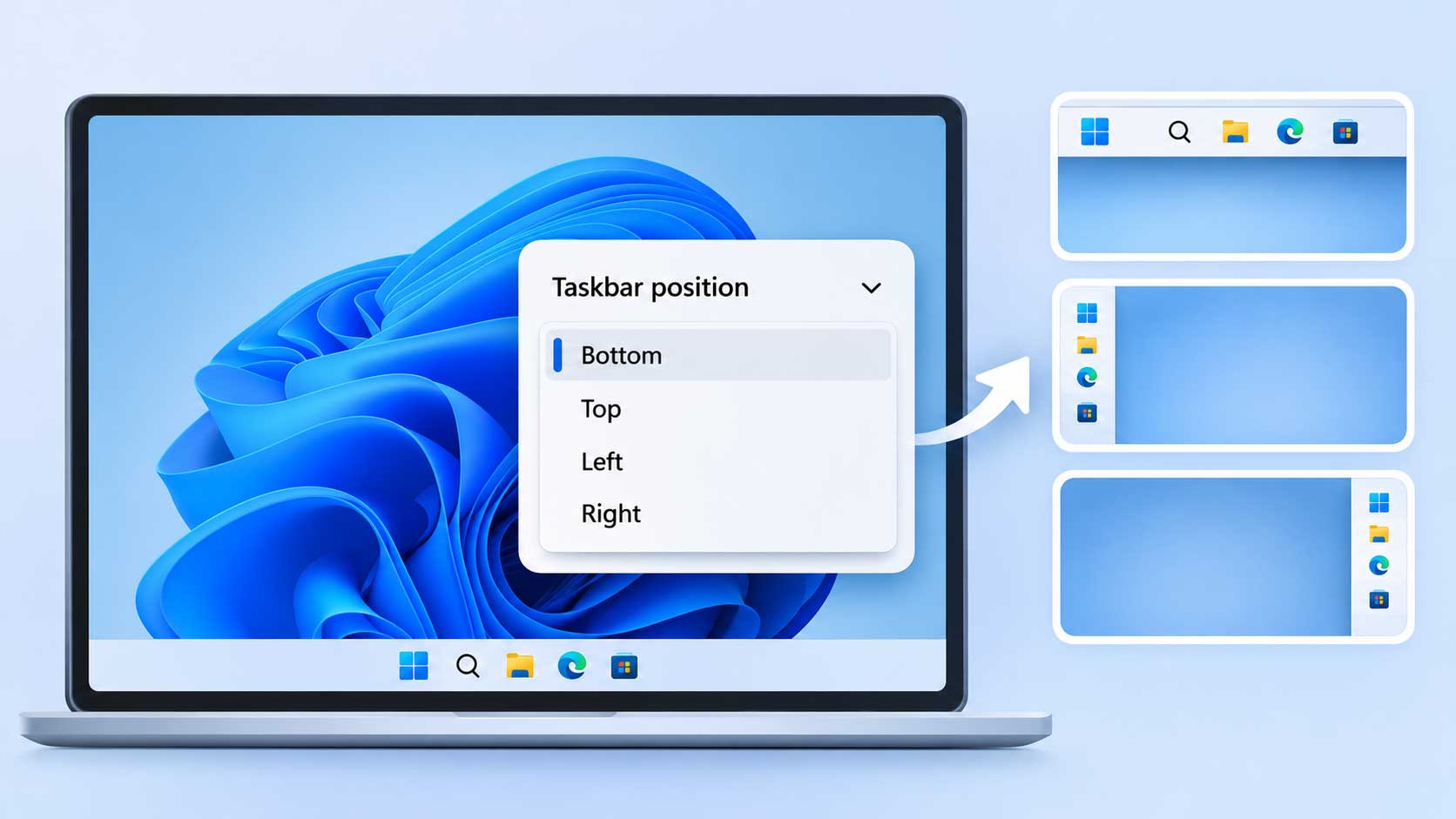
Features arrived quietly. 26H2 added a taskbar position setting for the top or side, and Microsoft says some features previously limited to commercial control on 25H2, including Windows settings backup, app-specific taskbar actions, and File Explorer improvements, are now on by default. Microsoft's October 15 post claims up to 20% more responsiveness, and no source read tested that figure.
Windows also has a new security layer in testing. Administrator Protection reached Release Preview on August 14 through optional update KB5120998, and Microsoft's 26H2 documentation lists it among the changes. Microsoft ships it disabled.
Local AI got its own spotlight. Microsoft set a Windows and Surface event for October 7 with local AI in focus, and Saganote's preview listed Satya Nadella, Pavan Davuluri, and Jensen Huang as expected speakers. That event's announcements are not covered in this hub.
| Known issue | Status as of October 28 | Workaround |
|---|---|---|
| USB audio devices fail with Code 10 (USB Audio Class 1.0) | Mitigated, fix in progress | None general |
| Apps needing AC-3 decoding close unexpectedly | Resolved by KB5127648, October 13 | Not needed |
| Black screen after sign-in, mostly Azure Virtual Desktop with FSLogix | Resolved by KB5127648 | Task Manager, Run new task, explorer.exe |
| RDP error 0xC000000D for non-admin users on Administrator Protection hosts | Resolved by KB5127936, October 28 | Admins can reset the UAC admin approval policy |
| Domain-joined PCs lose domain trust | Resolved by KB5124010, September 22 | Known Issue Rollback or a registry change |
Microsoft's known-issues page supplied every row above as of October 28, and statuses may have changed since that date for any given entry. Windows 11 tips age quickly. Check Microsoft's release health page before relying on a row.
Setup and Settings Worth Changing
Update settings
Updates deserve the first look. Settings, Windows Update holds the toggle for early updates, and Settings, System, About confirms the version afterward, which matters because a PC still on 24H2 Home or Pro no longer receives security updates.
Taskbar position
Settings, Personalization, Taskbar, Taskbar behaviors, Taskbar position offers Top, Left, Right, and Bottom choices on 26H2, with a staged rollout and no guarantee for managed PCs. Galaxus says one position applies to all monitors and the taskbar cannot be dragged. Dragging with a mouse does not work.
Older builds need workarounds. Windhawk and ExplorerPatcher can move the bar on older builds, but both can break after Windows updates, which is the main risk of using unsupported tools.
Right-click menu
Microsoft's supported route to the full menu is Show more options, or Shift plus right-click. A registry workaround restores the old right-click menu as the default by writing an empty value under a CLSID key in HKCU, which affects only the account that ran it. Microsoft does not support it. Results vary by build.
Screenshots
Windows has several screenshot shortcuts. PrtScn opens screen snipping by default on current Windows, and Settings, Accessibility, Keyboard changes that behavior, while Snipping Tool offers Freeform, Rectangle, Window, and Full screen modes.
- Windows + Shift + S opens the Snipping Tool overlay.
- Windows + PrtScn saves the full screen to Pictures, Screenshots.
- Alt + PrtScn copies the active window to the clipboard without saving a file.
- Windows + Alt + PrtScn saves game captures as PNG files to Videos, Captures through Xbox Game Bar.
AI features
Copilot and Recall have separate controls. A guide to turning off AI features across Windows, Gmail, Chrome, iPhone, and Meta apps lists the Windows paths: uninstall Copilot under Settings, Apps, Installed apps, reassign the Copilot key under Settings, Personalization, Text input, and manage Recall under Settings, Privacy & security, Recall & snapshots on Copilot+ PCs. Paint and Photos have no switch.
Administrator Protection
Administrator Protection ships off. Windows Security, Account protection, Administrator protection holds the consumer switch when a device administrator enables it, and Group Policy exposes User Account Control: Configure type of Admin Approval Mode under Security Options. Hyper-V and WSL may misbehave, and mapped drives can be unavailable in elevated sessions.
Google Project Zero found nine bypasses during testing, and Microsoft reportedly patched all nine. Microsoft's release notes say the feature is not a formal security boundary, while Microsoft Learn pages suggest it is, a mismatch Microsoft has not explained in the sources read. No general availability date exists.
VPN
A comparison of the best VPNs for Windows is research-based, not hands-on, with prices checked on August 14, 2026 from vendor sites. Proton VPN is the only pick it says runs split tunneling and the kill switch at once on Windows, and NordVPN's NordLynx reached up to 903 Mbps in cybernews benchmarks. Vendor speed claims there come from the vendors.
Run this Windows 11 guide's checklist in order. Step three applies only to PCs that already received the taskbar setting, and step ten applies only to PCs still running Windows 10 with ESU in mind.
- Confirm the installed version under Settings, System, About and compare it with the support table.
- Turn on Get the latest updates as soon as they're available and run Check for Windows updates.
- Set the taskbar position under Settings, Personalization, Taskbar if the PC is on 26H2.
- Decide whether Shift plus right-click is enough before touching the registry.
- Learn Windows + Shift + S and the other screenshot shortcuts.
- Review Copilot, Recall, and the Copilot key against the AI features guide.
- Disable unneeded startup apps in Task Manager under Startup apps.
- Enable Administrator Protection only after checking Hyper-V, WSL, and mapped drive dependencies.
- Pick a VPN with a kill switch if one is needed, and check the vendor's logging claims.
- For Windows 10 PCs, enroll in ESU before October 12, 2027 or plan a move to hardware with TPM 2.0.
Fixes for the Most Common Problems
A guide to ten fixes for a slow PC after the 26H2 update orders them from safest to most involved. Restart through Start, Power, Restart and wait 15 to 30 minutes first, then trim Task Manager startup apps and try Best performance power mode. Techdows says 26H2 rarely slows a PC.
Drivers and storage come next, followed by repair commands. Microsoft runs DISM.exe /Online /Cleanup-image /Restorehealth first and sfc /scannow second, while Online Tech Tips lists the reverse order for the same two repair commands. Follow Microsoft.
Rolling back is the last resort. Microsoft says Go back, at Settings, System, Recovery, is available for 10 days in most cases and needs the windows.old folder intact, and its page does not say whether the 26H2 enablement package qualifies. Settings, Windows Update, Update history, Uninstall updates removes a bad cumulative update, and Microsoft says some updates cannot be uninstalled.
Known 26H2 problems have specific answers. A black screen after sign-in has the workaround Task Manager, Run new task, explorer.exe, USB Audio Class 1.0 Code 10 faults have no general workaround, and the AC-3 and domain trust items were resolved by updates. Anyone on an unmanaged PC should check Windows Update before trying workarounds.
Every Guide in This Series
- Windows 11 26H2: How to Get It, Known Issues, and the 24H2 End-of-Support Deadline: the install path and the known-issues table.
- Windows 10 ESU Extended to October 2027: How to Enroll Free and What Changed: enrollment routes, requirements, and costs.
- How to Move the Windows 11 Taskbar to the Top or Side in the 26H2 Update: the taskbar position setting and its limits.
- Windows 11 Slow After an Update: 10 Fixes That Speed Up a PC on 26H2: ten ordered fixes and the rollback window.
- How to Restore the Old Right-Click Menu in Windows 11 as the Default: the registry workaround and its undo.
- How to Take a Screenshot on Windows: Every Shortcut You Need: every shortcut and where files land.
- How to Turn Off AI Features in Windows, Gmail, Chrome, iPhone, and Meta Apps: Copilot and Recall controls.
- Windows 11 Administrator Protection Moves to Release Preview After a Year in Testing: what the feature does and what it breaks.
- Best VPN for Windows 2026: 5 Picks for Kill Switch Depth, Split Tunneling, and Speed: five picks compared.
Support clocks drive everything in this Windows 11 guide. 25H2 Home and Pro updates end on October 12, 2027, and consumer Windows 10 ESU ends the same day, so that date is the next deadline for both.
Frequently Asked Questions
Which Windows 11 versions still get updates?
Is Windows 10 ESU free?
Can a PC on 26H1 move to 26H2?
How is the installed version checked?
Does 26H2 need new hardware?