Anyone who needs to change Gmail address details no longer has to open a new Google Account, because Google's support page now describes a built-in setting for gmail.com accounts. Mail, files, and purchases stay put. Saganote checked Google's page and four news reports on November 9, 2026, and Google gives no rollout dates, so some accounts may not see the option yet.
Who Can Use the Address Change Option
Google's support page says an account with an address ending in gmail.com can switch to a different address ending in gmail.com. Work and school accounts go through an administrator. Reports differ on reach, since Techlicious called the option available to all U.S. Google Account users on April 1, 2026, while iClarified said on March 31 that it was reaching some U.S. users with a broader rollout underway.
9to5Google reported on April 2 that the feature also appeared live in India and described Google's rollout as gradual, while Google's page adds that a missing option may mean a switch is not possible for that account. Check the setting before planning around it. Reach may differ by account.
Rules: Once a Year, Three Times in Total
Google's support page sets two limits: a new gmail.com address can be created once every 12 months and three times in total. That adds up to four addresses over the life of an account, counting the original. Pick the name carefully. Changing back to a previous address is allowed at any time, and a new address cannot be deleted.
| Rule | What Google's page says |
|---|---|
| Frequency | Once every 12 months |
| Lifetime cap | Three new addresses, four in total |
| Changing back | Allowed at any time |
| Deleting the new address | Not possible |
| Dots and punctuation | Cannot be changed |
| Work or school accounts | An administrator handles changes |
Whether switching back to an earlier address uses up one of the three is not stated in the sources read. Treat every switch as permanent. Google's page also says punctuation in an address, such as the dots in a name, cannot be edited, so a dotted spelling is fixed once chosen.
Step-by-Step Switch
To change Gmail address settings, start from a signed-in browser or the Google app. Steps follow Google's support page. Button labels differ slightly between sources, so the wording on screen may not match this list exactly, though the menu path stays the same.
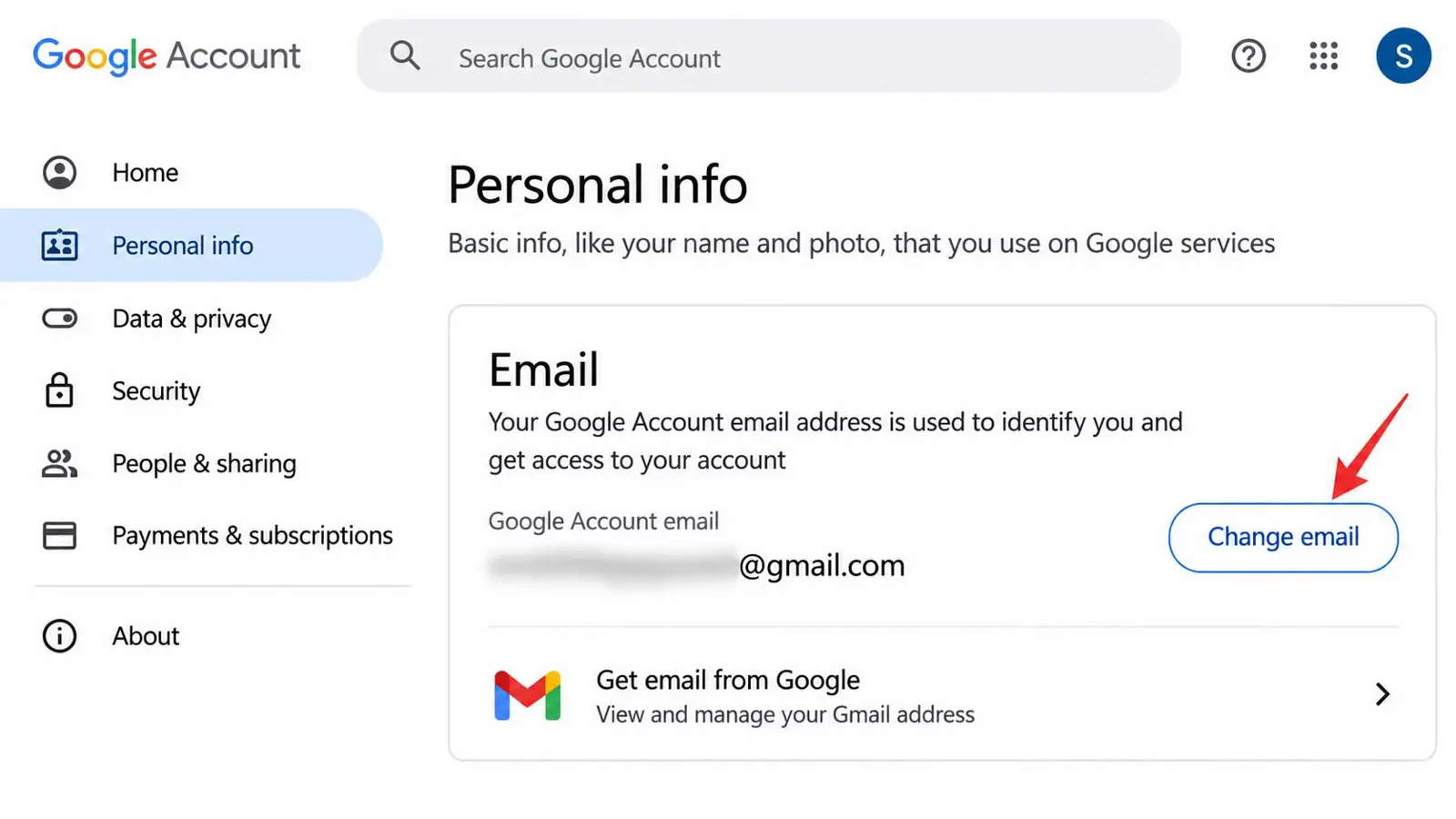
- Open myaccount.google.com/google-account-email, or go to a Google Account, then Personal info, then Email.
- Select Google Account email.
- Choose the option labeled Change Google Account email.
- Enter the new username, which must end in gmail.com.
- Confirm the change and follow the on-screen prompts to finish.
Back up first. Google warns that some app settings may be reset after a switch, and 9to5Google's example was the Gmail background theme, along with a Chat tab that went missing in its test. Settings that reset are cosmetic in that example, though Google's page does not promise it is the same for every app.
If the setting does not appear, Google says the address may not be changeable on that account. Some older guides still say a new account is required, and that advice predates this option. Check Google's own support page first. Verified November 9, 2026.
What Happens to Mail Sent to the Old Address
According to Google, the old address becomes an alternate email on the same account, so mail sent to either address lands in a single inbox. Nobody else can claim the old address. Google's page says saved data is not affected, and old items such as Calendar events keep the old address because changes are not applied retroactively.
Messages can still be sent from the old address. That setting can be removed later through Gmail's send-as aliases, and Google's page links a separate help article that explains the steps.
Old Calendar events and shared documents keep the earlier address, so people who message the account may need a heads-up before the first reply arrives. Saganote's report on the returning Google Phone Contacts tab covers where contacts live on Android, and the iPhone home address guide covers a different kind of address change. A short note to frequent senders helps.
Effects on Sign-In, YouTube, and Third-Party Apps
Google's page says either address works to sign in on Google services such as Gmail, Maps, YouTube, Google Play, and Drive. Chromebooks, Sign in with Google on non-Google sites, and Chrome Remote Desktop can break, and each has its own troubleshooting page. Test them after switching.
Sites that email verification codes test the inbox fast. Saganote's Gmail Copy code report covers a 2FA code button seen in testing on Android and iOS, which Google has not announced. Saganote's Google Health 5.08 report notes that the app requires a Google Account, so it is another sign-in worth testing.
Many sites store the old address as a username. Updating saved logins is easier inside a password manager, and Saganote has covered switching password managers on Android and 1Password's Google Chat integration.
Managed accounts differ. Work and school accounts must go through an administrator, according to Google. Saganote's Claude and Google Workspace guide covers how Docs, Sheets, and Slides connect to an AI assistant, and iClarified says Gemini in Gmail carries over after a switch, a single-source claim. Saganote's Gmail AI inbox to-do list report covers one such feature.
Security Checks Around a Switch
A change is a good time to review security. Saganote's guide to checking who has access to a Gmail account walks through device activity, account connections, and recovery options, and its passkeys guide covers setting up Google Account sign-in with passkeys. Its selfie video recovery report describes a biometric recovery option for personal accounts.
Connected apps deserve a look too. Saganote's report on Claude sending Gmail messages without approval covers one such connection, and any prompt that urges an immediate address change deserves suspicion until Google's own account page confirms it. Saganote's guides to enabling Google Messages scam detection and Gemini scam protection in Google Messages cover the text-message side.
Options When the Setting Is Missing
Accounts without the setting have fallbacks. Mailmeteor describes opening a new account and forwarding mail from the old one, or adding a send-as alias, which keeps logins tied to the primary address. Gmail also ignores dots, so dotted variants reach the same inbox, though a username cannot be edited that way.
Anyone who needs to change Gmail address details through a fresh account may want to trim the old mail first, and Saganote's Gmail storage guide shows search operators such as has:attachment larger:10M for finding large messages. Disposable addresses are another route. Brave 1.94 on desktop added built-in email aliases, with five free at launch, and Saganote's Brave email aliases report covers the setup under Autofill and Passwords in Settings.
Frequently Asked Questions
Can a Gmail address be changed without losing emails?
How often can the address be switched?
Can someone else take the old address?
Does a work or school account work the same way?
Why is the option missing?